EasyManua.ls Logo

A/DA APP-1 - User Manual

A/DA APP-1
10 pages
Print Icon
To Next Page IconTo Next Page
Loading...
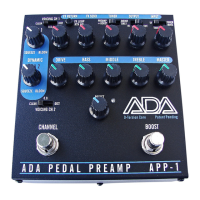
A/DA PEDAL PREAMP
APP-1
USER’S MANUAL
2
APP-1 Users’ Manual
V.2
A/DA’snewAPP1PedalPreampisbuiltaroundournewpatent
pending“DTORSIONCORE”technology,whichisveryresponsive,
reactingtothesignallevelofthestringstodelivermorevolume
dynamics,timbre,fastertransientsandricherharmonicsthanany
amplifieravailabletoday.TheAPP1allowstheguitarist
toexpress,
throughhisorherfingers,dynamicsandtonelikeneverbeforego
fromcleantooverdrivetodistortionwithoutturningasingleknob
onanyamp,stompboxorguitar.
FOROPTIMALPERFORMANCE,DONOTPLUGTHE
OUTPUTOFTHEAPP1INTOTHEFRONTPANELINPUT
OFACOMBOAMPORHEAD.USETHEINPUTTOTHE
POWERAMPORTHEEFFECTSRETURNINPUT.MOST
COMBOSANDHEADSDONOTHAVESUFFICIENT
HEADROOMFORTHE“BLOOM”ANDDYNAMICSOF
THE
APP1,ANDWILLDISTORT(INABADWAY)AND
CRUSHTHESIGNALDYNAMICSFROMTHEAPP1.
AlwayschecktheA/DAwebsitewww.adaamps.com
forupdatesand
currentinformationabouttheAPP1.Designedandmanufacturedin
California.
Question and Answer IconNeed help?

Do you have a question about the A/DA APP-1 and is the answer not in the manual?

Summary

APP-1 Users Manual

Quick Setup

Power Supply

Setting up your Combo, Head or Power Amp

Modes of Operation

Tuner Mute Mode

Silences all output except the signal to the tuner, allowing tuning without affecting the main signal path.

True Bypass Mode

Hardwire bypasses the signal, disconnecting all internal circuitry and the tuner jack.

Optimizing Signal Levels

Dialing in the D-Torsion Core

Voicing

True Bypass Function

Boost Function

Effects Loop Setup

Tuner Out and Tuning

Amp Flat and Clean Settings

Fender Amp Settings

Settings for Fender combos with 3-knob tone stacks to achieve a flat response.

Marshall Amp Settings

Settings for older Marshall heads to achieve a flat response.

Vox Amp Settings

Settings for Vox 2-Knob Tone Control Combos to achieve a flat response.

Technical Support

Troubleshooting Quick Tests

Series of quick tests to identify issues with the unit or signal chain.

Product Not Working Procedure

Steps to follow when the product is not functioning correctly, including contacting support.

Service Information

Returning Units for Service

Warranty Information

A/DA APP-1 Specifications

General IconGeneral
Frequency Response20Hz - 20kHz
Total Harmonic Distortion<0.1%
GainAdjustable
Power OutputN/A (preamplifier)
ControlsGain
Inputs1 x 1/4"
Outputs1 x 1/4"
EQ3-band (Bass, Mid, Treble)