EasyManua.ls Logo

A.O. Smith PHPT-60 - Fan Check Flow Chart

A.O. Smith PHPT-60
48 pages
Print Icon
To Next Page IconTo Next Page
To Previous Page IconTo Previous Page
Loading...
30
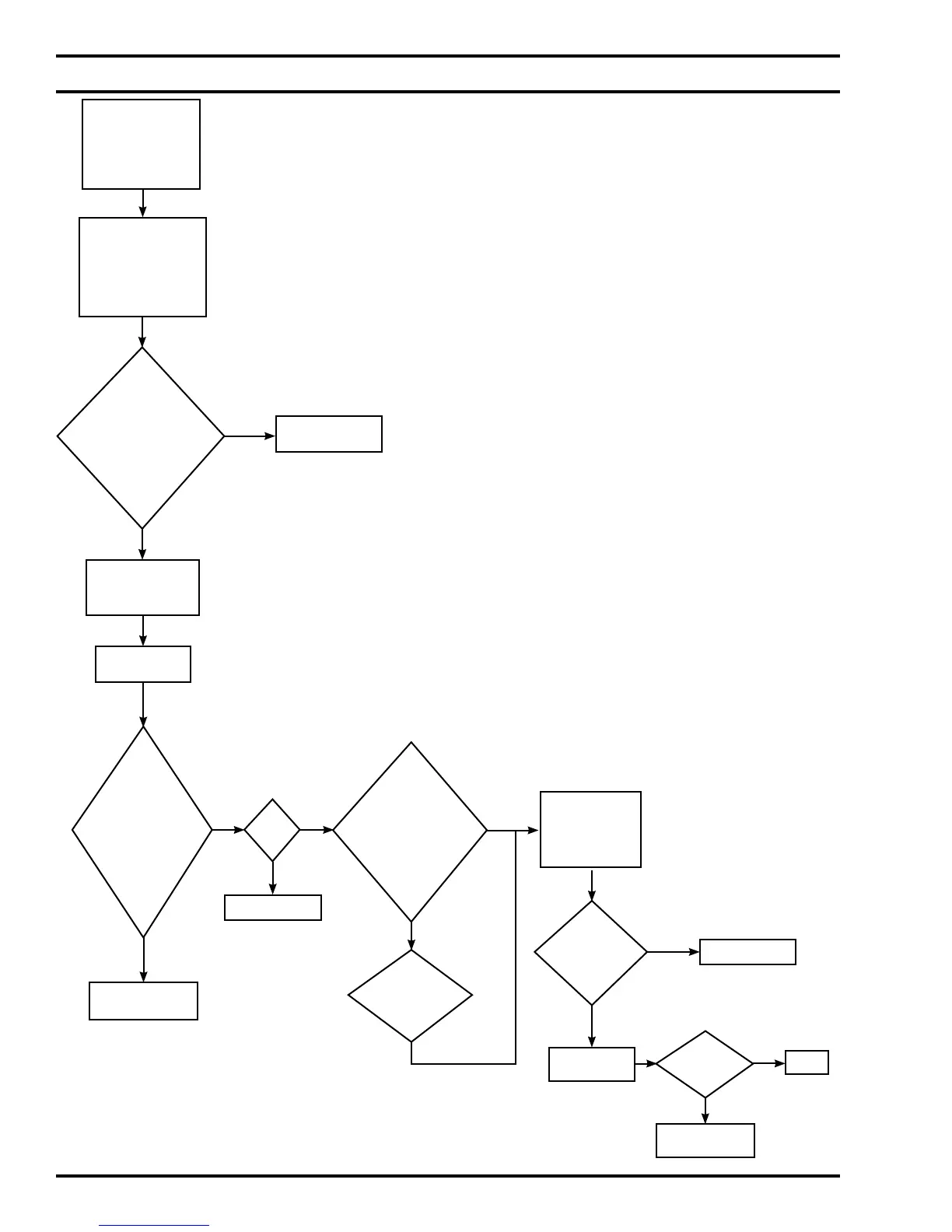
Fan Check Flow Chart
Fan doesn’t
operate when
compressor is
on; no fault on
UIM
Check
voltage at
control board
connector CN207
between pins
1 and 3
(240V)
No
Replace
control board *
Disconnect
CN207
Measure
motor
resistance of
fan wire harness
connector
at pins 1
and 3
Replace
control board *
Yes
Hot?
Yes
No
Replace fan
Check
lter and
evaporator for dirt
and dust build
up
Bad
˃100Ω
Good
Motor thermal
switch may
be open;
allow to cool
Repeat
resistance
check
Replace fan
˃100Ω
49-61Ω
Reconnect
CN207
Fan
working?
Done
Call tech
services
Clean
Dirty
Clean
evaporator
and lter
Yes
No
49-61Ω
Bad
Good
Set to ef ciency
mode; increase
set point15°F
so compressor
comes on
Turn off power
at breaker/fuse
panel
*If replacing the control board does not resolve the issue, contact technical support.

Related product manuals