EMB-B75A
2-14
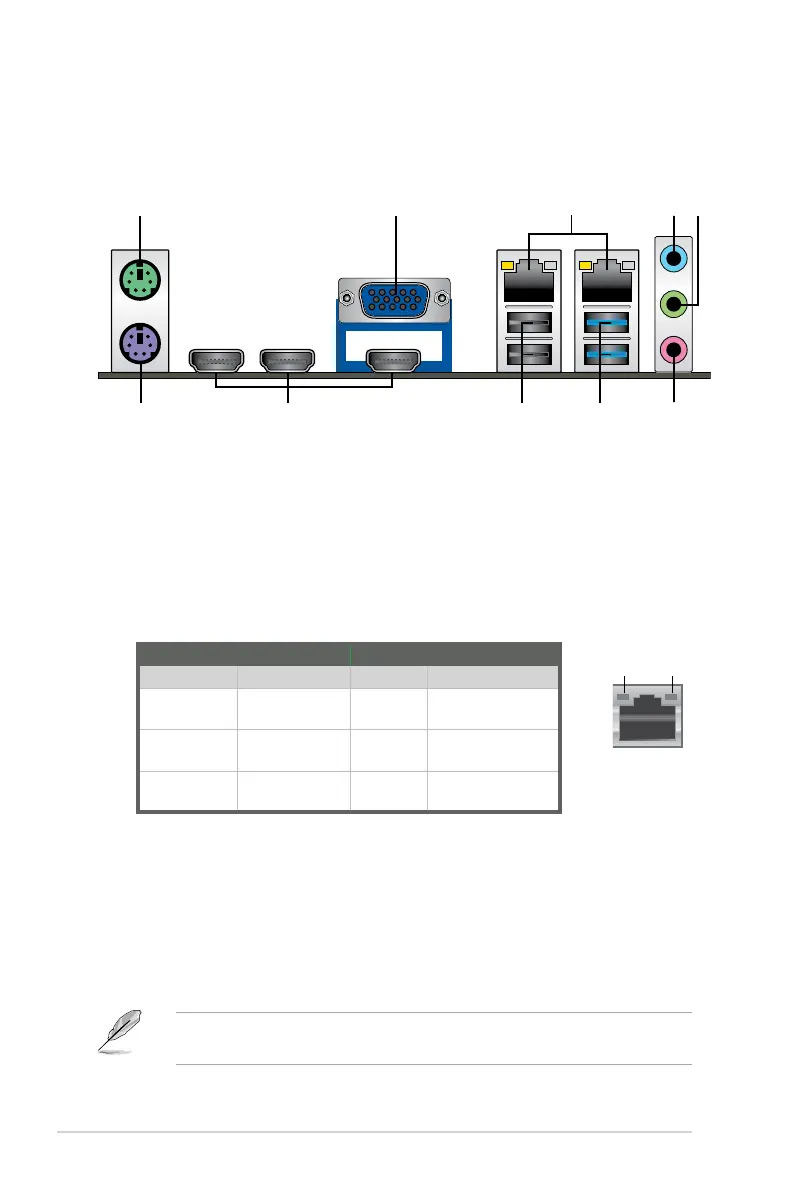
4. Line In port (light blue).Thisportconnectsthetape,CD,DVDplayer,or
other audio sources.
5. Line Out port (lime).Thisportconnectstoaheadphoneoraspeaker.In4-
channeland6-channelcongurations,thefunctionofthisportbecomesFront
Speaker Out.
6. Microphone port (pink). This port connects a microphone.
NOTE: Refertotheaudiocongurationtableonthenextpageforthefunction
oftheaudioportsinthe2,4,or6-channelconguration.
2.7 Connectors
2.7.1 Rear panel connectors
LAN port
Speed
LED
Activity Link
LED
ACT/LINK LED SPEED LED
Status Description Status Description
OFF No link OFF 10Mbps
connection
ORANGE Linked ORANGE 100Mbps
connection
BLINKING Dataactivity GREEN 1Gbps
connection
4 5
2
1
1. PS/2 Mouse port (green).ThisportisforaPS/2mouse.
2. Video Graphics Adapter (VGA) port.This15-pinportisforaVGAmonitor
orotherVGA-compatibledevices.
3. LAN (RJ-45) ports.TheseportsallowGigabitconnectiontoaLocalArea
Network(LAN)throughanetworkhub.RefertothetablebelowfortheLAN
port LED indications.
LAN port LED indications



 To Next Page