BM series 19
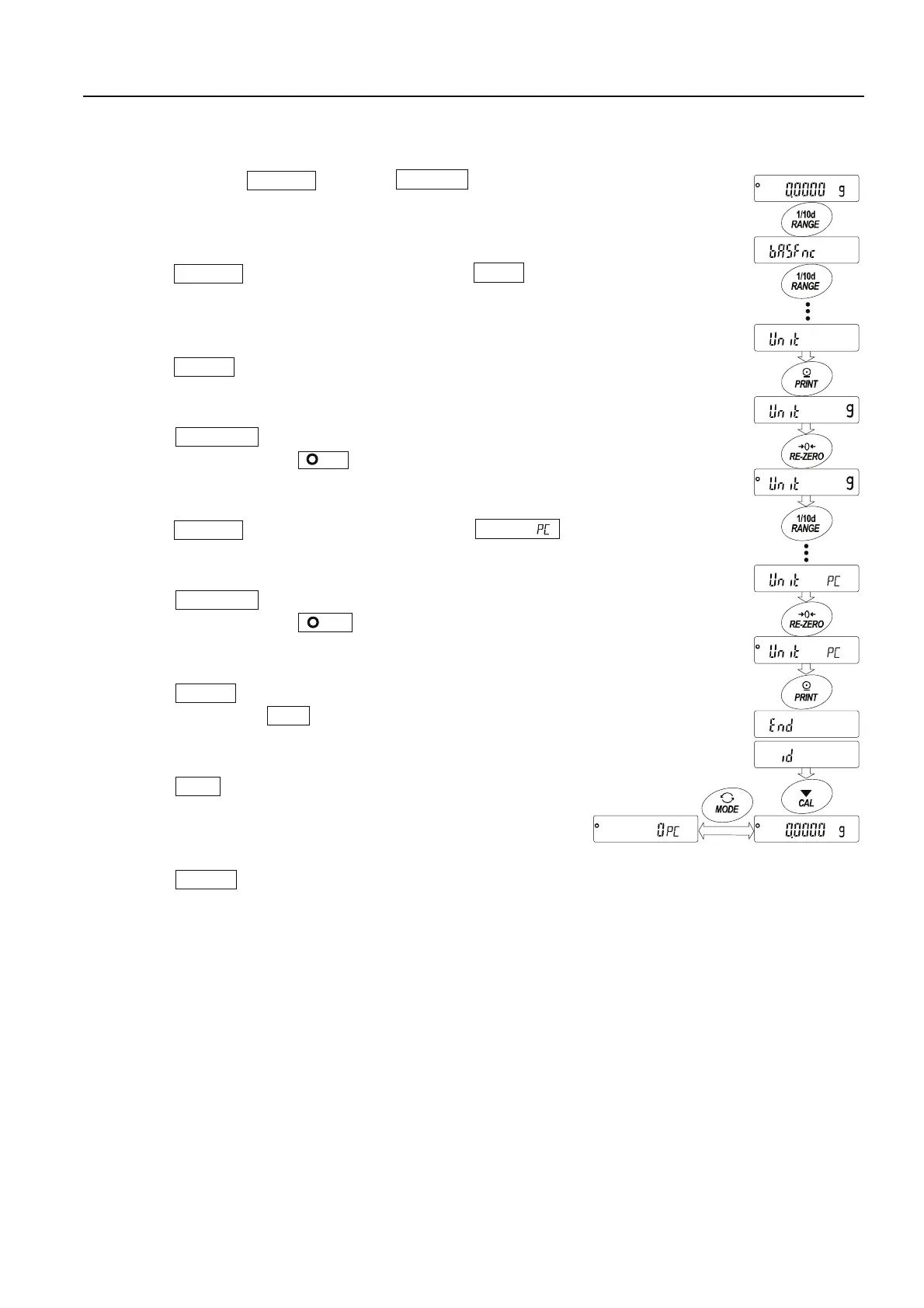
5.3.1. Unit Setting Example
The example below sets the units in the order with g (gram) as the first unit followed by PC
(counting mode).
1 Press and hold the RANGE key until ba5fnc of the
function table is displayed in the weighing mode, then release
the key.
2 Press the RANGE key several times to display Unit .
3 Press the PRINT key to enter the unit selection mode.
4 Press the RE-ZERO key to specify the unit of g.
The stabilization indicator appears when the unit is
specified.
5 Press the RANGE key several times to display Unit .
6 Press the RE-ZERO key to specify the unit of pcs.
The stabilization indicator appears when the unit is
specified.
7 Press the PRINT key to store the units.
The balance displays end and then displays the next
menu item of the function table.
8 Press the CAL key to exit the function table. Then the
balance returns to the weighing mode with g, the unit
selected first.
9 Press the MODE key to switch between g and PC.
Press and hold
Press several time
Press several time
Specify gram
Specify counting mod
Store them



 To Next Page