BM series 23
5.3. Selecting Units and Weighing Modes
Preset the sequence of displaying units and
weighing modes to fit the frequency of use.
Refer to "5.2. Storing Active Units".
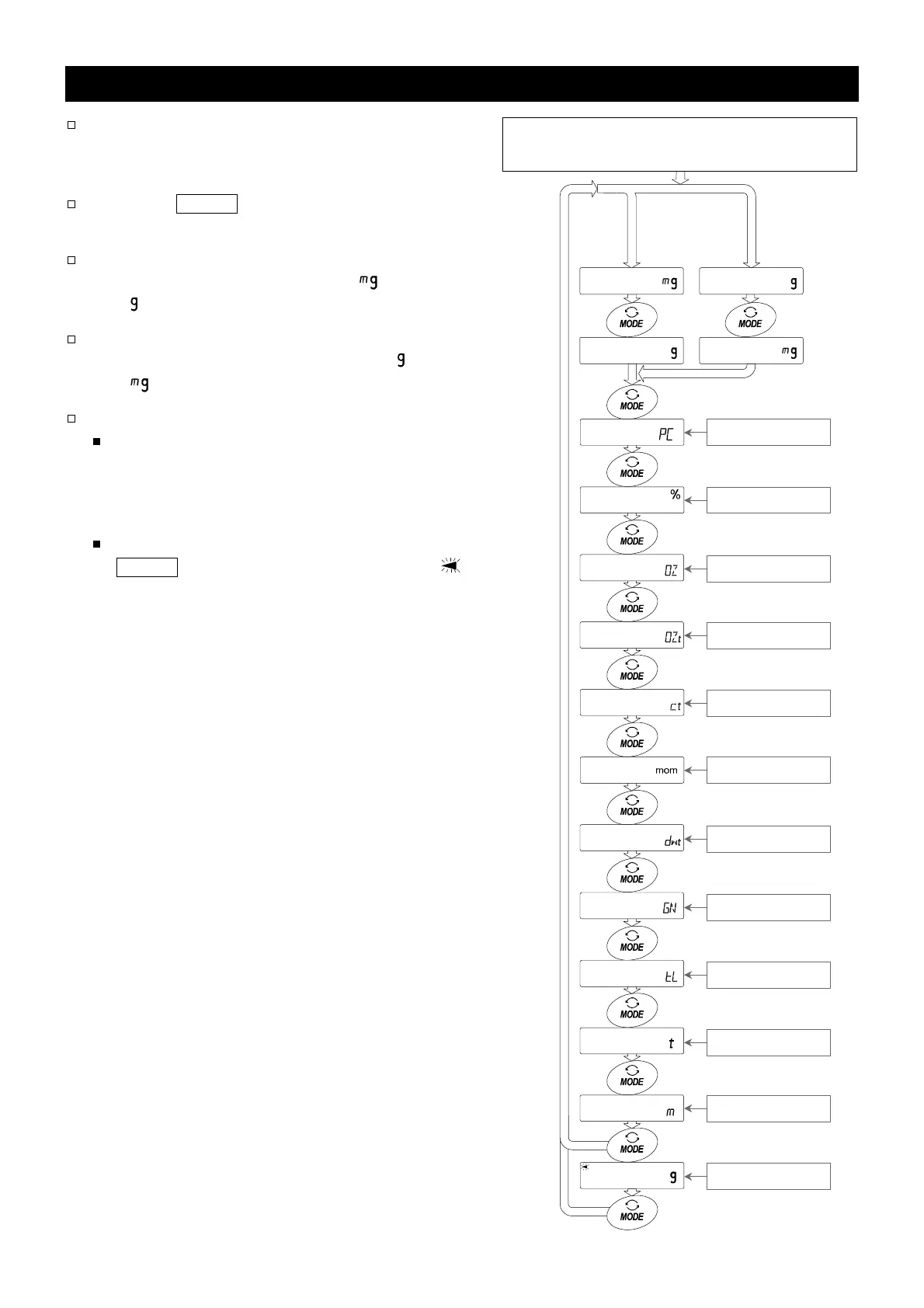
Press the MODE key in the weighing mode to
display the units and weighing modes in order.
For the BM-5, BM-5D, BM-20 and BM-22,
the units preset at the factory, (Milligram)
and (Gram), are displayed in this order.
For the BM-252, BM-200, BM-300 and BM-
500, the units preset at the factory, (Gram)
and (Milligram), are displayed in this order.
Density mode
To use the density mode, it must be stored in
the function table as described on page 22.
Refer to "14. Density Measurement" for
details about the mode.
To select the density mode, press the
MODE key until the processing indictor
blinks with the unit "g" displayed.
The unit sequence of the factory settings.
Turning the display on.
BM-5 BM-252
BM-5D BM-200
BM-20 BM-300
BM-22 BM-500
Counting mode
Percent mode
Ounce (Avoir)
Troy Ounce
Metric Cara
Momme
Pennyweigh
Grain (UK)
Tael
Tola (India)
Messghal
Density mode



 To Next Page