45
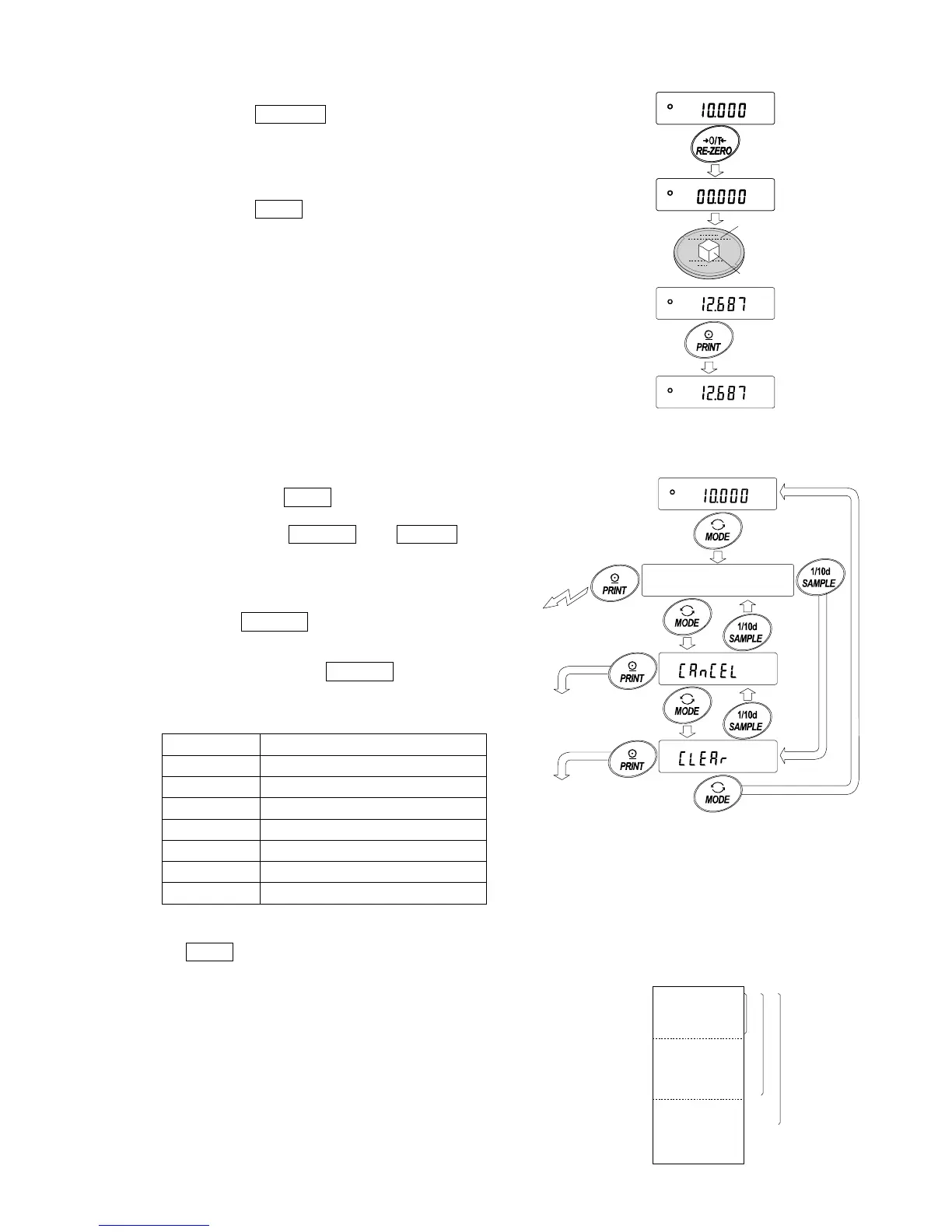
1 Press the RE-ZERO key to set the display to zero.
2 Place the sample on the weighing pan and wait for
the stabilization indicator to turn on.
3 Press the PRINT key to add the data displayed to
statistical calculation. The number of data on the upper
left of the display increases by 1.
4 Repeat steps 1 to 3 for each weighing.
Outputting the statistical results
5 Each time the MODE key is pressed, the display changes:
the results as selected in “Statistical function mode output
items (5taf)”, CanCel and Clear .
Notes
When the number of data is 1, the standard
deviation and coefficient of variation are
displayed as - - - - - - - .
When the average is 0, the coefficient of
variation is displayed as - - - - - - - .
Statistical items are indicated on the upper left
of the display using the following symbols.
Symbol Statistical item
SUM Sum
MAX Maximum
MIN Minimum
R Range (Maximum – minimum)
AVE Average
SD Standard deviation
CV Coefficient of variation
6 While the results are displayed, press the
PRINT key to output the results.
Out


 To Next Page
 Loading...