EasyManua.ls Logo

A&D UA-1200BLE - User Manual

A&D UA-1200BLE
64 pages
Print Icon
To Next Page IconTo Next Page
Loading...
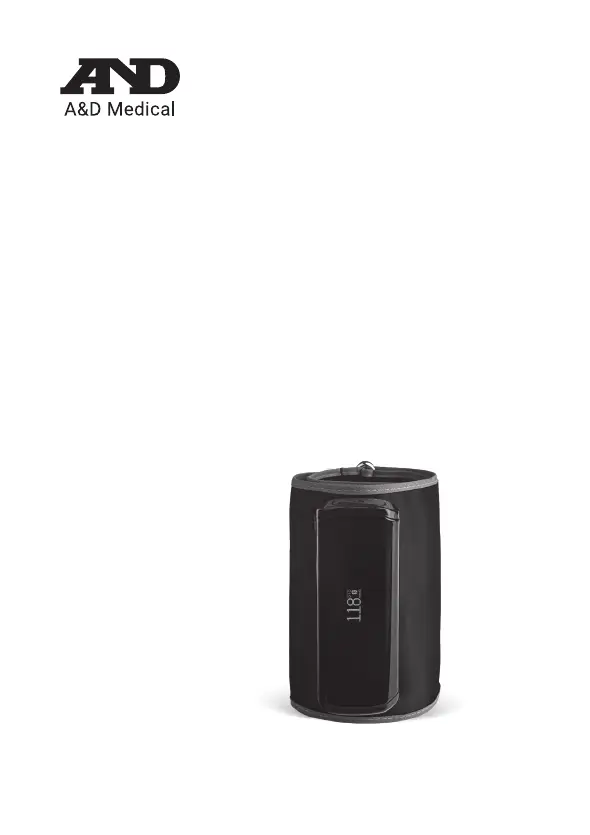
PREMIUM WIRELESS
BLOOD PRESSURE MONITOR
UPPER ARM
UA-1200BLE
Instruction Manual

Questions and Answers

  • R
    Renee Blair DVMAug 3, 2025
    Why are A&D UA-1200BLE readings inaccurate?
    • H
      howellkellyAug 3, 2025
      Why A&D Blood Pressure Monitor readings are inaccurate? If your A&D Blood Pressure Monitor is giving readings that seem too high or too low, it might be because you moved during the measurement. To ensure accuracy, remain still and quiet. Also, make sure your arm is correctly positioned: sit comfortably, place your arm on a table with your palm facing up, and ensure the cuff is at heart level.
  • K
    Kevin LambertAug 7, 2025
    How to fix A&D Blood Pressure Monitor if it does not turn on?
    • R
      Robert BrownAug 7, 2025
      If your A&D Blood Pressure Monitor isn't turning on, it could be due to a few reasons. First, check if the battery is low and charge it if necessary. Second, there might be an internal error, in that case, try pressing the Reset Switch. Lastly, make sure the charging cable is disconnected, as it can sometimes prevent the device from powering on.
  • S
    Steven WhiteAug 11, 2025
    How to fix A&D UA-1200BLE that won't turn on?
    • R
      Richard HarrisAug 11, 2025
      How to fix A&D Blood Pressure Monitor that won't turn on? If your A&D Blood Pressure Monitor isn't turning on, here are a few things to check: * Ensure the battery is charged. If it's low, charge it. * There may be an internal error, in this case, press the Reset Switch. * If a battery charging cable is connected, remove it.
  • P
    Phillip GreeneAug 16, 2025
    What to do if A&D UA-1200BLE Blood Pressure Monitor cuff does not inflate?
    • J
      Jacob AdkinsAug 16, 2025
      What to do if A&D Blood Pressure Monitor cuff does not inflate? If the cuff on your A&D Blood Pressure Monitor isn't inflating, the battery might be low. Try charging the battery.
  • M
    Mary JosephAug 20, 2025
    Why does A&D UA-1200BLE Blood Pressure Monitor show different values from the doctor's office?
    • K
      Kelly DickersonAug 20, 2025
      Why does A&D Blood Pressure Monitor show different values from the doctor's office? If your A&D Blood Pressure Monitor shows a different value compared to measurements taken at a clinic or doctor’s office, it could be due to apprehension causing elevated readings in those settings. Home measurement reduces the effects of outside influences on blood pressure readings & supplementing the doctor’s readings.
  • C
    Catherine RossAug 25, 2025
    Why A&D UA-1200BLE Blood Pressure Monitor readings are too high or too low?
    • V
      Veronica CrossAug 25, 2025
      If your A&D Blood Pressure Monitor doesn't measure correctly, and the readings seem too high or low, there are a few potential causes. First, ensure you remain still and quiet during the measurement, as movement can affect the reading. Second, if you have a very weak or irregular heartbeat, the device may struggle to accurately determine your blood pressure. Finally, make sure your arm is correctly positioned: sit comfortably, place your arm on a table with your palm facing up, and keep the wrist cuff at heart level.
  • T
    Theresa GardnerAug 28, 2025
    Why A&D UA-1200BLE readings are different at home?
    • M
      Matthew MeltonAug 28, 2025
      Home measurement reduces the effects of outside influences on blood pressure readings, supplementing the doctor’s readings. At a clinic or doctor’s office apprehension may cause an elevated reading.

Summary

Greetings and Intended Use

Greetings

Introductory message about the advanced blood pressure monitor and recommendation to read the manual.

Intended Use of UA-1200 BLE

Digital blood pressure monitor for adult home/clinic use, measures BP and pulse rate using oscillometric method.

Preliminary Remarks and Precautions

Preliminary Remarks

Device complies with FCC rules, designed for adults, and intended for home healthcare environments.

General Precautions and Handling

Avoid environmental extremes, clean properly, prevent water contact, and avoid electrical field interference.

Measurement Precautions

Comfort and Safety During Measurement

Cuff may cause temporary discomfort. Remove if pain occurs. Avoid frequent measurements to prevent harm.

Medical Conditions and Device Usage

Do not use cuff with other medical devices. Consult a doctor for specific medical conditions or wounds.

Safety Precautions for Use

FCC Compliance and Operation

Device must not cause harmful interference and must accept received interference as per FCC rules.

Electrical and Environmental Safety

Avoid touching batteries and patient simultaneously. Keep distance from wireless devices and hot cuffs.

Device Identification and Contents

Parts Identification Diagram

Visual identification of key components: OLED, Start Switch, Reset Switch, USB Connector, and Cuff.

Included Accessories

List of items provided with the monitor: Blood Pressure Monitor, Instruction Manual, Quick Start Guide, Charging Cable.

Understanding Monitor Symbols

Display Symbol Meanings

Explanation of common display symbols indicating BP values, battery status, connection, and measurement progress.

Common Error Codes and Solutions

Details error codes like PUL E (pulse not detected) and Err 1 (movement interference) with recommended actions.

Advanced Symbol Explanations

Additional Error Codes and Modes

Explanation of error codes Err 3, Err 9, and symbols for data transfer, airplane mode, and firmware updates.

Movement and Cuff Attachment Indicators

Symbols indicating body/wrist movement or loose cuff attachment, and their impact on readings.

Device Case and Cuff Symbols

External Symbol Reference

Defines symbols found on the device case and cuff, including power, DC, Type BF, serial number, and keep dry indicators.

Using the Blood Pressure Monitor

Available Measurement Modes

Overview of the four measurement modes: In-App, Offline, Multiuser, and Visitor Mode.

Monitor Operation and Charging

Charging the Device

Detailed steps for charging the monitor via USB, including LED indicators and important cautions.

Charging Safety Cautions

Crucial warnings about battery life, using the correct cable, avoiding measurements during charging, and battery replacement.

Wireless Functionality and Interference

Managing Wireless Interference

Guidelines for optimal placement and avoiding interference from other wireless devices like LAN and microwaves.

Connection Limitations

Notes on potential connection issues and A&D's disclaimer regarding compatibility with all Bluetooth devices.

Bluetooth Connectivity and Pairing

Bluetooth Version and Compatibility

Information on Bluetooth 4.1 compatibility with specific iOS and Android versions and devices.

Pairing with the A&D Heart Track App

Step-by-step instructions for pairing the monitor with a mobile device using the A&D Heart Track application.

Multiuser and Connection Distance

Multiuser Registration and Pairing

Guide to registering up to six users and pairing their respective mobile devices with the monitor.

Communication Range Considerations

Details the effective communication distance of 10m (33ft) and factors that may reduce it.

Applying the Arm Cuff

Correct Cuff Placement Technique

Detailed instructions on how to wrap the cuff around the upper arm for accurate measurement, including positioning relative to the elbow.

In-App Mode Measurement

Steps for In-App Measurement

Step-by-step guide to perform a blood pressure measurement using the A&D Heart Track app.

Measurement Completion and Display

Information on when the measurement is complete and how results are displayed on the app and monitor.

Offline Mode Measurement

Steps for Offline Measurement

Instructions for performing blood pressure measurements without the app, including user selection.

Offline Measurement Display Details

Explanation of the measurement process and how results are displayed on the monitor in offline mode.

Multiuser and Visitor Modes

Multiuser Mode Operation

Guide for using the monitor with multiple users when not connected to the app, including username switching.

Visitor Mode Usage

Instructions for using the visitor mode for temporary measurements where data is not stored.

Tips for Accurate Measurements

Best Practices for Measurement

Advice on posture, relaxation, and avoiding stimulants like smoking or exercise before taking readings.

Factors Affecting Measurement Accuracy

Information on how irregular heartbeats impact accuracy and what to do if an error symbol appears.

Irregular Heartbeat Indicator

Understanding Irregular Heartbeats

Definition of irregular heartbeat and the appearance of the IHB indicator on the monitor display.

Blood Pressure Classification

Pressure Bar Indicator Explained

Explanation of the pressure category indicator feature that provides a snapshot of blood pressure classification.

AHA Hypertension Classification Table

Reference table for blood pressure categories (Normal, Elevated, Hypertension) based on systolic and diastolic readings.

Monitor Settings and Configuration

Configurable Monitor Settings

Details on settings like nickname, start time, user removal, software updates, unpairing, and factory reset.

Airplane Mode Settings

Enabling Airplane Mode

Instructions on how to activate Airplane mode to disable radio frequency for measurements in specific environments.

Troubleshooting Common Issues

Power and Inflation Problems

Solutions for power not turning on, cuff not inflating, low battery, and internal monitor errors.

Measurement and Reading Errors

Troubleshooting for connection issues, no measurement, or inaccurate readings due to movement or cuff position.

Advanced Troubleshooting and Maintenance

Addressing Reading Discrepancies

Guidance on managing differences in readings compared to clinic measurements and advice to consult a doctor.

Device Maintenance and Support

Instructions to avoid opening the device and contact customer service for repair assistance or spare parts.

Technical Specifications

Device Performance Specifications

Details on measurement method, range, accuracy, arm circumference, power supply, and operating conditions.

Compliance, Communication, and Lifespan

Information on EMC, wireless communication standards, applied part, and product useful life.

Included Items and FCC Compliance

Package Contents List

Enumeration of all items included in the product package, such as the monitor and accessories.

FCC RF Exposure and Interference Guidelines

FCC cautions on RF exposure, co-location, and methods to mitigate harmful interference to radio communications.

Product Warranty Information

Limited Warranty Details

Explanation of the limited warranty covering defects in material, workmanship, and design for the product.

Obtaining Warranty Service

Instructions for contacting A&D for warranty service, including necessary information and contact numbers.

Warranty Exclusions and Limitations

Warranty Exclusions

Covers items not covered by the warranty, such as misuse, accidental damage, and unauthorized repairs.

Liability and Exclusive Remedy

Defines the exclusive remedy as repair/replacement and disclaims liability for indirect or consequential damages.

Warranty Legal Rights

Consumer Legal Rights

Information on consumer legal rights granted by the warranty, which may vary by state.

Warranty Modification Restrictions

States that no third party is authorized to make warranties or modify the terms of A&D's limited warranty.

A&D UA-1200BLE Specifications

General IconGeneral
Measurement MethodOscillometric
DisplayLCD
ConnectivityBluetooth
Power SourceBattery
Number of Batteries4
Cuff Size22-32 cm
Irregular Heartbeat DetectionYes
Measurement Range (Pressure)0-299 mmHg
Device TypeBlood Pressure Monitor
Measurement Range (Pulse)40-180 beats/min
WeightApprox. 300g (without batteries)

Related product manuals