10
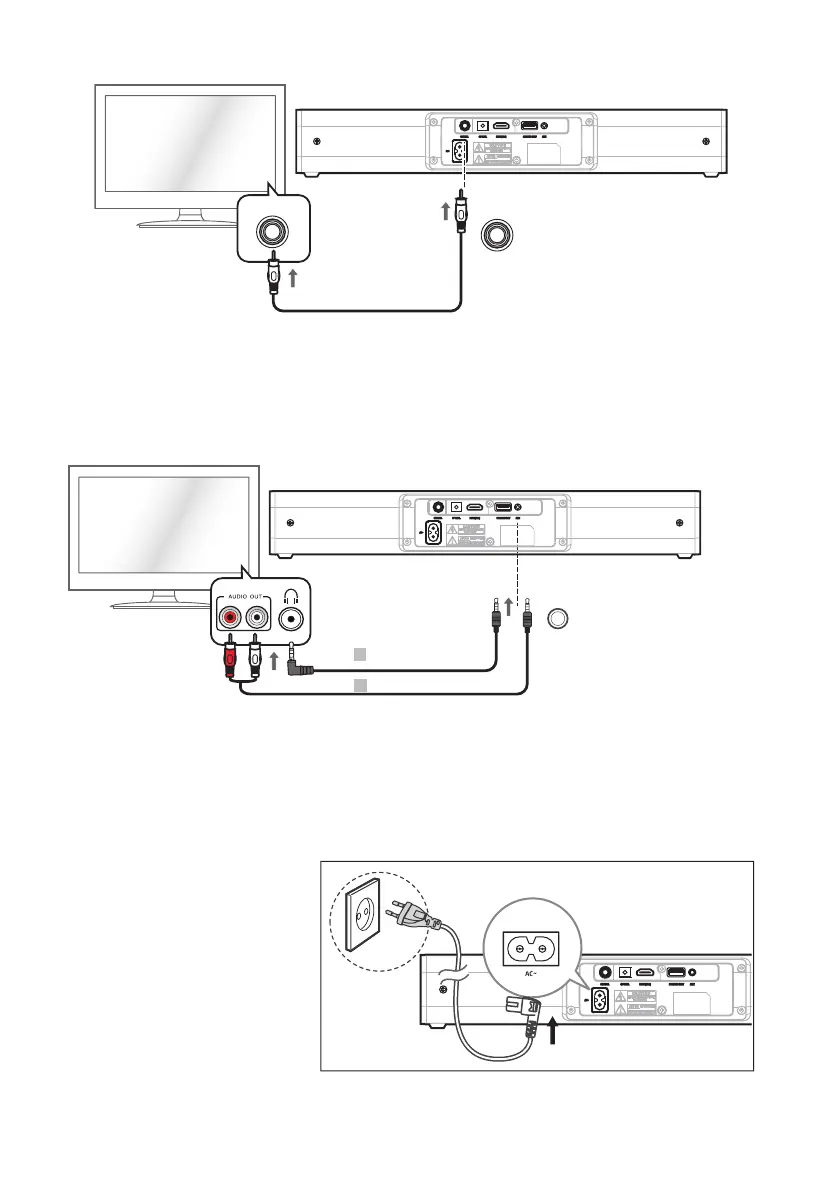
TV
COAXIAL
COAXIAL
Tip: While in OPTICAL/COAXIAL/HDMI ARC mode, if there’s no sound output from the unit and the
OPTICAL/COAXIAL/HDMI ARC Indicator ashes, you may need to activate PCM Signal output on your
source device (eg. TV, DVD or Blu-ray player).
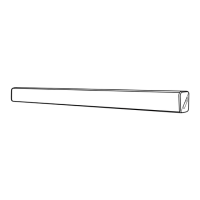
Use the AUX Socket
TV
A
B
AUX
A. Use a RCA to 3.5mm audio cable (not included) to connect the TV’s audio output sockets to the AUX
socket on the unit.
B. Use a 3.5mm to 3.5mm audio cable (included) to connect the TV’s or external audio device
headphone socket to the AUX socket on the unit.
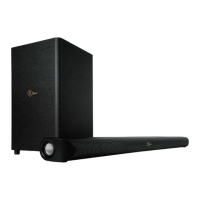
Connect to Power
- Before connecting the AC power
cord, ensure you have completed
all other connections.
- Risk of product damage! Ensure
that the power supply voltage
corresponds to the voltage
printed on the back or the
underside of the unit.
• Connect the mains cable to the
AC~ Socket of the unit and then
into a mains socket.


 To Next Page