28
6.4.2 Event Timer
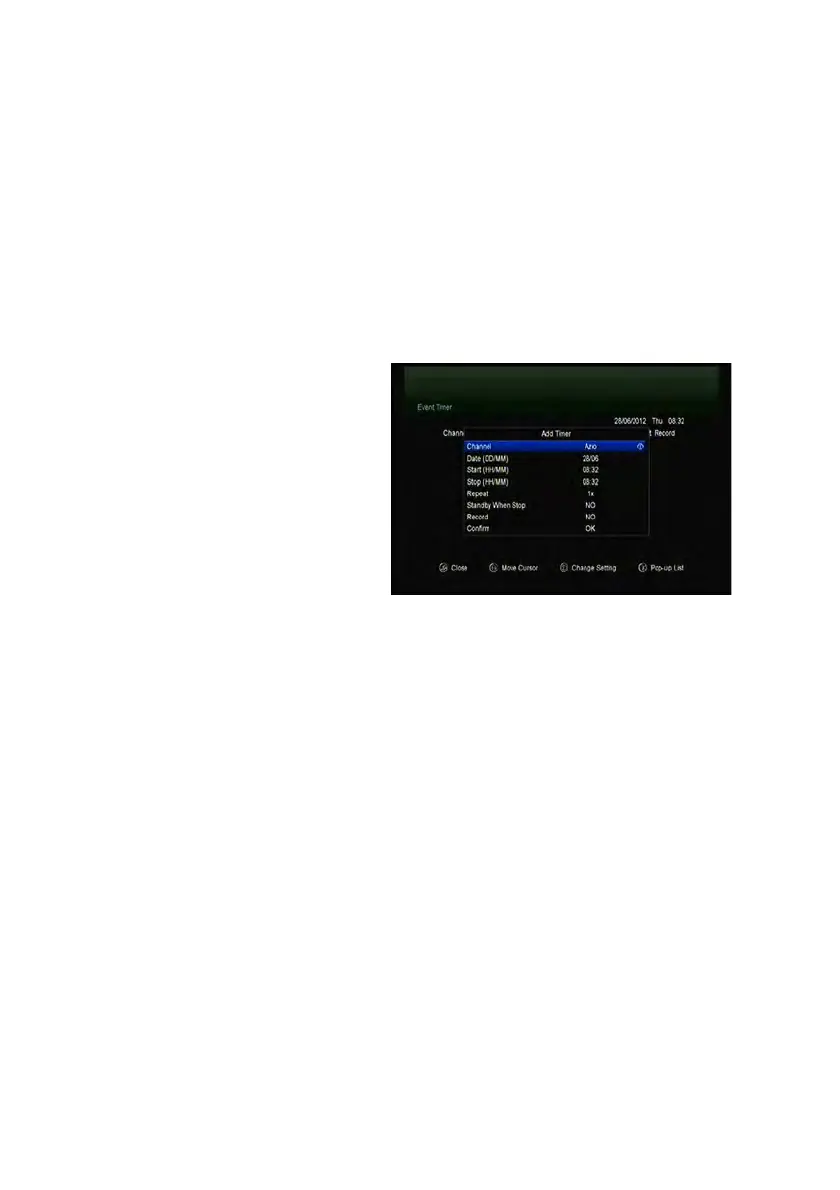
Event Timer You can set 8 timer events. It will record or play the program
automatically according to the timer event list that you set.
1. Menu-> SETTINGS ->TIMES-> Event Timer or press the TIMER button directly.
2. Press the GREEN button to setup a timer, and press the OK button to save the
timer after setup.
Channel
Select the Channel from Channel
List.
Date
Input start date of the timer.
Start/Stop
Set Start and Stop time of the timer.
Repeat
<1X> only one time.
<Day> Repeat every day.
<Weekly> Repeat the channel weekly.
<1-5> Repeat the channel from Monday to Friday.
<6-7> Repeat the channel from Saturday to Sunday.
Standby when Stop
If set YES, the receiver will go to standby mode after the timer, if set NO it won’t be
standby.
Time Record
If set YES, only if there is a USB device, it will be recorded automatically when the
timer is started. And the recorded PVR will be saved in USB device. If set NO, it will
not be recorded.
3. In Event Timer menu, highlight one event, press the RED button will cancel this
timer and press the YELLOW button can go to edit this timer.


 To Next Page