9
4.1 First installation / Installation wizard
The FIRST INSTALLATION WIZZARD starts with the first installation after your purchase.
When you use this receiver for the first
time, the automatic installation wizard
starts and guides you through initial
programming. Press the RED button
to change your language.
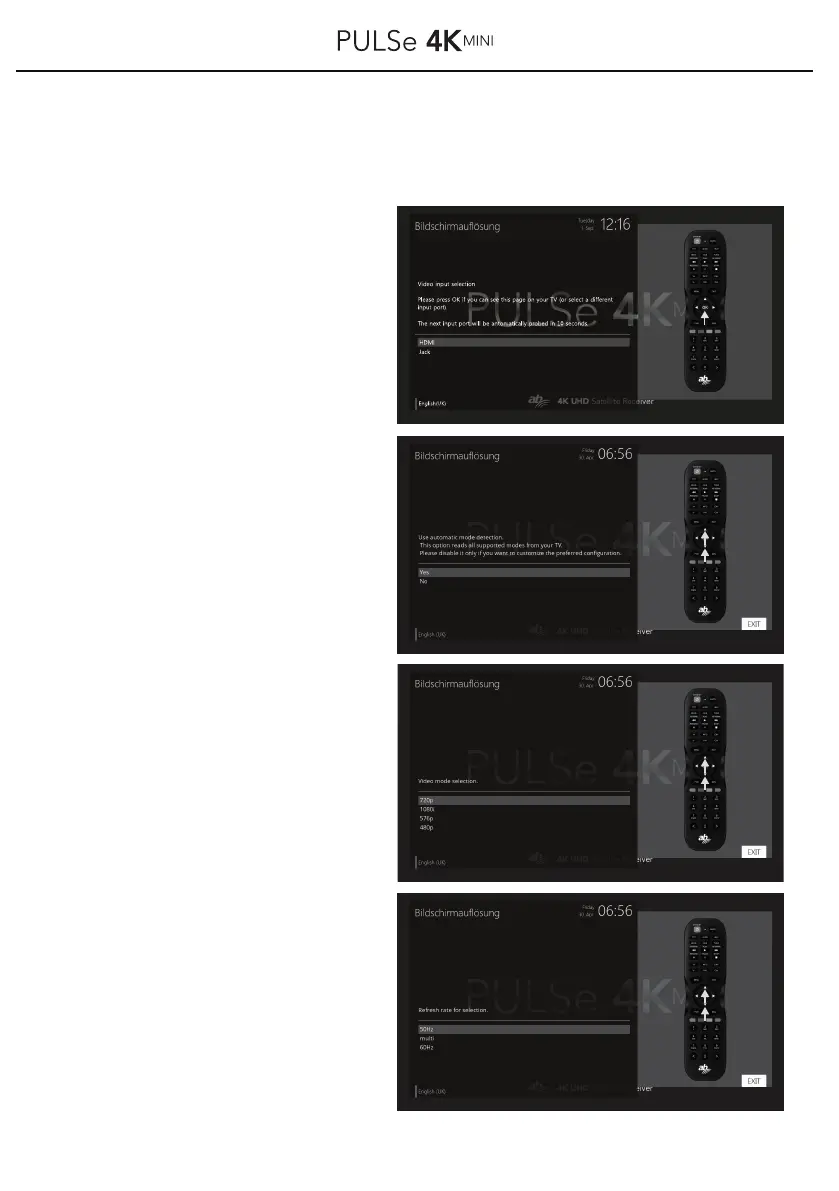
First select your input (HDMI or JACK).
Use ▲ / ▼ buttons on your remote
control to select and confirm your
selection with the OK button.
Choose your next menu, to the receiver
some screen solutions from your tv
device from read soil. Choose you yes
/ no with the keys ▲ / ▼ on your
remote and confirm your selection
with the OK button.
Your possible resolutions are now
displayed. Select your desired
resolution (video Mode) with the
▲ / ▼ buttons on your remote
control and confirm your selection
with the OK button.
e.g.: 720p, 1080p, 1080i, 576p,
576i, 480p, 2160p
In next menu, select the refresh rate
with the ▲ / ▼ buttons on the
remote control and confirm your
selection with the OK button.
e.g50 Hz, multi, 60 Hz, auto



 To Next Page