bdiAccess
JTAG interface library, BDI3000 (XScale) Installation Manual 11
© Copyright 1992-2007 by ABATRON AG V 1.00
2.6 BDI3000 Setup/Update
First make sure that the BDI is properly connected to the host via RS232 and/or network.
To avoid data line conflicts, the BDI3000 must be disconnected from the target system while
programming the firmware for an other target CPU family.
2.6.1 Windows Hosts
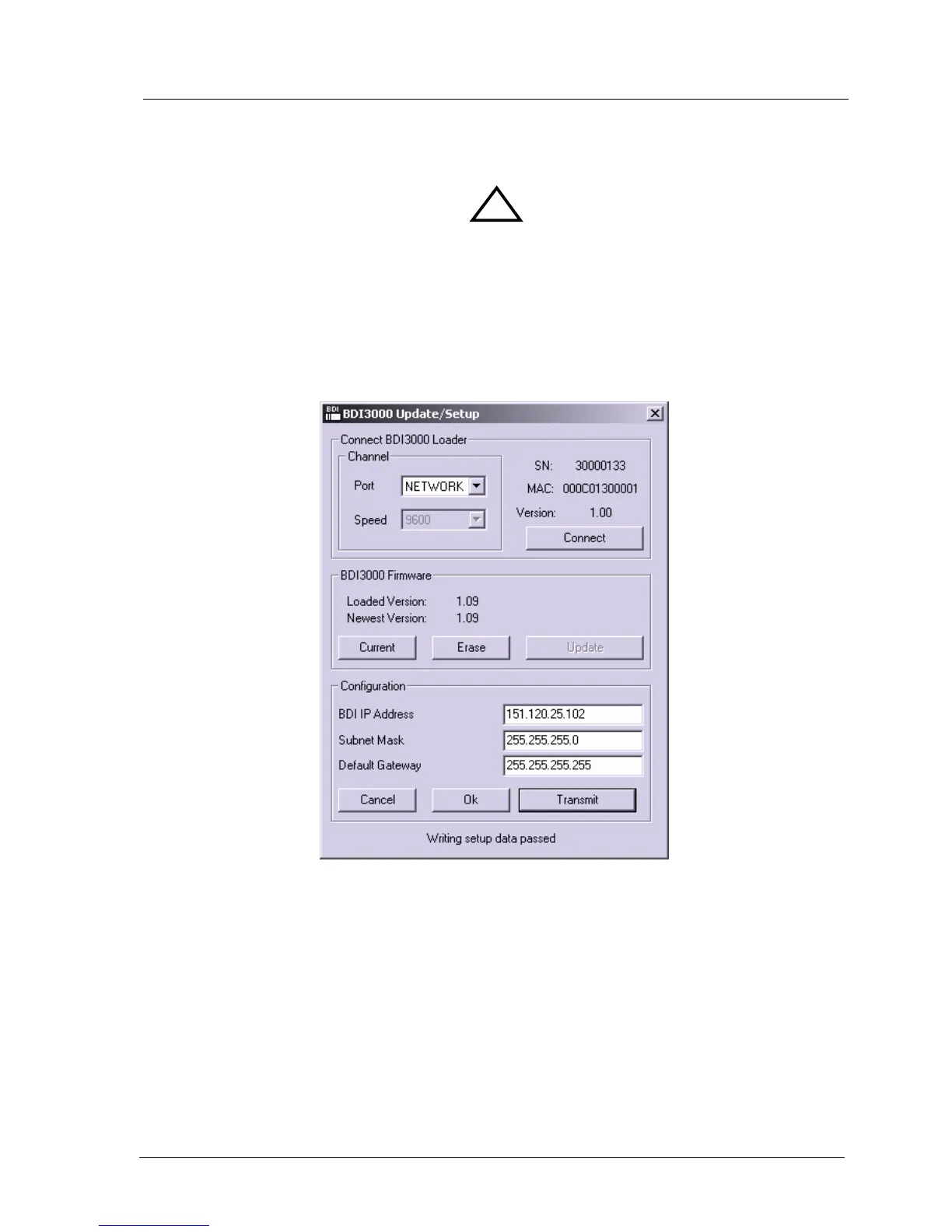
After starting the Windows setup tool, the following dialog box will be displayed.
dialog box «BDI3000 Update/Setup»
The following options allow you to update the BDI3000 firmware and store the network parameters:
Port Select the communication port where the BDI3000 is connected during
this setup session.
Speed Select the baudrate used to communicate with the BDI3000 loader during
this setup session.
Connect Click on this button to establish a connection with the BDI3000 loader.
Once connected, the BDI3000 remains in loader mode until it is restarted
or this dialog box is closed.
!


 To Next Page