19
1SDH000760R0002, L4106
Installation and operating instructions, ATS022
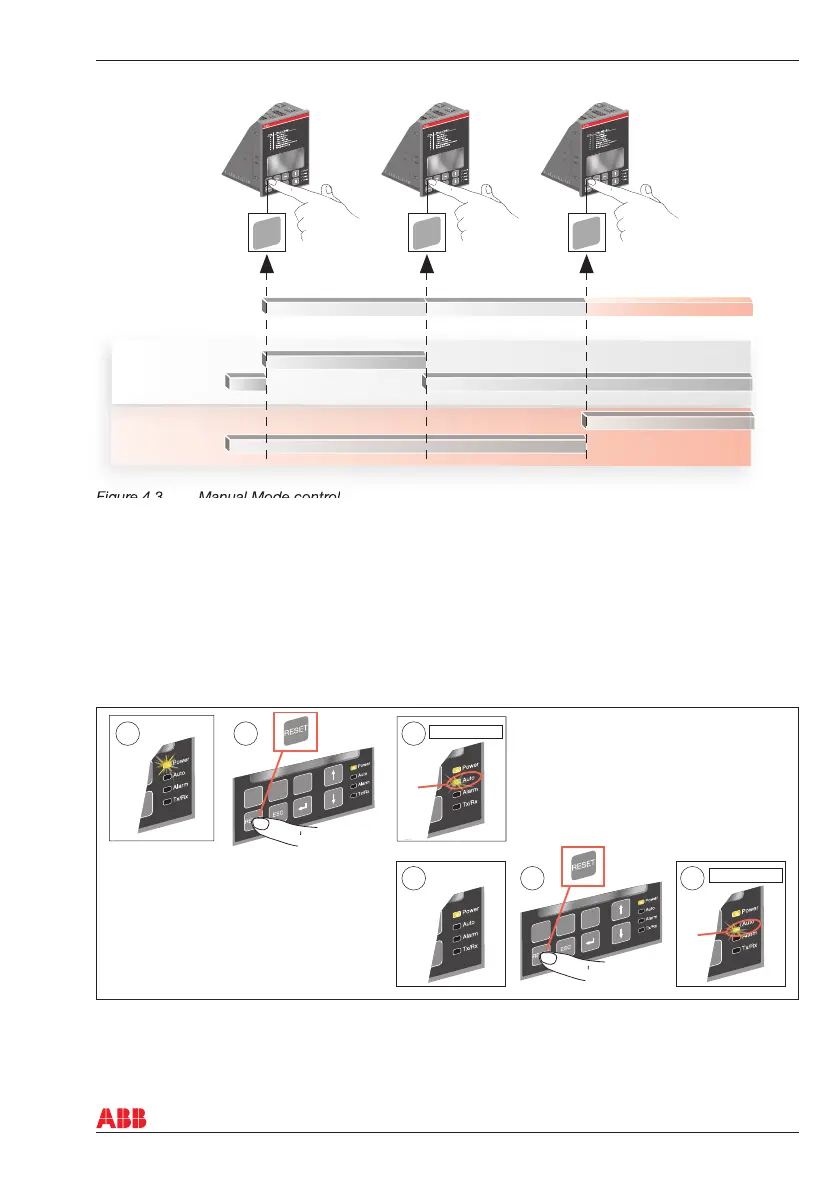
Figure 4.3 Manual Mode control
4.2 Automatic transfer switch ATS022 in Automatic Mode
Selecting the automatic transfer switch ATS022 to the Automatic Mode:
a. Make sure that power LED is ON, see the Figure 4.4/j.
b. Push the RESET key once /k.
c. If Auto LED is ON, the automatic transfer switch is in Automatic Mode /l.
d. If the Auto LED is OFF, push the RESET key again /m, the Auto LED switches to ON /n and the
automatic transfer switch is in Automatic Mode.
Figure 4.4 Selecting the automatic transfer switch ATS022 to Automatic Mode
4. Operating
CB1
Protection
device on line 1
Protection
device on line 2
CB1-command CB1-command CB2-command
Closed
Closed
Open
Open
CB1
CB2
KA00423
KA00347
OR
!
TEST
CB1
CB2
Automatic mode
TEST
CB1
CB2
!
Automatic mode
1 2 3
3
4
5



 To Next Page