EasyManua.ls Logo

ABB Welcome M22344-W - User Manual

ABB Welcome M22344-W
25 pages
Print Icon
To Next Page IconTo Next Page
Loading...
Pos: 2 /DinA4 - Anleitungen Online/Inh alt/KNX/Doo rEntry/83220-AP-xxx/Titelblat t - 832 20-AP-xxx - ABB @ 1 9\mod_1323249806 476_15.docx @ 11 1084 @ @ 1
VER: 1.2 | 02.20.2017
ABB Welcome
®
M22344-W
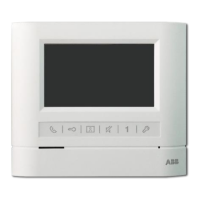
Basic 4.3" video hands-free
indoor station
Question and Answer IconNeed help?

Do you have a question about the ABB Welcome M22344-W and is the answer not in the manual?

Summary

Safety, Intended Use, and Environment

Safety Precautions

Essential safety guidelines related to electrical hazards and proper handling.

Intended Use and Environment

Specifies the device's purpose, operational environment, and disposal recommendations.

Device Operations

Standard Operations and Controls

Covers basic functions, interactions, and identifies physical control elements.

Call Handling and Communication

Details managing incoming calls, active conversations, and communication menus.

Display and Volume Adjustments

How to adjust display and audio settings during a call.

System Settings and Configuration

Settings Overview and Customization

Lists available settings for actuators, buttons, ringtones, volume, and other features.

Date, Time, and History Review

Configuration for date, time, and viewing event history.

System Information and Reset

Viewing system info, language settings, and performing factory resets.

Device Adjustment

Station Addressing and Configuration

Setting station addresses, master/slave functions, and terminal resistors.

Technical Data

Mounting and Installation

Electrician Safety and Requirements

Essential qualifications and safety rules for electricians performing installation.

Installation Procedures and Types

Guidelines for general installation, wiring, mounting methods, and types.

Summary

Safety, Intended Use, and Environment

Safety Precautions

Essential safety guidelines related to electrical hazards and proper handling.

Intended Use and Environment

Specifies the device's purpose, operational environment, and disposal recommendations.

Device Operations

Standard Operations and Controls

Covers basic functions, interactions, and identifies physical control elements.

Call Handling and Communication

Details managing incoming calls, active conversations, and communication menus.

Display and Volume Adjustments

How to adjust display and audio settings during a call.

System Settings and Configuration

Settings Overview and Customization

Lists available settings for actuators, buttons, ringtones, volume, and other features.

Date, Time, and History Review

Configuration for date, time, and viewing event history.

System Information and Reset

Viewing system info, language settings, and performing factory resets.

Device Adjustment

Station Addressing and Configuration

Setting station addresses, master/slave functions, and terminal resistors.

Technical Data

Mounting and Installation

Electrician Safety and Requirements

Essential qualifications and safety rules for electricians performing installation.

Installation Procedures and Types

Guidelines for general installation, wiring, mounting methods, and types.

Overview

The ABB Welcome M22344-W is a basic 4.3" video hands-free indoor station, an integral part of the ABB Welcome door entry system. It is designed for installation in dry indoor rooms and operates exclusively with other components from this system.

Function Description

The device serves as a central point for communication and control within the door entry system. Its primary functions include:

  • Communication:

    • Incoming Call: When an outdoor station rings, the 4.3" color display shows the caller. Pressing the communication button within 30 seconds activates communication, and pressing it again ends the call. A slowly flashing LED indicates an incoming call, while a solid LED means a conversation is in progress. A rapidly flashing LED indicates the system is busy.
    • Communication Menu: In standby mode, pressing the communication button accesses the communication menu, which includes options to call a guard unit or activate switch actuators.
    • Call to Guard Unit: Allows direct calls to a guard unit.
    • Switch Actuator: Activates existing actuator lists to control connected locks or lights. The actuator list can be set up in the system settings.
  • Door Control:

    • Unlock Button: Pressing this button at any time opens the door from which a call originates.
    • Programmable Button 1: By default, this button releases a second lock connected to an outdoor station. It can also be programmed for additional functions, such as calling a guard unit.
  • Surveillance and History:

    • Surveillance Button: In standby mode, this button surveys the default outdoor station. While the display is on, it can survey the next outdoor station (depending on installation type). Holding this button while the display is on takes a snapshot.
    • History Review: If the LED on the surveillance button flashes in standby mode, pressing it displays the "History" record, showing notifications of missed calls. The history menu can record up to 100 events, including dialed, received, and missed calls, with date, time, and event type. If the snapshot function is enabled, an icon is displayed, and two photos are always taken when a visitor rings the bell. Users can view event details and delete record items.
  • Audio Control:

    • Mute Button: In standby mode, pressing this button mutes the ringtone of the indoor station. Holding it mutes ringtones for all indoor stations in the apartment. During an incoming call, it rejects the call. During a conversation, it mutes the microphone, indicated by an illuminated LED.
  • System Settings:

    • System Setting Button: Enters the system setting menu, indicated by a rapidly flashing LED if the system is busy. This menu provides access to various functions:
      • Switch Actuator Settings: Allows modification of existing switch actuator lists and addition of up to 10 new lists. Users can change target addresses (001-199) and rename lists (e.g., "light").
      • Program Button Settings: Configures functions for programmable buttons, such as releasing a second lock, calling a guard unit, or enabling a switch actuator. Only switch actuator lists can be assigned to program buttons.
      • Ringtone Settings: Sets different ringtones for the default outdoor station, other outdoor stations, the apartment door, and other calls (e.g., from a guard unit).
      • Volume Settings: Adjusts the volume of the bell sound, enables/disables feedback tones for touch button presses, and sets the ringtone to ring once or continuously.
      • Date and Time Settings: Configures the date (YYYY-MM-DD), time (HH:MM), and enables/disables summertime function.
      • Other Settings: Includes options to enable/disable auto full screen, auto-snapshots, and missed call notifications (a flashing icon indicates a missed call).
      • Language Settings: Sets the local language.
      • Information: Displays device information such as Flash Version, MCU Version, M/S status (Master/Slave), Indoor Station Address, and Default Outdoor Station. A QR code provides access to detailed instructions.
      • Resetting Factory Default: Offers two options: "Reset All Settings" restores default configurations without deleting programmed data or history, while "Clear All Data" deletes all programmed data and history, restoring all configurations to factory default.

Important Technical Specifications

  • Display Resolution: 480 x 272
  • Display Size: 4.3"
  • Operating Temperature: +14 °F to +131 °F (-10 °C to +55 °C)
  • Storage Temperature: -40 °F to +158 °F (-40 °C to +70 °C)
  • Protection: IP 30
  • Wire Clamps:
    • Single-wire: 2 x 22 AWG - 2 x 18 AWG
    • Fine-wire: 2 x 22 AWG - 2 x 18 AWG
  • Bus Voltage: 20 V - 30 V
  • Size: 5.39" x 6.10" x 0.94" (137 mm x 155 mm x 24 mm)

Usage Features

  • Hands-Free Operation: Allows communication without needing to hold a handset.
  • Intuitive Interface: Features a color display and clearly labeled control elements for easy navigation and operation.
  • Customizable Settings: Users can personalize ringtones, volumes, date/time, and other display behaviors.
  • Snapshot Functionality: Captures images of visitors, enhancing security and record-keeping.
  • Master/Slave Configuration: One indoor station in an apartment must be set as "Master" (M/S on), while additional stations are set as "Slave" (M/S off).
  • Terminal Resistor: In video or mixed audio/video installations, the terminal resistor switch ("RC") must be "on" on the last device in the line.
  • Induction Loop Connector: Supports an induction loop for accessibility.

Maintenance Features

  • Cleaning:
    • Caution: The screen surface is delicate. Avoid hard or sharp objects; use a finger or plastic stylus.
    • Cleaning Agents: Clean surfaces with a soft cloth and commercially available glass cleaner. Do not use abrasive cleaning agents.
  • Adjusting the Device:
    • Addressing: Selector switches are used to set the address of the default outdoor station (1-9) and the indoor station (tens and ones, X10 X1). Dip-switches (X200 X100) set the hundreds digit of the indoor station address.
    • Wiring: The device connects via a bus connection (a b) and may include a doorbell connection (1) and additional power supply (DC GND).
  • Mounting and Installation:
    • Safety: Installation must be performed by qualified personnel. Always disconnect the main power supply before installation or disassembly. Adhere to the "five safety rules" (DIN VDE 0105, EN 50110).
    • General Instructions: Terminate all wiring branches via a connected bus device. Avoid installing the system controller near bell transformers or other power supplies to prevent interference. Do not run system bus wires with 100 V - 240 V wires or use common cables for door opener wires and system bus wires. Use only two wires for the system bus in a four-core or multi-core cable. Avoid bridges between different cable types. When looping, do not install incoming and outgoing bus wires in the same cable, nor internal and external bus wires in the same cable.
    • Recommended Height: 1.5 meters (4.9 feet).
    • Installation Types:
      • Surface-mounted:
  • On the wall: Affix the bottom of the device to the wall using screw holes. Latch the upper part onto the lock-in lugs, then press the bottom side until the clamp catches.
  • With flush-mounted box: Fix the bottom of the device to an existing flush-mounted box. Latch the upper part onto the lock-in lugs, then press the bottom side until the clamp catches.
    • Desktop-mounted: Affix the bottom of the device to a desktop bracket. Latch the upper part onto the lock-in lugs, then press the bottom side until the clamp catches.
*   **Wiring:** Affix the bottom of the device and connect it according to illustrations. The insulated section of the cable end should not exceed 0.39".
*   **Dismantling:** Open the housing by pulling the clamp at the bottom of the device.

ABB Welcome M22344-W Specifications

General IconGeneral
BrandABB
ModelWelcome M22344-W
CategoryIntercom System
LanguageEnglish

Related product manuals