Steps Do This
1.
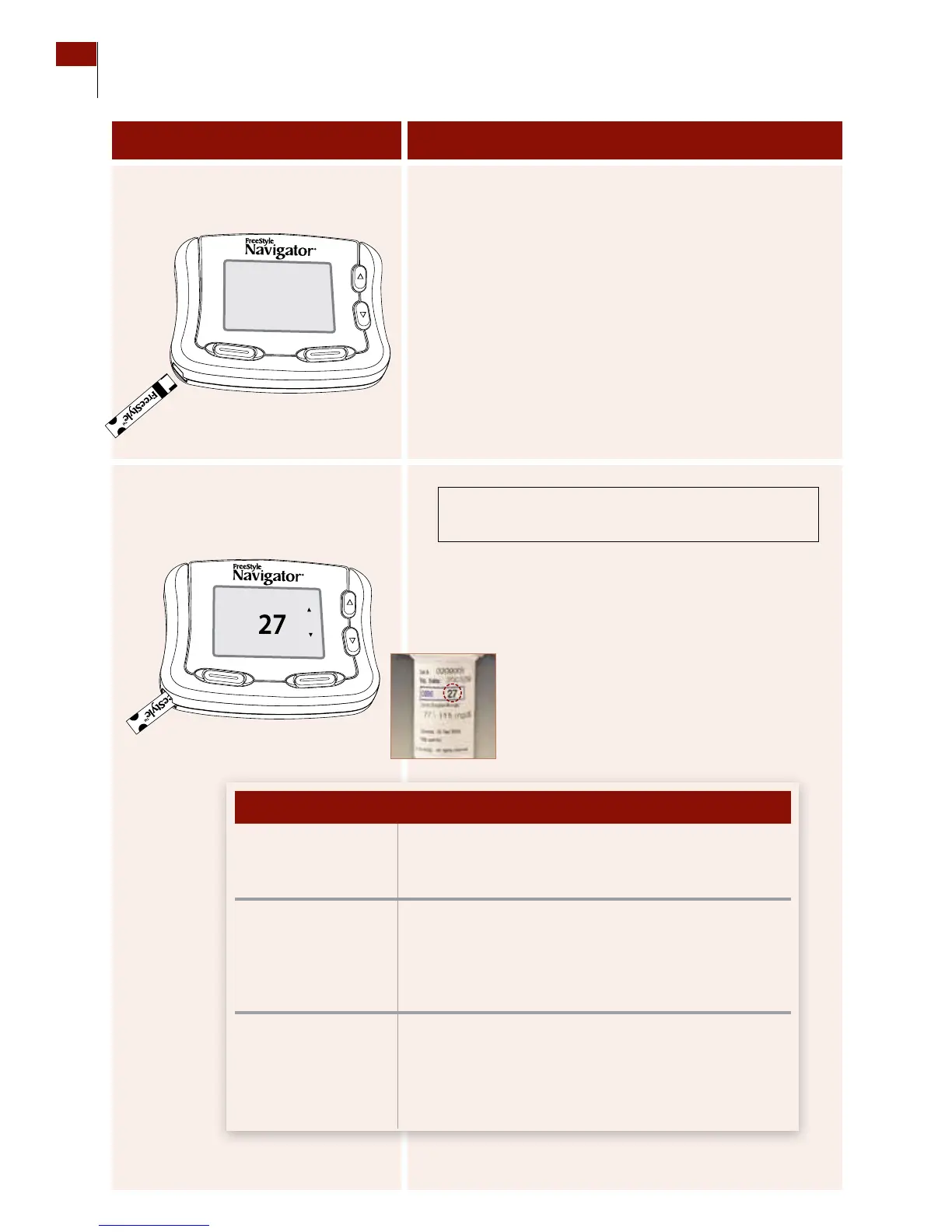
Insert a FreeStyle Test Strip into
the receiver’s test strip port.
a. Insert the end with the dark rectangle.
b. Gently push until the test strip stops.
Result: e receiver will display the most recently used
test strip code number.
2. Ensure that the code number
on the screen matches the code
number on the test strip vial.
Compare the code number on the display with the code
number on the vial of test strips.
Result: e receiver will prompt you to “Apply Sample.”
•enumbersmatch. a. Press the RIGHT Option button (Set).
b. Go to Step 3.
•enumbersdo
NOT match.
a. Use the UP/DOWN Arrow buttons to change the
code to match.
b. Press the RIGHT Option button (Set).
c. Go to Step 3.
•escreenchanges
to the Apply Sample
screen.
If the numbers do NOT match:
a. Press the LEFT Option button (Back).
b. Repeat Step 2.
If the numbers match, go to Step 3.
If en
Caution:
e code numbers MUST match to ensure
accurate test results.
Customer Care: 1-866-597-5520
56 Section 7
Calibrate Your System/Test Blood Glucose Manually















 To Next Page