to contact the touchscreen. The touchscreen has a special coating that can be damaged by
contact with other hard surfaces.
7. On the Merlin™ 2 PCS screen, select the Adjust Display button to configure the ECG
waveform. For more information, select the ? button at the top of the screen when the Adjust
Display window appears.
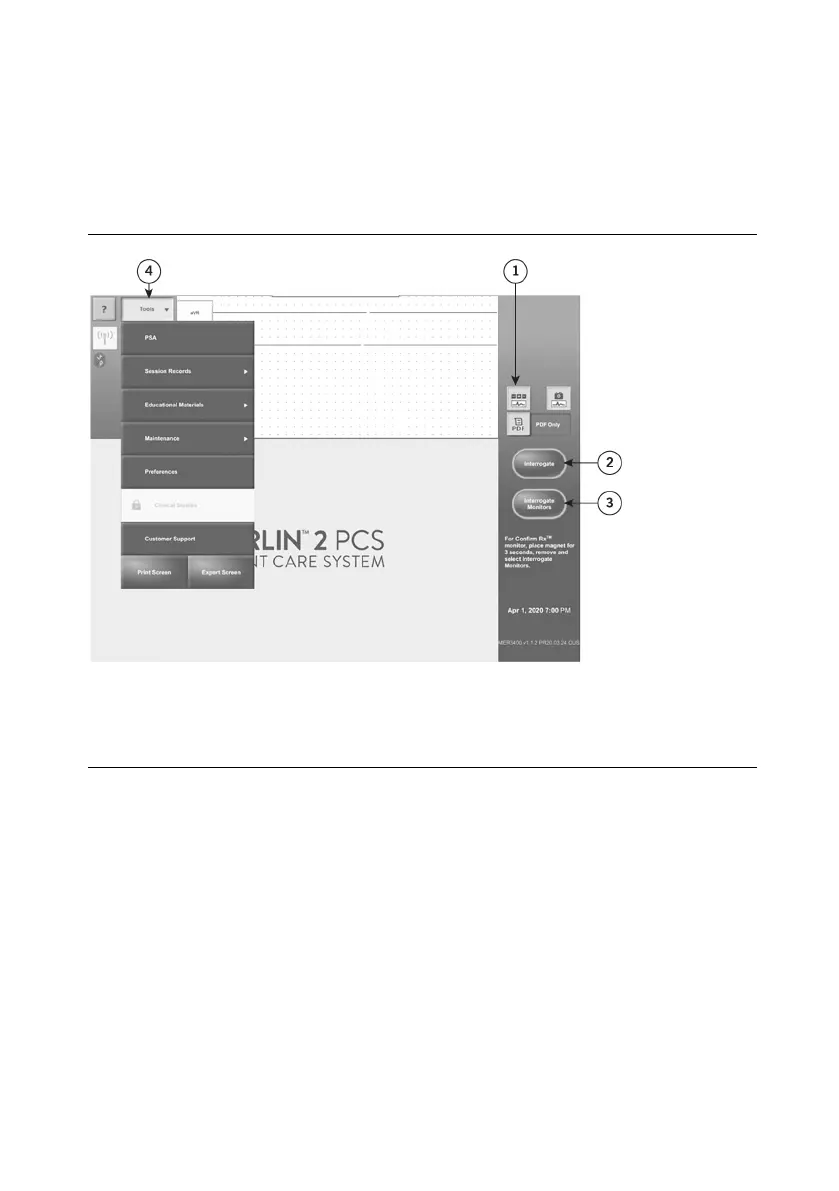
Figure 6. The Adjust Display button, the Interrogate button, and the Tools Menu
1. Adjust Display button
2. Interrogate button
3. Interrogate monitors button
4. Tools menu
Setup for Inductive Telemetry Devices
1. Place the inductive telemetry wand over the patient's device.
NOTE: For devices that use inductive telemetry, use only the Model 3630W telemetry wand
with the Merlin™ 2 PCS.
2. Select the Interrogate button for pacemakers, ICDs, and CRTs.
3. Use the telemetry strength indicator on the telemetry wand to position the wand over the
device. A single lighted LED indicates telemetry is established. A greater number of lighted
LEDs indicates stronger signal strength.
Setup for Insertable Cardiac Monitors
1. Place the magnet on the patient's device for 3 seconds and remove.










 To Next Page