Playback
79
Playback
General information
Playback can be made in three different ways:
Through the video search in the main menu
From the live view
Through the log file in the maintenance menu
Note
The buttons “previous file/day/event” are used dif-
ferently depending on the playback mode:
Normal playback:
By pressing the button the playback jumps to the
previous/next day.
Video Search:
By pressing the button the playback jumps to the
previous/next event day.
Video Export:
By pressing the button the playback jumps to the
previous/next file.
Note
It is possible to start a simultaneous playback with
up to 4 cameras.
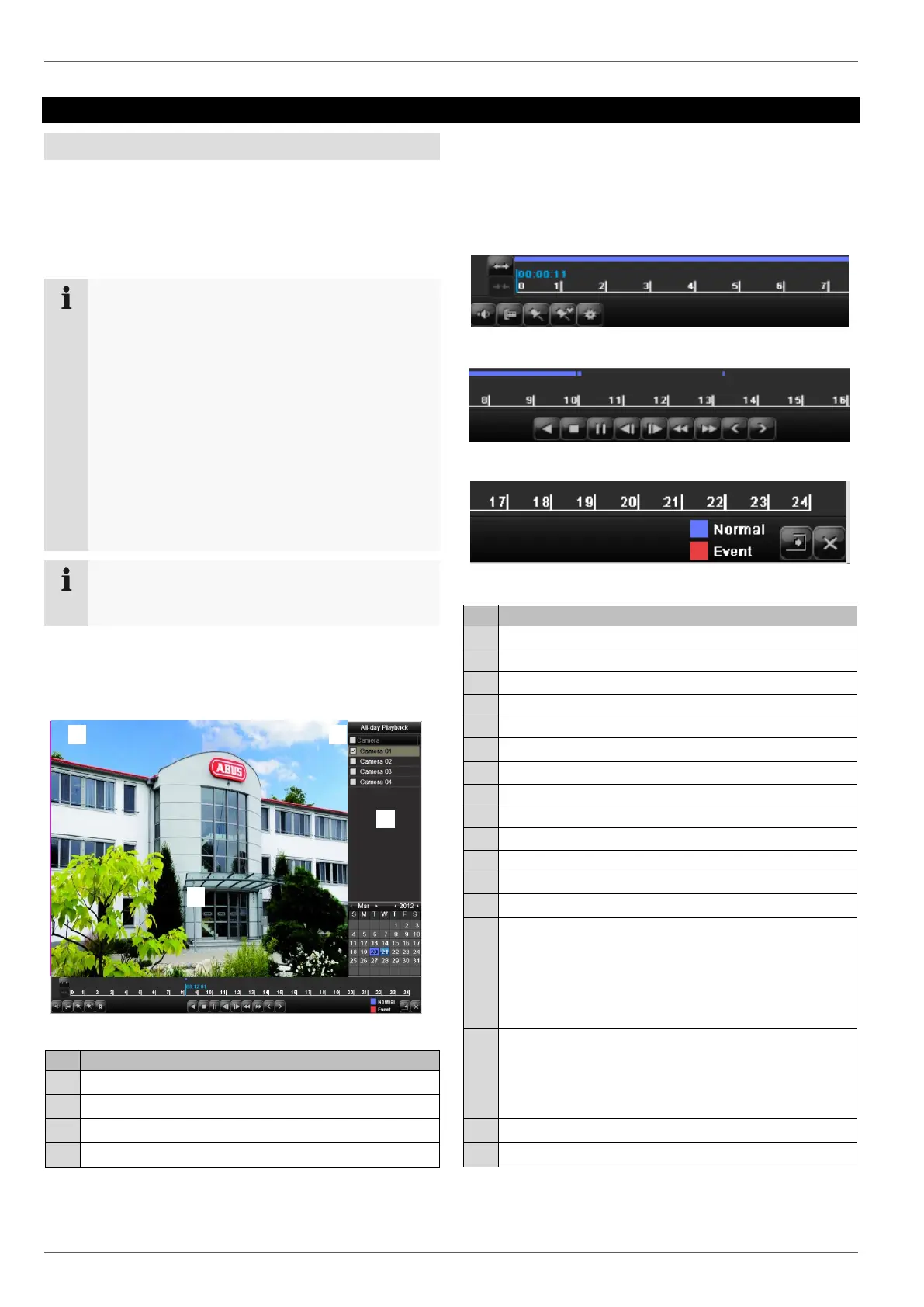
Playback screen
Playback is controlled on the control panel:
Running playback with date and time
Used to select the camera for feedback
Calendar with recording type
Control panel with time bar (see right)
Using the control panel
The control panel (4) is used for controlling the running
playback. The symbols have the following meaning:
Slow forward (slow motion) (1/16x - 1x)
Previous recording marking
Time bar:
Click on the time bar with the mouse to contin-
ue playback from another point
To start playback from a specific time, click on
the slider and drag it to the required time
Recording type
Blue = Continuous recording
Red = Event recording
Green = Smart
3
2
1
4
5
(
1
7
)
(
1
8
)
(
1
9
)
(
7
)
(
8
)
(
9
)
(
1
0
)
(
1
1
)
(
1
2
)
(
1
3
)
(
1
4
)
(
1
5
)
(
1
6
)
(
2
)
(
3
)
(
4
)
(
5
)
(
6
)
(
1
)
2
5
6
7
8
9
1
4
1
6
1
7
1
9
2
0
1
8
1
4
1
5
8
1
1
1
2
1
3
1
0
9
Siehe Fehler! Kein gültiges Resultat für Tabel-
le. S. 4.
3
2
1
4
5
(
1
7
)
(
1
8
)
(
1
9
)
(
7
)
(
8
)
(
9
)
(
1
0
)
(
1
1
)
(
1
2
)
(
1
3
)
(
1
4
)
(
1
5
)
(
1
6
)
(
2
)
(
3
)
(
4
)
(
5
)
(
6
)
(
1
)
2
5
6
7
8
9
1
4
1
6
1
7
1
9
2
0
1
8
1
4
1
5
8
1
1
1
2
1
3
1
0
9
Siehe Fehler! Kein gültiges Resultat für Tabel-
le. S. 4.
3
2
1
4
5
(
1
7
)
(
1
8
)
(
1
9
)
(
7
)
(
8
)
(
9
)
(
1
0
)
(
1
1
)
(
1
2
)
(
1
3
)
(
1
4
)
(
1
5
)
(
1
6
)
(
2
)
(
3
)
(
4
)
(
5
)
(
6
)
(
1
)
2
5
6
7
8
9
1
4
1
6
1
7
1
9
2
0
1
8
1
4
1
5
8
1
1
1
2
1
3
1
0
9
Siehe Fehler! Kein gültiges Resultat für Tabel-
le. S. 4.
3
2
1
4
5
(
1
7
)
(
1
8
)
(
1
9
)
(
7
)
(
8
)
(
9
)
(
1
0
)
(
1
1
)
(
1
2
)
(
1
3
)
(
1
4
)
(
1
5
)
(
1
6
)
(
2
)
(
3
)
(
4
)
(
5
)
(
6
)
(
1
)
2
5
6
7
8
9
1
4
1
6
1
7
1
9
2
0
1
8
1
4
1
5
8
1
1
1
2
1
3
1
0
9
Siehe Fehler! Kein gültiges Resultat für Tabel-
le. S. 4.
3
2
1
4
5
(
1
7
)
(
1
8
)
(
1
9
)
(
7
)
(
8
)
(
9
)
(
1
0
)
(
1
1
)
(
1
2
)
(
1
3
)
(
1
4
)
(
1
5
)
(
1
6
)
(
2
)
(
3
)
(
4
)
(
5
)
(
6
)
(
1
)
2
5
6
7
8
9
1
4
1
6
1
7
1
9
2
0
1
8
1
4
1
5
8
1
1
1
2
1
3
1
0
9
Siehe Fehler! Kein gültiges Resultat für Tabel-
le. S. 4.
3
2
1
4
5
(
1
7
)
(
1
8
)
(
1
9
)
(
7
)
(
8
)
(
9
)
(
1
0
)
(
1
1
)
(
1
2
)
(
1
3
)
(
1
4
)
(
1
5
)
(
1
6
)
(
2
)
(
3
)
(
4
)
(
5
)
(
6
)
(
1
)
2
5
6
7
8
9
1
4
1
6
1
7
1
9
2
0
1
8
1
4
1
5
8
1
1
1
2
1
3
1
0
9
Siehe Fehler! Kein gültiges Resultat für Tabel-
le. S. 4.
3
2
1
4
5
(1
7)
(1
8)
(1
9)
(7
)
(8
)
(9
)
(1
0)
(1
1)
(1
2)
(1
3)
(1
4)
(1
5)
(1
6)
(2
)
(3
)
(4
)
(5
)
(6
)
(1
)
2
5
6
7
8
9
14
1
6
1
7
1
9
2
0
1
8
1
4
1
5
8
1
1
1
2
1
3
1
0
9
Siehe Fehler! Kein gültiges Resultat für Tabel-
le. S. 4.
(1)
2
1
4
5
(17)
(18)
(19)
(7)
(8)
(9)
(10)
(11)
(12)
(13)
(14)
(15)
(16)
(2)
(3)
(4)
(5)
(6)
(1)
2
5
6
7
8
9
14
16
17
19
20
18
14
15
8
11
12
13
10
9
Siehe Fehler! Kein gültiges Resultat für Tabel-
le. S. 4.



 To Next Page