EasyManua.ls Logo

Abus TVIP61500 - 5 Camera Description; 6 Description of the Connections

Abus TVIP61500
Print Icon
To Next Page IconTo Next Page
To Previous Page IconTo Previous Page
Loading...
59
English
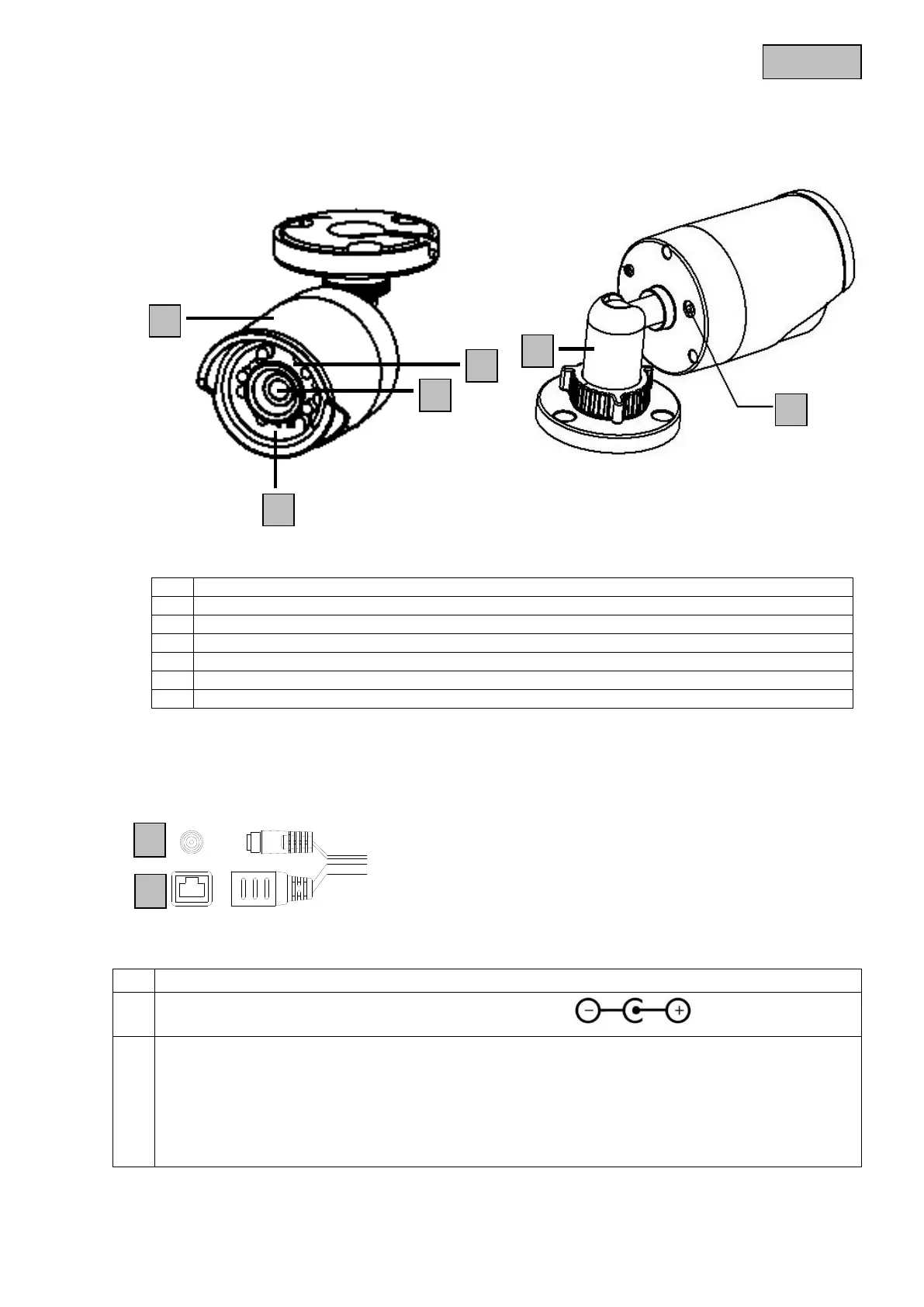
5. Camera description
6. Description of the connections
No.
Description
1
Sun shield
2
IR LEDs
3
Lens
4
Photo sensor for day/night switching
5
Reset button (hold down for approx. 30 seconds to reset the camera)
6
Camera holder
No.
Description
1
12 V DC power supply connection (round plug 5.5x2.1 mm)
2
Network access (RJ45)
The network access includes a cover, which can be used if necessary. This cover provides
additional protection by preventing moisture from entering the equipment. When using the cover, the
network cable must only be connected (crimped) to the network plug once it is passed through the
cover. In addition, the connections (as well as the power supply connection) can be sealed with
insulation tape.

1
2
1
2
3
4
5
6

Table of Contents

Other manuals for Abus TVIP61500

Related product manuals