23
PROGRAMMING
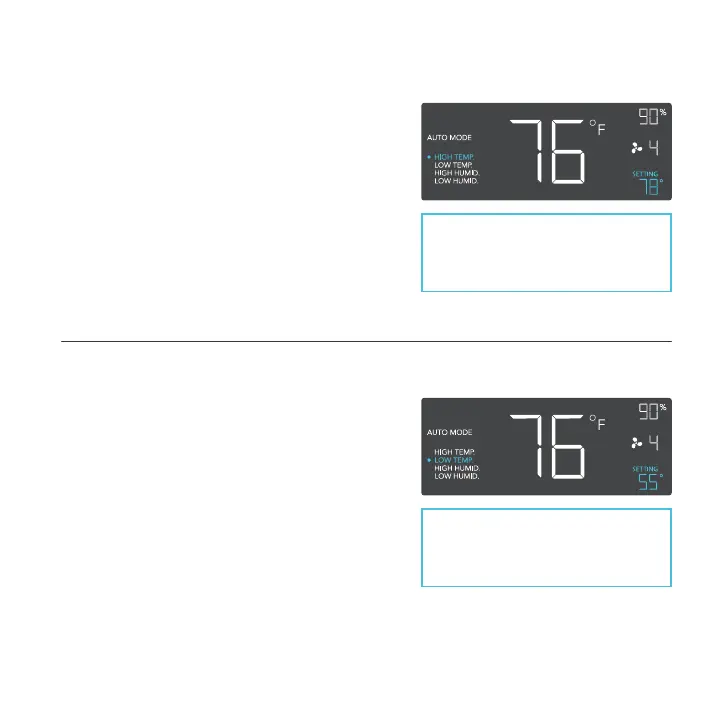
AUTO MODE: HIGH TEMP.
In this mode, press the up or down button to set a
high temperature trigger. The fans will activate if the
probe’s measured temperature exceeds the
temperature you have set in this mode. The
activated fans will slowly increase in speed until
it reaches the speed set in ON Mode. Whenever
the measured temperature falls below your set
temperature, the fans will slowly decrease in speed
until the fans stop. You may also hold the up and
down button simultaneously to turn off this trigger
in which the digits under settings will show OFF.
Note that this trigger can activate as
long as you are in AUTO Mode, even
if you are viewing a dierent trigger
within AUTO Mode.
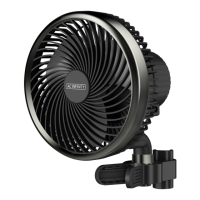
AUTO MODE: LOW TEMP.
In this mode, press the up or down button to set
a low temperature trigger. The fans will activate
if the probe’s measured temperature falls below
the temperature you have set in this mode. The
activated fans will slowly increase in speed until
it reaches the speed set in ON Mode. Whenever
the measured temperature rises above your set
temperature, the fans will slowly decrease in speed
until the fans stop. You may also hold the up and
down button simultaneously to turn off this trigger,
in which the digits under settings will show OFF.
Note that this trigger can activate as
long as you are in AUTO Mode, even
if you are viewing a dierent trigger
within AUTO Mode.



 To Next Page