Page 12
FP1, FP2, FP3, FP4 & SIL
BEFORE YOU START THIS PROCEDURE PLEASE MAKE SURE YOU
SET THE CORRECT TIME-OF-DAY.
Note the a.m. LED light
-Press SET & DOWN arrow keys together at the same time.
-Code “FP1” is displayed.
-Press the SET key.
- Enter the desired start time to begin the First Filtration Period
FP1. Enter the hour then press “SET”. Enter the minutes then
press “SET”
-Press UP arrow and go to code “FP1d”.
-Press “SET”. Enter the number of hours or the duration of the
First Filtration Period in minutes. Maximum is 4 hours, then
press “SET”.
-Repeat above procedure for FP2, FP3, and FP4 if necessary.
-Press UP arrow (ignore the rest of the codes) and go to code “SEND”.
-Press SET to exit and save the new values.
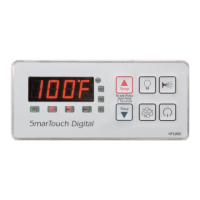
‘UP ARROW’ KEY IS MARKED ‘TEMP’
‘DOWN ARROW’ KEY IS MARKED ‘TIME’
NOTE:
IF POWER TO THE SPA IS TURNED OFF OR INTERRUPTED
PROGRAMMING FOR THE “FILTRATION PERIODS” IS NOT
AFFECTED TIME OF DAY MUST BE RE-ENTERED.
SETTING FILTRATION PERIODS & SILENT MODE



 To Next Page