13
To configure the balance/scale; i.e., adapt the balance/scale to individual requirements.
Step Key (or instruction) Display
1. Switch off the balance/scale (ON/OFF)
2. Switch on the balance/scale and (ON/OFF)
while all segments are displayed (ZERO) briefly
Navigation in the Setup Menu
Key Press briefly Press and hold
(ENTER) Menu level: move to the right (cyclical) Confirm setting
(F) Menu item: Scrolling –
(ZERO) Menu level: Move to the left Save settings and exit Setup
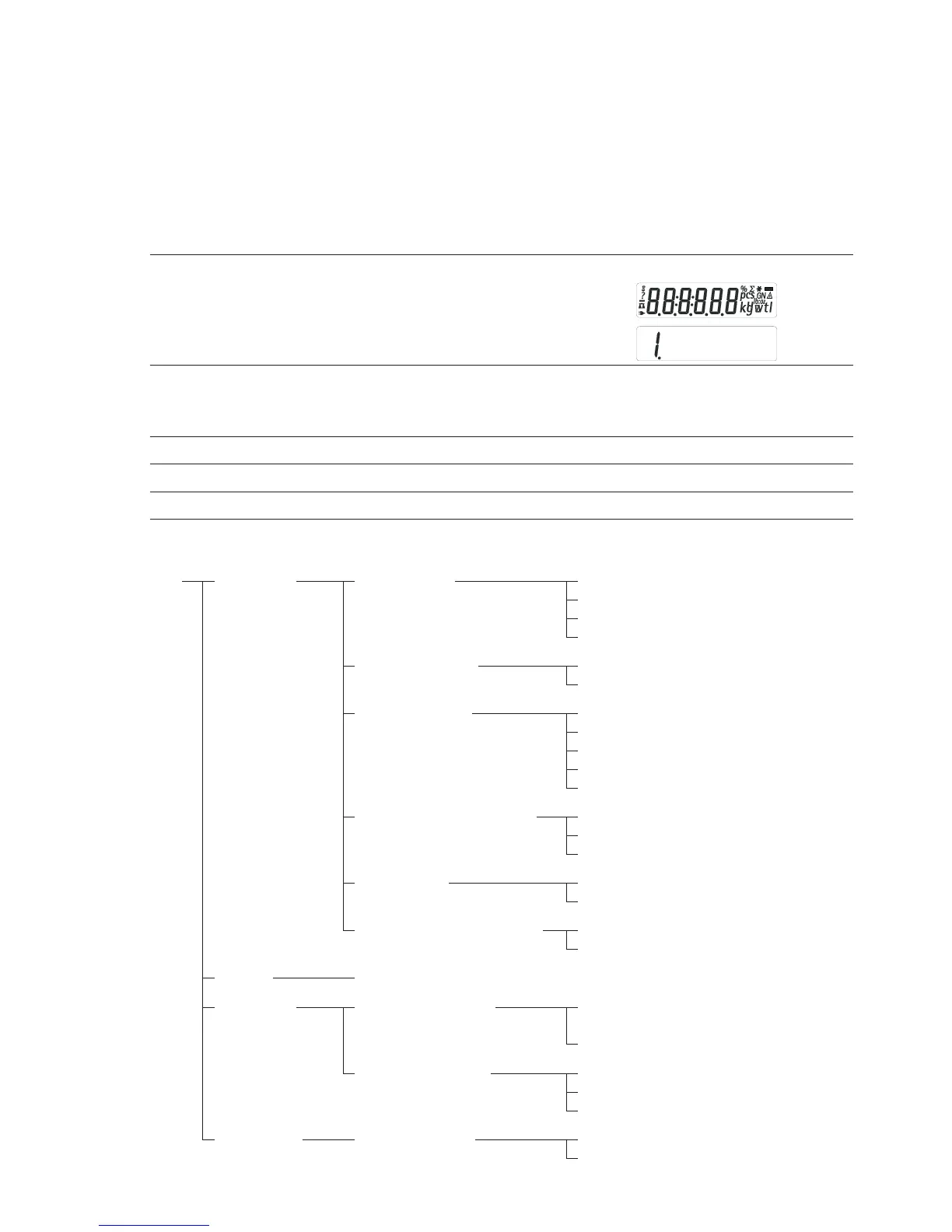
Parameter Settings (Overview) ο Factory setting √ User-defined setting
Setup 1 Weighing 1.1. Adapt filter 1.1.1 Very stable conditions
menu 1.1.2 ο Stable conditions
1.1.3 Unstable conditions
1.1.4 Very unstable conditions
1.2. Application filter 1.2.1 ο Final readout
1.2.2 Filling
1.3. Stability range 1.3.1 1/4 digit
1.3.2 1/2 digit
1.3.3 1 digit
1.3.4 ο 2 digits
1.3.5 4 digits
1.5. Calib./adjust./linearization: 1.5.1 ο Calibration/adjustment
Function of the (CAL) key 1.5.2 Linearization: for service personnel only
1.5.3 Key blocked
1.6. Auto zero 1.6.1 ο On
1.6.2 Off
1.7. 1st weight unit, or 2nd unit in 1.7.1 User-defined unit; see
Toggle Weight Units app. to 1.7.23 “Toggling between Weight Units”
5. and 6. Only relevant with built-in data interface: see corresponding interface description
8. Additional 8.1. Block key functions 8.1.1 All keys blocked except for (ON/OFF)
functions and (ZERO)
8.1.2 ο All keys unblocked
8.2. Automatic shut-off 8.2.1 ο After 2 minutes
8.2.2 After 5 minutes
8.2.3 After 10 minutes
9. Reset menu 9.1. Factory settings 9.1.1 Restore
9.1.2 ο Do not restore
Configuration (Setup Menu)


 To Next Page