Home
Accuniq
Measuring Instruments
BC720
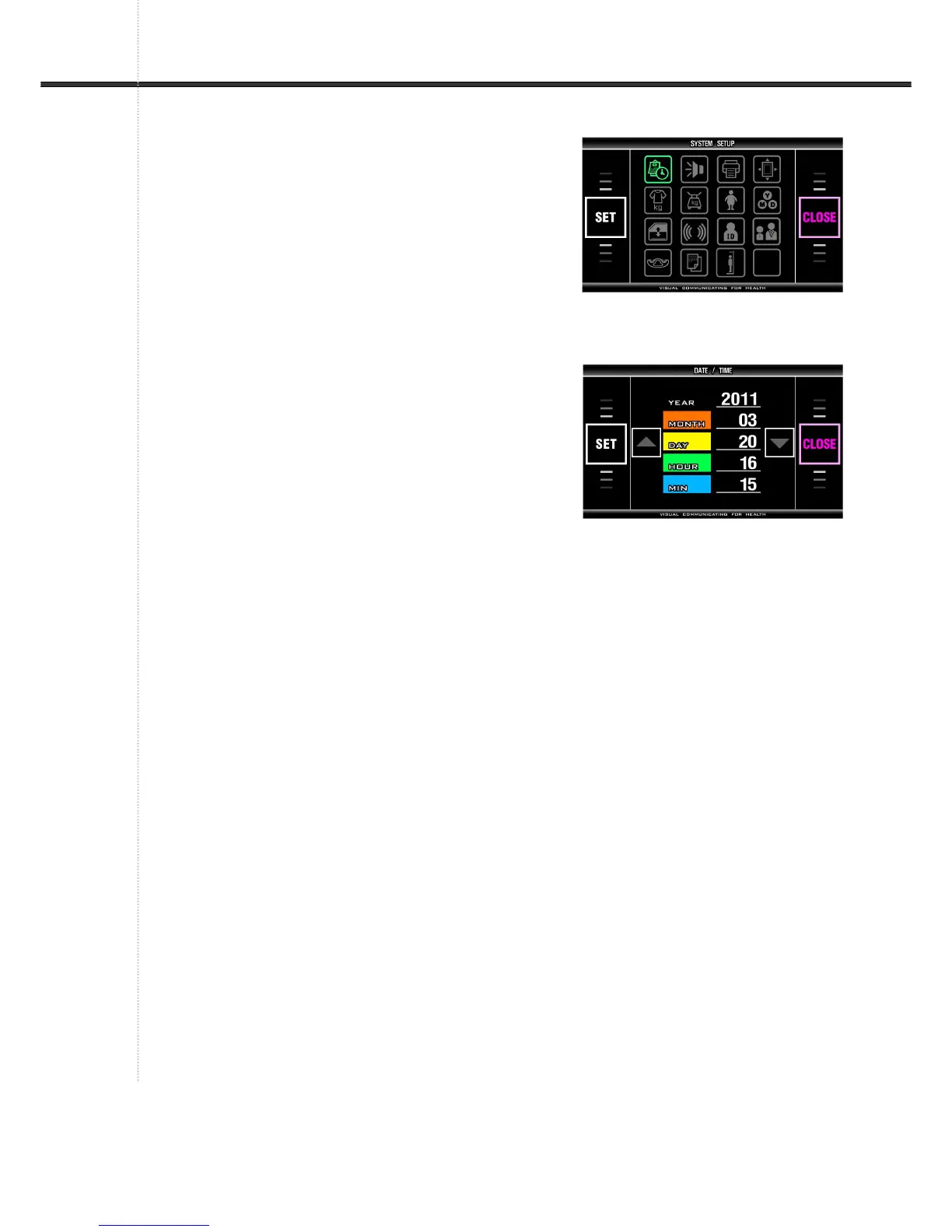
Page 32 (How to Move into SYSTEM SETUP)
Accuniq BC720 - How to Move into SYSTEM SETUP; How to Escape from SYSTEM SETUP
91 pages
Manual
Save Page as PDF
To Next Page
To Next Page
To Previous Page
To Previous Page
Loading...
32
4. How
to escape
from
‘SY
STEM SETU
P’
Press
「
CLOSE
」
b
utton on 'SY
STEM SETUP' phas
e,
then back to initial vi
ew of the analyz
er.
5. How
to move int
o ‘SYST
EM
SETUP’
Press
「
CLOSE
」
butt
on on the menu vi
e
w, then
program is returned to
'SYSTEM SETU
P' phase.
31
33
Table of Contents
Main Page
Table of Contents
3
Introduction
5
Intended Use
5
Word Definitions
5
Classification and Compliance
5
Safety Precautions
6
Safety Symbols and Information
11
Guidance for Electromagnetic Compatibility(EMC)
13
About Body Composition
18
Options
21
Appearance of the Device
23
Term of each Parts and Its Function
24
Installation
27
Power Supply
27
Peripheral Device Installation
28
Connecting Computer
28
Connecting Printer
28
Connecting Blood Pressure Monitor
29
System Setup
31
Entering SYSTEM SETUP
31
Entering 'MENU' View
31
How to Move into 'SYSTEM SETUP
32
How to Escape from 'SYSTEM SETUP
32
Setup
33
Initial Screen Setting
40
Precautions for Measurement
41
Correct Posture
44
Measuring Procedure
49
Procedure Using Blood Pressure Monitor
50
Storage of Data Using Usb Memory
51
Printing
53
Result Interpretation
54
Storage & Maintenance
60
Error & Repair
61
Kinds of Error & Repair
61
Error Occurrence & Repair
63
After Service
64
Packing and Transport
64
Specification
65
Warranty
67
Instructions for Assembly
68
How to Install a Device
68
ASSEMBLING an Bluetooth (OPTION)
73
Assembling a Height Meter (Option)
76
Assembling an Ankle Electrode (Option)
84


 To Next Page