●
●
●
●
●
●
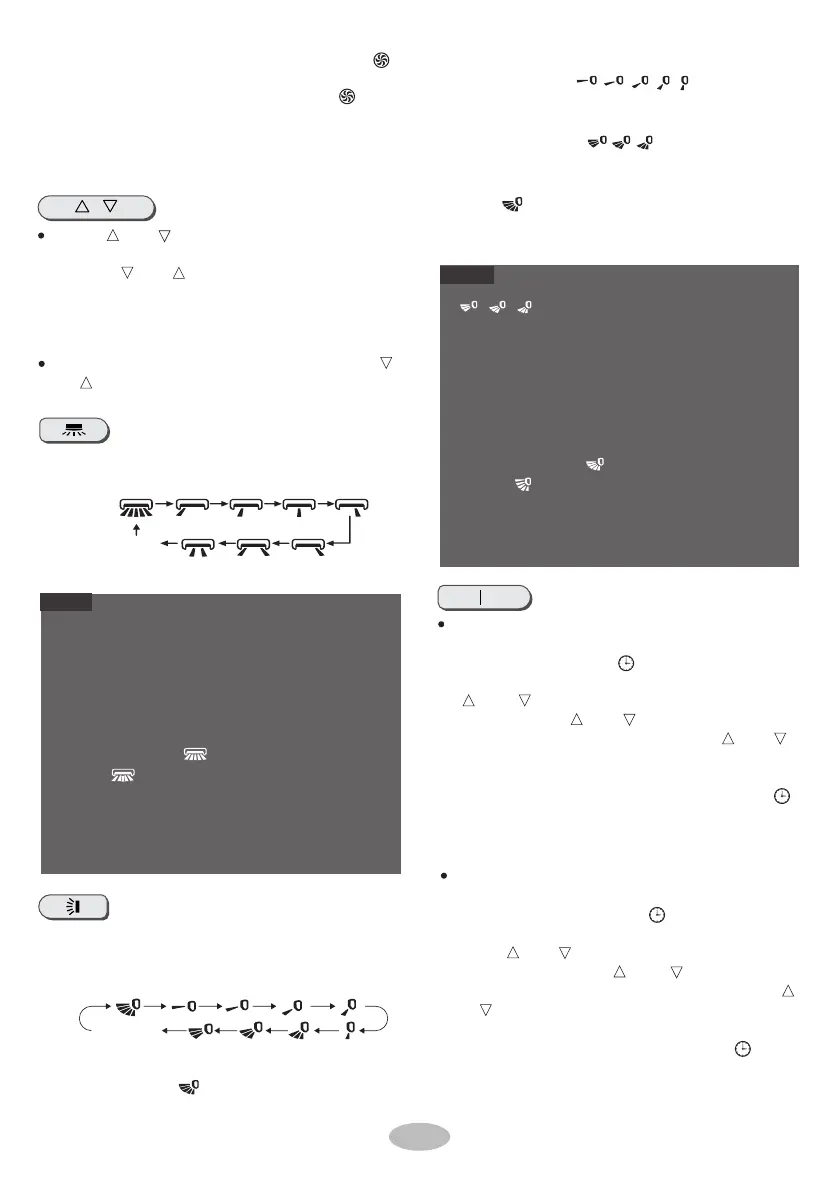
Press this button to select left & right swing angle.
Fan blowing angle can be selected circularly as
below:
Pressing this button can select the up & down
swing
angle. Fan blow angle can be selected circularly
as
below:
●
NOTE
NOTE
●
This function is only available for some models.
W
hen selecting " ", air conditioner is blowing
fan automatically. Horizontal louver will automat-
/
Hold " "button for 2s to set your required
swing angle. When reaching your required
angle, release the button.
Press this button continuously more than 2s, the
main unit will swing back an d for th from left to right,
and then release the button, the swinging will stop
and present position of louver guide will be kept.
Under left and righ t swing mode, when the status is
switched from off to , if pressing this button again
2s later, status will switch to off status
directly; if pressing this button again within 2s, the
change of swing status w ill also depend on the
circulation s equence stated above.
no display
posi
tion)
(
stops at current
“
、 、
" may not be available. When air condi-
tioner receives this signal, the air conditioner will blow
fan automatically.
Press this button continuously for more th an 2s, the
main unit will swing back and forth from up to down,
and then release the button, th e unit present
posit ion of louver guide will be kept immediately.
Under up and down s wing mode, when the status is
switched from off to , if pressing this bu tton again
2s later, status will switch to off status
directly; if
pressing this button again within 2s, the
change of swing status will also depend on the
circulation sequence stated above.
●
●
no display
(horizontal louvers stops
at current position)
W
hen selecting " ", air conditioner is
、 、
ically swing up & down at maximum angle.
When selecting
"
、 、 、 、
", air condition-
er is blowing fan at a fixed position.
Horizontal louver will stop at the fixed position.
Press " " or " " button once to increase or
decrease set temperature by 1
℃(°F).
Holding " " or " " button, 2s later, set
temperature on remote control will change
quickly. On releasing button
after setting is
finished, temperature indica tor on
indoor unit
will change accordingly.
When setting T-ON, T-OFF or CLOCK, press " "
or " " button to adjust time. (Refer to CLOCK, T-
ON, T-OFF buttons)
blowing fan at a fixed angle. Horiz ontal louver
will send air at a fixed angle.
T-ON T-OFF
T-ON button
"T-ON" button can set the timer duration. Af ter
b
utton to cancel it.
pressing this button, " " icon disappears and
the word "ON" on remote control blinks. Press
" " or
" " button to adjust T-ON setting. After
each pressing " " or " " button, T-ON setting
will increase or decrease 1min. Hold " " or " "
button, 2s later, the time will ch a n ge quickly until
reaching your required time. Press "T-ON" to
confirm it. The word "ON" w i ll
stop blinking. " "
icon resumes display. Cancel T-ON: Under the
condition that T-O N is started up, press "T - ON"
button to cancel it.
T-OFF button
"T-OFF" button can set the time for timer off. Af-
ter pressing this button , " " icon disappears
and the word "OFF" on remote controller blinks.
Press " " or " " but ton to adjust T-OFF sett i ng.
8
t urn t o q uick C OOL or quick HEAT mode. " "
icon is displayed on remote control. Press th is
button again to exit turbo function and " " icon
will disappear. When using this function, the
unit will run at super-high fan speed to cool or
heat quickly so that the ambient temperature
ap pr oaches t he preset temperature as soon as
possible.
Af
ter each pressing " " or " " button, T-OFF
setting will increas e or decrease 1min. Hold " "
or " " button, 2s later, the time will change qui-
ckly until reaching your required time. P r ess "T-
OFF" word "OFF" will stop blinking.
" " icon
r
esumes displaying. Canc el T-OFF. Under the
condi
tion that T-OFF is s tarted up, press "T-OFF"


 To Next Page
 Loading...