Page 12Page 11
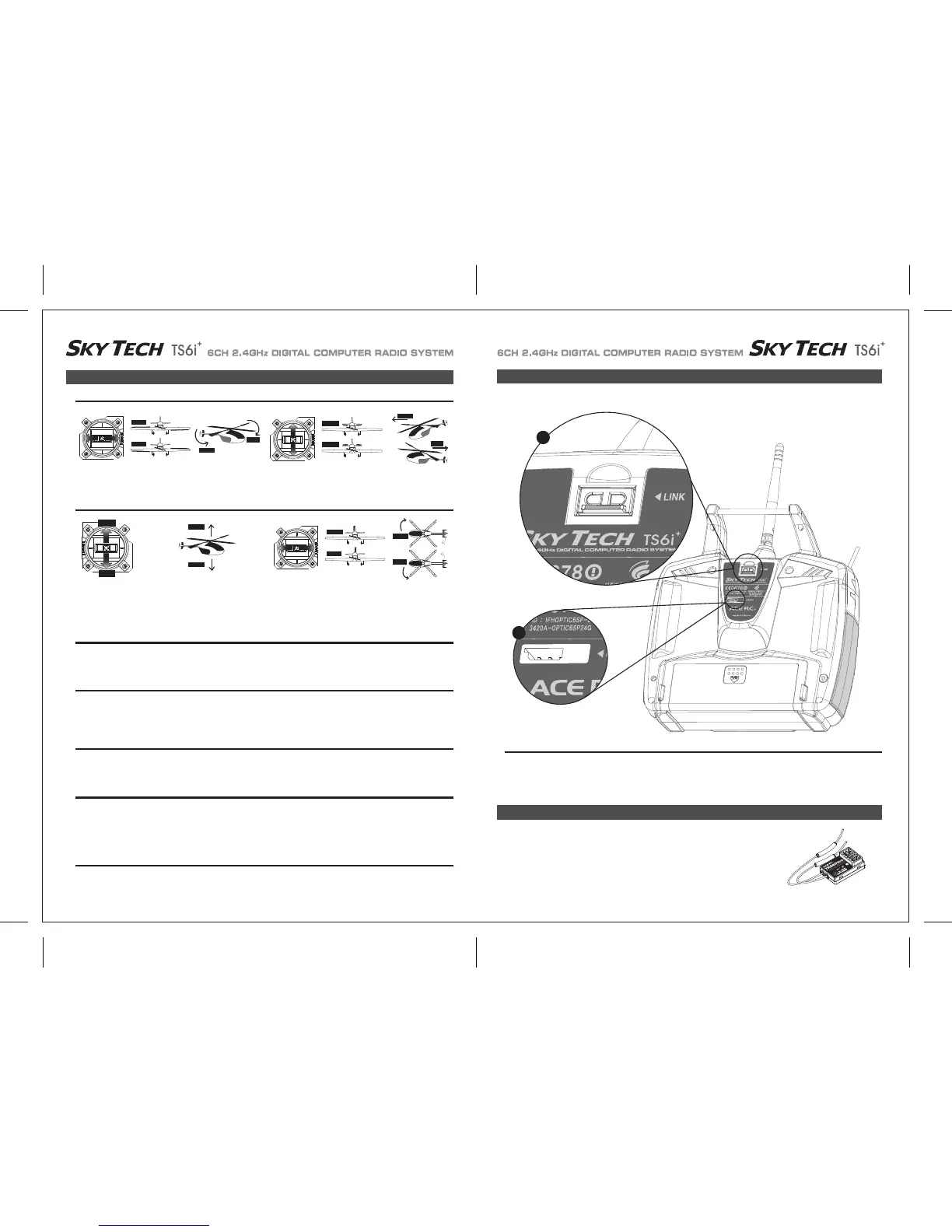
Assuming you have selected "Mode 2" in the initial setup menu (the most common control arrangement in North America), this stick controls
the elevator (forward is down and back toward you is up) and the ailerons (left and right).
The following contains the complete instructions on how to use the ACE RC AFHSS 2.4GHz system on Sky Tech TS6i
+
and TRS603DD
receiver set. We encourage you to review this information before using these products.
Again assuming the "Mode 2" configuration, this stick controls the rudder (left and right) and the throttle (forward and back-back is off for
electric motors and idle for glow). If you have selected "GLID" as the transmitter's programming baseline in the initial setup menu than the
stick's forward and back movement controls the ailerons and flaps for the model's descent control (called "CROW").
This is your "Dual-rate" switch: The "0" position typically selects the full rate of movement of the aileron, elevator and rudder while the "1"
position selects the diminished rate you have programmed in the model setup menu. The exponential values for these control surfaces are
also selected by this switch.
"SW-2" switch
This Function Button with Dual LED indicator has two colored LEDs, blue and red, for status indication and for set-up process indication of
2.4GHz system.
This function button can be used for Link(ID -Setting) process between Sky Tech TS6i
+
to ACE RC 2.4GHz series receivers, entering the
power down mode for range checks, and SmartScan function set up.
As of this writing, there is TRS603DD 2.4GHz receivers that are compatible with ACE RC AFHSS 2.4GHz System.
The TRS603DD is loaded with a variety of functions that are sure to deliver a satisfying R/C experience.
The TRS603DD receiver is offered as a standard receiver for the Sky Tech TS6i
+
.
1. Function Button (With Dual LED Status Indicator)
This switch allows you to choose three different "flight condition modes"-an advanced programming function.
In Heli mode this switch selects the NOR, or "hover", and 2 "idle-up" or stunt modes
"SW-3 FLT MODE" switch
If you've activated the engine cut function in the model setup menu programming, this button serves as the kill-switch for your motor.
Otherwise, it functions as the trainer switch when your transmitter is linked via a cable to a second transmitter to act as a "buddy box"for flight
training. As long as you hold down the training button the buddy box will be flying the model-let go of the button and your transmitter reverts
to being the master.
"Eng Cut"/"Trainer" switch
Use these switches to make small offset adjustments to the servos controlled by the two joysticks.
Any adjustments will be "memorized" for this particular model so you won't have to re-trim every time you fly.
Trim switches
Depending on the initial set-up base-line programming you have selected, this switch can be used to lower landing gear; operate the throttle
of an electric motor (as on a powered glider); or select a flight condition mode. In Heli mode, this is the throttle hold switch.
"SW-1" switch
Transmitter Features
ACE RC AFHSS 2.4GHz Receiver System
Joystick Controls
Right-hand joystick
Left-hand joystick
LEFT RIGHT
RIGHT
LEFT
Front View
LEFT
RIGHT
DOWN
UP
DOWN
UP
UP
DOWN
HIGH
LOW
HIGH
LOW
HIGH Position:
Full Throttle
LOW Position:
Power Off
LEFT RIGHT
RIGHT
LEFT
Front View
RIGHT
LEFT
2
1
2.4GHz 6 Channel
Aircraft Receiver
TRS603DD


 To Next Page