16
English
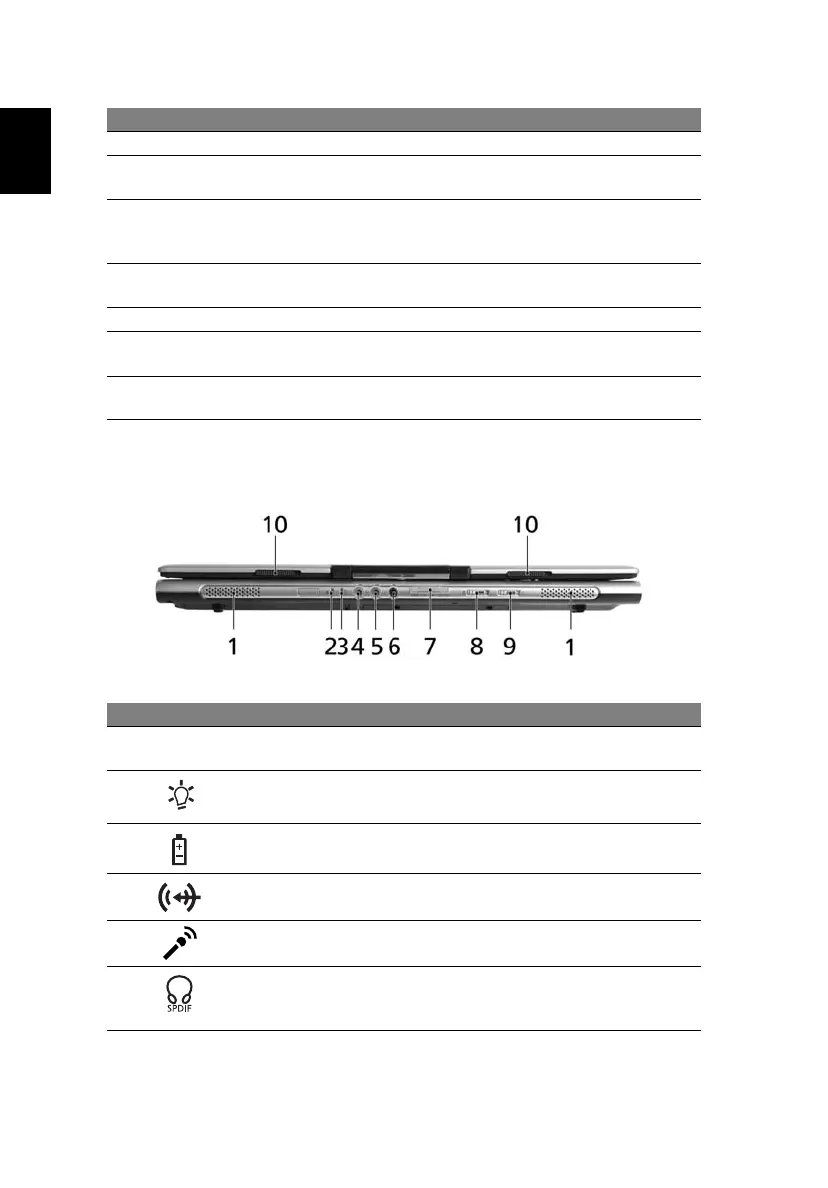
Closed front view
4 Keyboard For entering data into your computer.
5 Touchpad Touch-sensitive pointing device which functions like a
computer mouse.
6 Click buttons
(left, center
and right)
The left and right buttons function like the left and
right mouse buttons; the center button serves as a
4-way scroll button.
7 Palmrest Comfortable support area for your hands when you
use the computer.
8 Power button Turns the computer on and off.
9 Easy-launch
buttons
Buttons for launching frequently used programs. See
"Easy-launch buttons" on page 25 for more details.
10 Status
indicators
Light-Emitting Diodes (LEDs) that light up to show the
status of the computer's functions and components.
# Icon Item Description
1 Speakers Left and right speakers deliver stereo
audio output.
2 Power indicator Indicates the computer's power status.
3 Battery indicator Indicates the computer's batttery status.
4 Line-in jack Accepts audio line-in devices
(e.g., audio CD player, stereo walkman).
5 Microphone-in jack Accepts input from external
microphones.
6 Headphones/
speaker/line-out jack
with S/PDIF support
Connects to audio line-out devices
(e.g., speakers, headphones).
# Item Description





 To Next Page