17
English
Left view
7 5-in-1 card reader
(for selected
models)
Accepts Memory Stick (MS), Memory
Stick PRO (MS PRO), MultiMediaCard
(MMC), Secure Digital (SD) and
xD-Picture Card (xD)
Note: Only one card can operate at any
given time.
8Bluetooth
communication
switch/indicator
Enables/disables the Bluetooth
function. Indicates the status of
Bluetooth
communication. (for selected models)
9Wireless
communication
switch/indicator
Enables/disables the wireless function.
Indicates the status of wireless LAN
communication.
(for selected models)
10 Latch Locks and releases the lid.
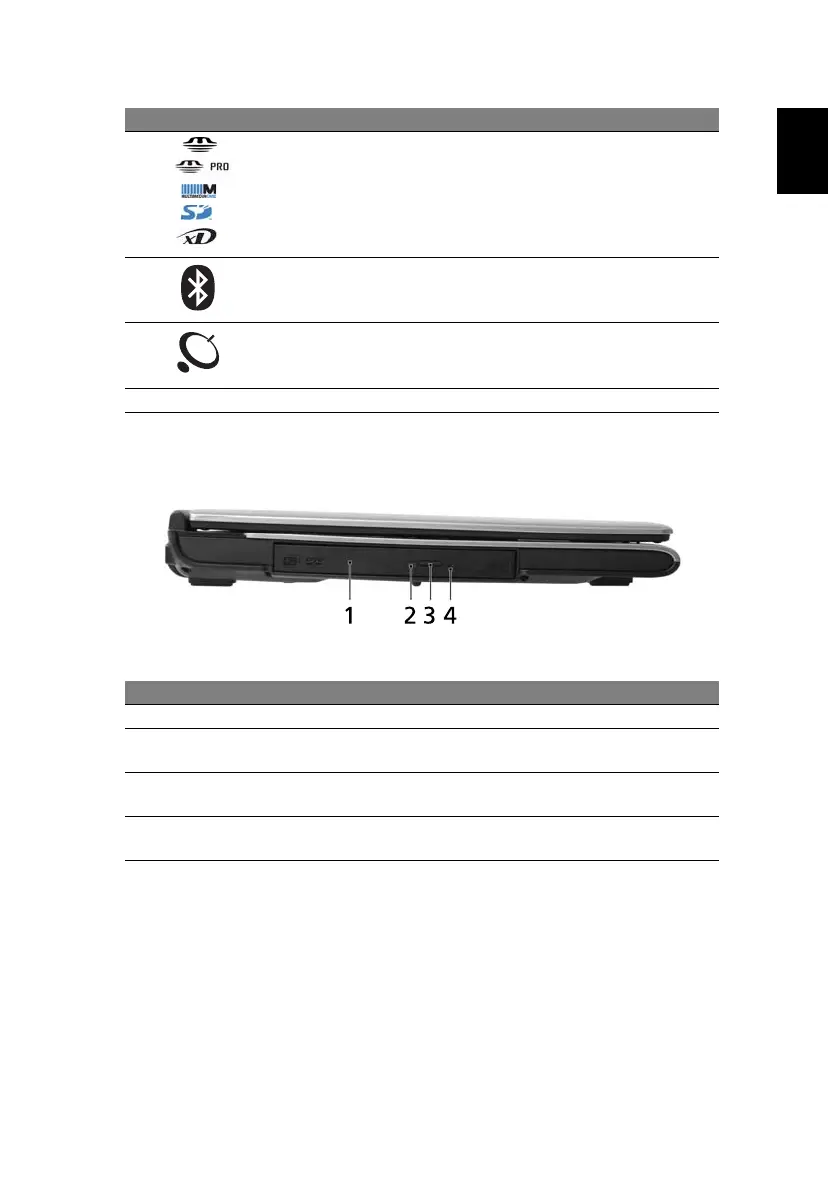
# Item Description
1 Optical drive Internal optical drive; accepts CDs or DVDs
2 Optical disk
access indicator
Lights up when the optical drive is active.
3 Optical drive
eject button
Ejects the optical disk from the drive.
4 Emergency eject
hole
Ejects the optical drive tray when the computer is
turned off.
# Icon Item Description





 To Next Page