EasyManua.ls Logo

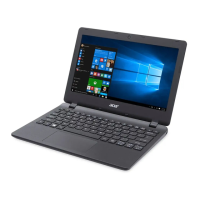
Acer Aspire ES11 - User Manual

Acer Aspire ES11
80 pages
Print Icon
To Next Page IconTo Next Page
Loading...
- 1
User’s Manual

Table of Contents

Question and Answer IconNeed help?

Do you have a question about the Acer Aspire ES11 and is the answer not in the manual?

Summary

First things first

Basic care and tips for using your computer

Guidelines for maintaining the computer's condition and longevity.

PRECISION TOUCHPAD

RECOVERY

Creating a recovery backup

Steps to create a backup of the system's original contents.

Creating a drivers and applications backup

Steps to create a backup of system drivers and installed software.

Recovering your system

Overview of different methods to restore the system.

Reinstalling drivers and applications

How to reinstall pre-installed software and drivers.

Returning to an earlier system snapshot

Using System Restore to revert to a previous system state.

Returning your system to its factory condition

Restoring the computer to its original factory state.

CONNECTING TO THE INTERNET

Connecting wirelessly

Methods for connecting to wireless networks.

USING A BLUETOOTH CONNECTION

Enable Bluetooth and add a device

Pairing a new device with the computer's Bluetooth adapter.

BIOS UTILITY

Setting passwords

How to set passwords within the BIOS utility.

SECURING YOUR COMPUTER

Using passwords

Explanation of different password types for system security.

POWER MANAGEMENT

BATTERY PACK

Optimizing battery life

Advice on extending the battery's operational time.

TRAVELING WITH YOUR COMPUTER

Traveling internationally

Specific advice for international travel with the computer.

UNIVERSAL SERIAL BUS (USB)

Got a question?

Frequently asked questions

Common issues and their solutions.

Troubleshooting

Information on how to deal with common system problems.

Internet and online security

Advice on protecting the computer while online.

Summary

First things first

Basic care and tips for using your computer

Guidelines for maintaining the computer's condition and longevity.

PRECISION TOUCHPAD

RECOVERY

Creating a recovery backup

Steps to create a backup of the system's original contents.

Creating a drivers and applications backup

Steps to create a backup of system drivers and installed software.

Recovering your system

Overview of different methods to restore the system.

Reinstalling drivers and applications

How to reinstall pre-installed software and drivers.

Returning to an earlier system snapshot

Using System Restore to revert to a previous system state.

Returning your system to its factory condition

Restoring the computer to its original factory state.

CONNECTING TO THE INTERNET

Connecting wirelessly

Methods for connecting to wireless networks.

USING A BLUETOOTH CONNECTION

Enable Bluetooth and add a device

Pairing a new device with the computer's Bluetooth adapter.

BIOS UTILITY

Setting passwords

How to set passwords within the BIOS utility.

SECURING YOUR COMPUTER

Using passwords

Explanation of different password types for system security.

POWER MANAGEMENT

BATTERY PACK

Optimizing battery life

Advice on extending the battery's operational time.

TRAVELING WITH YOUR COMPUTER

Traveling internationally

Specific advice for international travel with the computer.

UNIVERSAL SERIAL BUS (USB)

Got a question?

Frequently asked questions

Common issues and their solutions.

Troubleshooting

Information on how to deal with common system problems.

Internet and online security

Advice on protecting the computer while online.

Acer Aspire ES11 Specifications

General IconGeneral
RAM2GB DDR3L
Storage32GB eMMC
Display11.6-inch HD (1366 x 768)
GraphicsIntel HD Graphics
Operating SystemWindows 10 Home
Wireless802.11b/g/n Wi-Fi, Bluetooth 4.0
ProcessorIntel Celeron N3050
Battery3-cell Li-ion
Weight1.25 kg
Ports1 x USB 3.0, 1 x USB 2.0, HDMI, SD card reader, headphone/microphone combo jack

Related product manuals