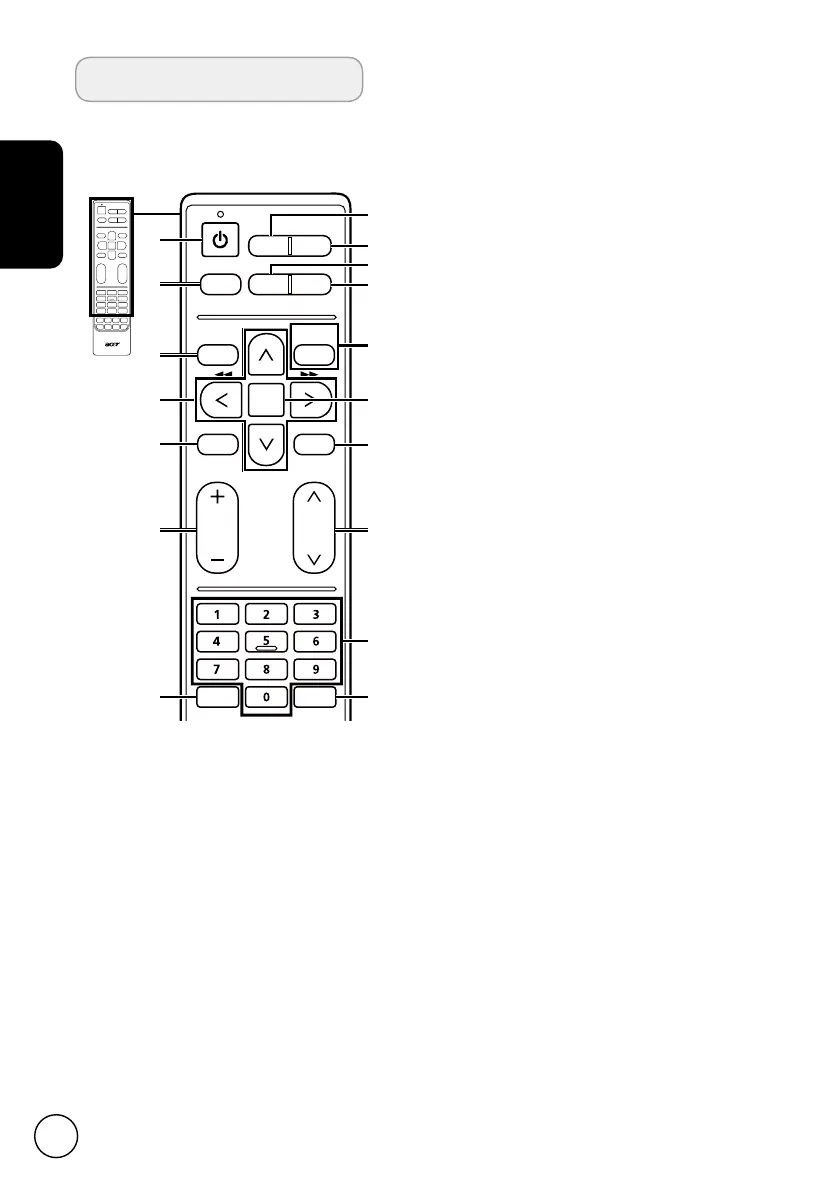
General keys
Remote control
16:9 format and 4:3 format modes.
6 MPX
Press to select a sound type available
for the selected analogue TV
programme; to select an audio
langugae available for the selected
digital TV programme.
7 MENU
Press to open the Menu.
Press to back to the previous menu.
8 BACK/CANCEL
Press to close the Menu.
Press to exit some operations.
Press to go back to the previously
viewed channel.
9 Directional keys
In menu operation, press the up/
down directional keys to select a
certain option and press the left and
right directional keys to adjust.
10 OK/ENTER/CH LIST
ENTER:
Press to confirm a selection.
CH LIST:
Press to launch the channel
list. See page 20.
11
MUTE
Press to toggle audio on and off.
12 FAV
Press to display the favorite channel
list.
13
VOL (+/-)
Press to increase or decrease the
volume.
14 CH (up/down)
Press to sequentially select the TV
channel and other source input.
15 Number keys
16 TELETEXT
Press to switch from TV/AV to Teletext
mode.
Press again to overlay teletext page
on the TV image.
17 SUBTITLE
Press to select a subtitle language
available for the selected digital TV
programme.
1 POWER
Press to turn your TV on/off.
2 DISPLAY
Press to display channel information
(dependent on input/source type).
3 GUIDE
Press to launch Electronic Programme
Guide (EPG) mode
(Digital TV mode only). See page 22.
4 SOURCE
Press to display the Source menu.
5 WIDE
Press to toggle scaling mode between
Cinerama, 14:9 Zoom, 16:9 Zoom,
16:9 Zoom up, Wide Zoom, Zoom 2,
DISPLAY GUIDE
WIDESOURCE
MENU
MUTE
TELETEXT
INDEX SIZE HOLD REVEAL
SUBTITLE
BACK
CANCEL
FAV
MPX
1
8
4
10
7
2
3
11
9
5
6
12
13
14
15
16
17
VOL CH


 To Next Page