English
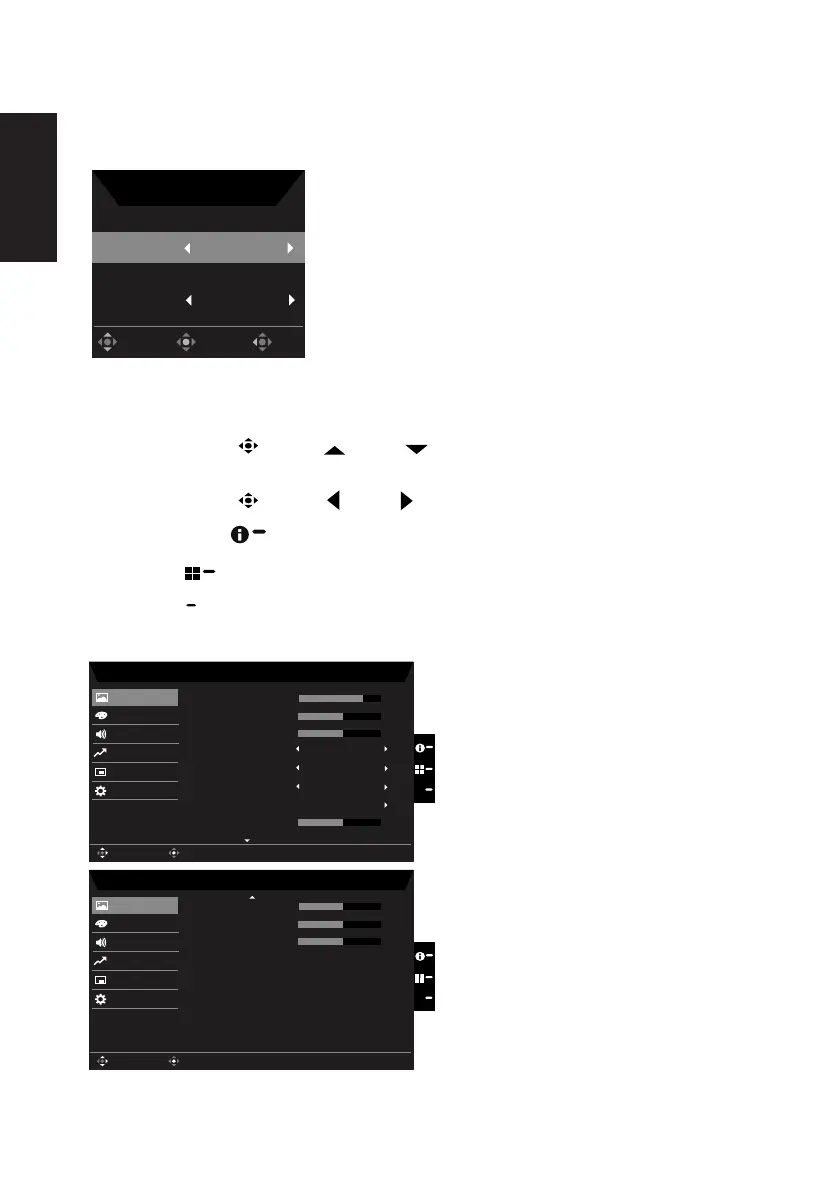
Selecting the input
press the joystick to exit current page and store.
Input
HDMI
Auto Source
On
OK
Move
Exit
Input
Main menu
2. Toggle the joystick
to the up or down
to select Picture from the OSD. The toggle
to the right to navigate to the element you wish to adjust and press the joystick to enter it.
3. Toggle the joystick
to the left
or right to adjust the sliding scales.
: Show Monitor Information and Reset control function.
: To exit current page and store.
Picture
Mode - Standard
70
50
Off
Off
Off
Color
Audio
Performance
OSD
System
Brightness
Contrast
Picture
Enter
Move
Black Boost
X
Low Blue Light
ACM
Super Sharpness
Auto Config
H.Posi�on
5
50
Mode - Standard
50
50
Color
Audio
Performance
OSD
System
V.Posi�on
Focus
Picture
Enter
Move
Clock
X
50


 To Next Page