9
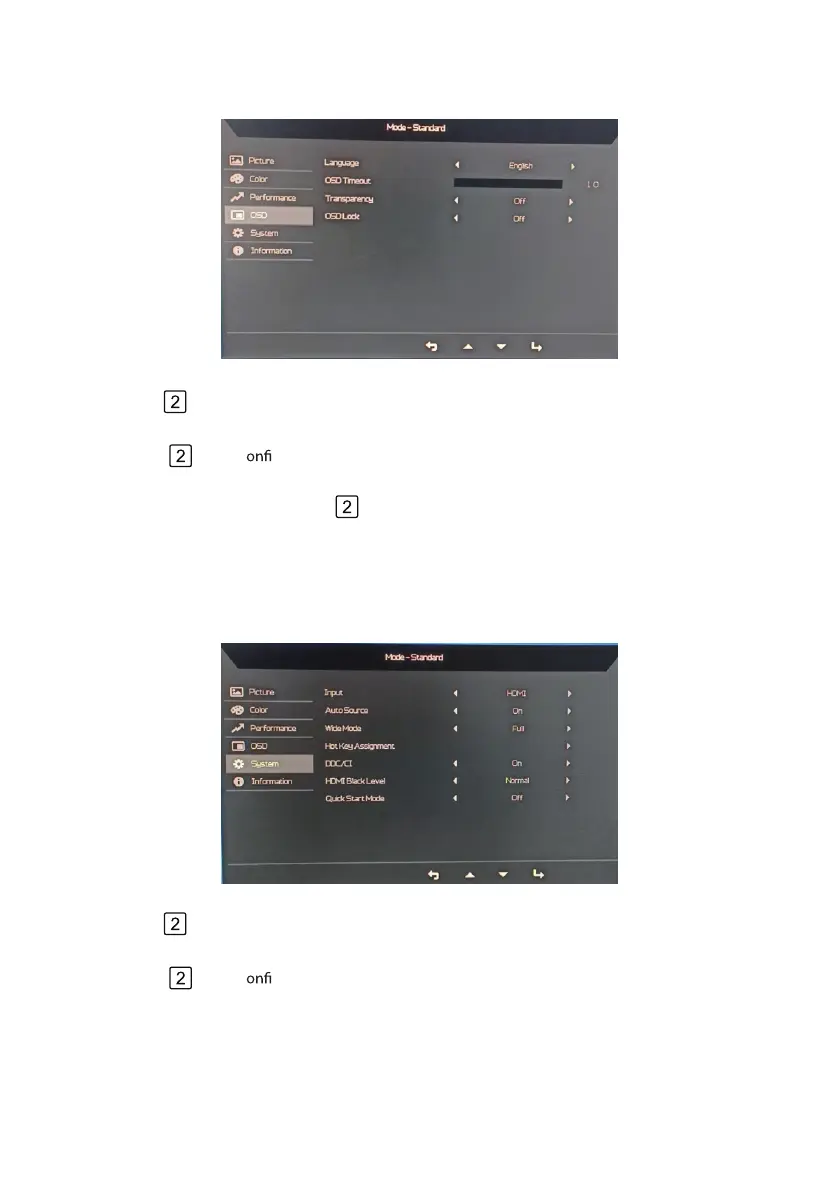
Use the < / >keys to choose 4. Language、OSD Timeout、Transparency、OSD Lock.
Adjusting the OSD settings
Adjusting the System setting
1.
2.
3.
Use the
< / >keys to OSD from OSD adjust the sliding scales.
Press the key to bring up the OSD.
Press the key to c rm your select.
Use the
< / >keys to choose Input、Auto Source、Wide Mode、Hot Key Assignment、DDC/CI、
HDMI Black Level、Quick Start Mode.
4. .
1.
2.
3.
Use the
< / >keys to Systern Menu from OSD adjust the sliding scales.
Press the key to bring up the OSD.
Press the key to c rm your select.
5. When OSD is locked, Pressing the Key for more than 3 seconds to unlock the OSD.



 To Next Page