18
How to Get a Preferred Image Size by Adjusting
Distance and Zoom
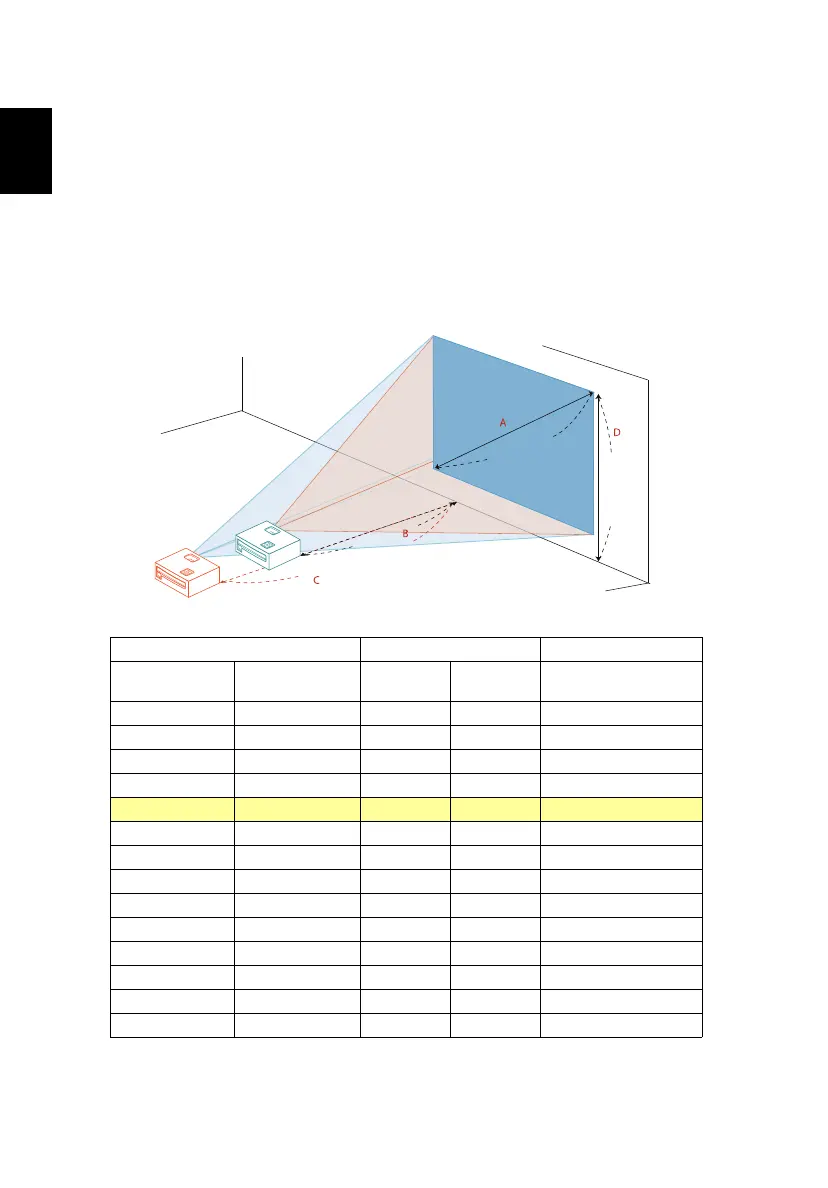
The table below shows how to achieve a desired image size by adjusting either
the position or the zoom ring.
• P5227
To obtain an image size of 70", set the projector at a distance between 2.1 m
and 2.8 m from the screen and adjust the zoom level accordingly.
Desired Image Size Distance (m) Top (cm)
Diagonal (inch)
< A >
W (cm) x H (cm)
Max zoom
< B >
Min zoom
< C >
From base to top of
image < D >
30 61 x 46 1.2 49
40 81 x 61 1.2 1.6 66
50 102 x 76 1.5 2.0 82
60 122 x 91 1.8 2.4 98
70 142 x 107 2.1 2.8 115
80 163 x 122 2.5 3.2 131
90 183 x 137 2.8 3.6 147
100 203 x 152 3.1 4.0 164
120 244 x 183 3.7 4.8 197
150 305 x 229 4.6 6.0 246
180 366 x 274 5.5 7.2 295
200 406 x 305 6.1 8.0 328
250 508 x 381 7.7 10.0 410
300 610 x 457 9.2 491
Zoom Ratio: 1.3 x
Desired distance
Height:
115 cm
From base
to top of
image
70"
Desired
image size
2.1 m
2.8 m


 To Next Page