7
English
Installation
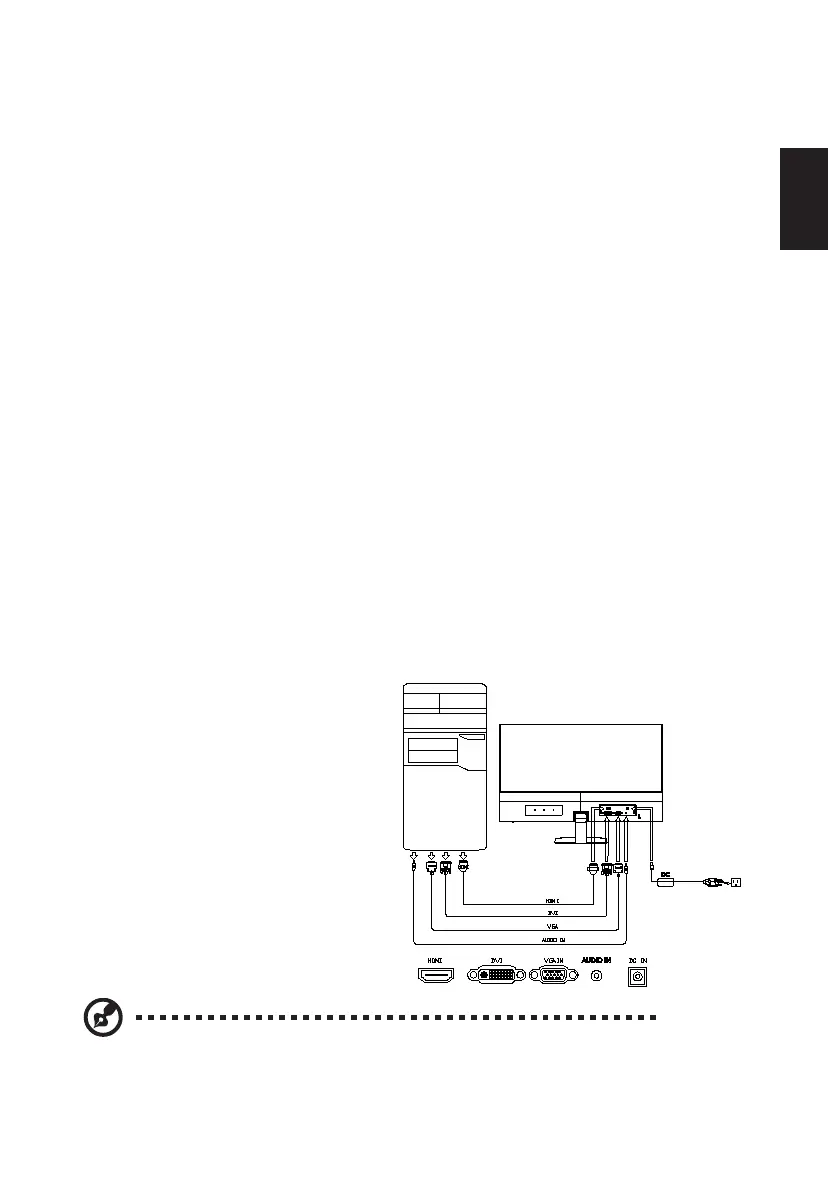
To install the monitor on your host system, please follow the steps below:
Steps
1 Connect the video cable
a Make sure both the monitor and computer are switched off.
b Connect the VGA video cable to the computer.
c Connect the digital cable
(1) Make sure both the monitor and computer are switched off.
(2) DVI Cable (Optional, only Dual-Input Model)
a. Make sure both the monitor and computer are powered-OFF.
b. Connect the DVI cable to the computer.
(3) HDMI Cable (Optional, only HDMI-Input Model)
a. Make sure both the monitor and computer are powered-OFF.
b. Connect the HDMI cable to the computer.
d Connect the audio cable (Optional, only Audio-input Model).
2 Connect the adapter
a Connect the AC cord to the adapter.
b Connect one end of the adapter to the monitor and the other end to a properly
grounded, AC outlet.
3 Turn on the monitor and computer
Turn on the monitor first, then the computer. This sequence is very important.
4 If the monitor does not function properly, please refer to the troubleshooting section
to diagnose the problem.
Note: Audio output is only for audio output model.
In order to prevent damage to the monitor, do not lift the monitor by its base.


 To Next Page