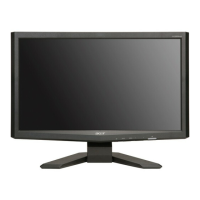
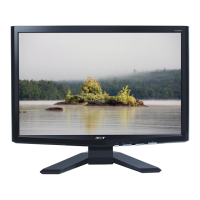
This document is a user manual for the Acer X163W LCD Monitor, providing comprehensive information on its setup, operation, maintenance, and troubleshooting.
Function Description
The Acer X163W is a 15.6-inch widescreen LCD monitor designed for general computer use. It functions as a visual output device, displaying images and text from a connected host system. The monitor supports both analog (15-pin D-Sub) and digital (DVI, for dual-input models) video input signals, allowing compatibility with a wide range of computers. It is equipped with a universal power supply, enabling operation in various AC voltage areas (100/120V AC or 220/240V AC) without requiring user adjustment. The monitor also incorporates DDC (Display Data Channel) protocol support, specifically DDC2B, which facilitates Plug and Play installation by automatically communicating its capabilities (supported resolutions, timing) to the host system.
Usage Features
The Acer X163W monitor offers several features to enhance user experience and comfort:
- Physical Adjustments: The monitor allows for tilt adjustment, with a range of 15 degrees upward and 5 degrees downward, to help users find an optimal viewing position and reduce neck strain. For users who prefer wall mounting, the monitor is compatible with UL Listed wall mount brackets (100 mm x 100 mm screw holes), requiring M4 mm x 10 mm (L) screws.
- Connectivity: It supports both 15-pin D-Sub (analog) and DVI (digital, on dual-input models) connections. The manual provides a detailed pin assignment table for the 15-pin D-Sub cable, outlining the function of each pin (e.g., Red, Green, Blue, +5V, Logic Ground, Monitor Ground, DDC-Serial Data, H-Sync, V-Sync, DDC-Serial Clock).
- Power Management: The monitor features a "Power Saving" mode, indicated by an amber-colored power LED, which activates when a control signal from the display controller is detected. This mode helps conserve energy, and the monitor recovers to the ON state within approximately 5 seconds when a control signal is detected or the keyboard/mouse is activated. The product is ENERGY STAR qualified, indicating its energy efficiency and contribution to reducing greenhouse gas emissions. It is shipped with power management enabled, activating display sleep mode within 15 minutes and computer sleep mode within 30 minutes of user inactivity.
- On-Screen Display (OSD) Controls: The monitor is equipped with front panel controls for easy navigation and adjustment of settings. These include:
- Power Switch: To turn the monitor ON or OFF.
- Power LED: Indicates the power status (blue for ON, amber for power saving).
- Empowering / Exit Button: Functions as an EXIT-KEY for the OSD menu when active, and allows selection of scenario modes when the OSD is off.
- Auto Adjust Button / Exit: Acts as an EXIT-KEY for the OSD menu when active. When the OSD is off, pressing this button for 2 seconds activates the Auto Adjustment function, which automatically sets HPos, VPos, Clock, and Focus.
- < / > Buttons: Used to select desired functions and change settings within the OSD menu.
- MENU / ENTER Button: Activates the OSD menu when off, and activates/de-activates adjustment functions when the OSD is on.
- Acer eColor Management OSD: This feature provides various display modes tailored for different content types:
- User mode: Allows for fine-tuned, user-defined settings.
- Text mode: Optimizes brightness and contrast to prevent eyestrain, making it comfortable for reading text.
- Standard mode: Default settings, reflecting native display capability.
- Graphic mode: Enhances colors and emphasizes fine detail for graphic content.
- Movie mode: Displays scenes in clearest detail with vibrant colors and sharp detail, suitable for video content.
- Standard OSD Controls (USER): In addition to eColor Management, the monitor offers standard OSD adjustments:
- Contrast: Adjusts the contrast between foreground and background.
- Brightness: Adjusts the background brightness.
- ACM (Adaptive Contrast Management): An ON/OFF switch for adaptive contrast.
- Focus: Adjusts picture focus (available in analog mode only).
- Clock: Adjusts picture clock (available in analog mode only).
- H. Position / V. Position: Adjusts horizontal and vertical position of the screen image and OSD.
- OSD Timeout: Adjusts the duration the OSD remains visible.
- Color Temperature: Options for Warm and Cool color temperatures, or User (Red, Green, Blue) adjustments.
- Input Select: Allows selection between Analog (D-Sub) and Digital (DVI, for dual-input models) input signals.
- DDC/CI: Option to turn ON/OFF DDC/CI support.
- Information: Displays current resolution, H/V frequency, and input port.
- Reset: Clears old auto-configuration settings and resets color temperature to Cool.
- Exit: Saves user adjustments and closes the OSD.
- Comfortable Use Guidelines: The manual provides extensive tips for comfortable computer use, including advice on finding a comfort zone (adjusting monitor angle, using a footrest, sitting height), avoiding prolonged fixed postures, taking regular breaks, stretching, and maintaining good work habits to prevent physical injuries and eyestrain.
Maintenance Features
Maintaining the Acer X163W monitor involves simple, routine care:
- Cleaning: The manual advises unplugging the monitor before cleaning. A soft cloth should be used to wipe the screen and the front and sides of the cabinet.
- Safety Precautions: Several warnings are provided to ensure the longevity and safe operation of the monitor:
- Avoid placing heavy objects on the power cord.
- Do not expose the monitor to rain, excessive moisture, or dust.
- Ensure adequate ventilation by not covering the ventilation slots.
- Avoid placing the monitor against bright backgrounds or where light sources may reflect on the screen.
- Handle the monitor with care during transport to prevent damage to the fragile screen.
- Do not push objects into cabinet slots or spill liquids onto the product.
- Avoid placing the product on unstable surfaces or vibrating environments.
- Product Servicing: Users are advised not to attempt servicing the product themselves to avoid exposure to dangerous voltages. All servicing should be referred to qualified service personnel, especially if the power cord is damaged, liquid is spilled, the product is exposed to rain/water, dropped, or exhibits a distinct change in performance.
- LCD Pixel Statement: The manual notes that the LCD unit is manufactured with high precision, but minor blemishes such as missing pixels or constantly lit pixels (0.01% or less) are normal and do not constitute a malfunction. Afterimages may temporarily remain after switching images displayed for long periods, but this is also normal and the screen recovers slowly.


 To Next Page

 General