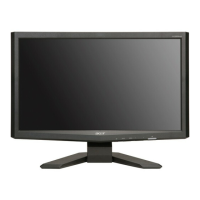
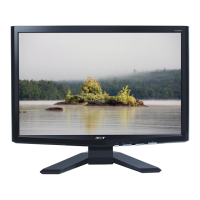
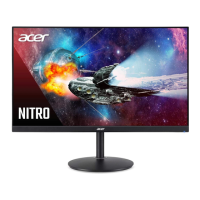
This document describes the Acer X193HQL LCD monitor, providing detailed information for maintenance and service.
The Acer X193HQL is an 18.5-inch wide, 24-bit color TFT LCD monitor designed to support a resolution of up to 1366 x 768. It features a VGA input and is compliant with VESA specifications for smart power management. The monitor incorporates DDC/CI (Display Data Channel/Command Interface) functionality, enabling communication with a PC via Acer ADM DDC/CI software. Additionally, it includes an ACM (Adaptive Contrast Management) function to enhance the contrast ratio. The monitor also offers an OSD (On-Screen Display) Menu for users to control adjustable items and access information.
Important Technical Specifications:
- Display: 18.5-inch Wide, 24-bit color TFT LCD panel.
- Resolution: Maximum supported resolution is 1366 (H) x 768 (V) at 60Hz.
- Pixel Pitch: 0.3(H) x 0.3(W) mm (per one triad).
- Display Area: 409.8(H) x 230.4(V) mm.
- Physical Size: 430.4(H) x 254.6(V) x 9.9(D) mm.
- Weight: 1330g (Typ.) for the panel.
- Technology: TN type.
- Support Color: 16.7 Million colors (6 bit + HiFRC).
- Viewing Angle:
- Horizontal (Right/Left): 75 degrees (CR = 10).
- Vertical (Up/Down): 70 degrees (CR = 10).
- Contrast Ratio: 1000:1 (typ.), 600:1 (min) at 50% contrast, 100% brightness, User preset color.
- Luminance: 250 cd/m² (typ.), 200 cd/m² (min) at 50% contrast, 100% brightness, User preset color.
- Response Time: 5 ms (typ.) for Rising Time, 1.4 ms for Falling Time, 5 ms for Rising + Falling.
- Scan Range:
- Horizontal: 31-80KHz.
- Vertical: 55-76 Hz.
- Input Power: AC power input: 90-264 Volts, 47-63 Hz.
- Power Consumption: 31W (Max).
- DPMS Supported: Yes, <2W.
- LED Indicator: Blue/Amber for power status.
- OSD: Supported for control and information, multi-language support for EMEA and Non-EMEA regions.
- Buttons: 6 buttons, including one for monitor power on/off.
- Scaling Function: Supported.
- Auto Adjustment: Supported ("Auto-Key" function).
- DDC Function: Supported (EDID ver. 1.3, DDC2B).
- DDC-CI Support: Version 1.1 or later (DDC-CI).
- Audio: Audio speakers supported, Audio Jack (input connector) supported (Line-in connector). Earphone Jack and Microphone functions are not supported.
- Mechanical Design: Tilt base design (from -5 to +23 degrees), VESA wall mounting design. Mechanical Rotate design is not supported.
- Environmental:
- Operating Temperature: 0 ~ +40 °C.
- Non-operating Temperature: -20 ~ +60 °C.
- Operating Humidity: 10 ~ 90% (Non-condensing).
- Non-operating Humidity: 10 ~ 90% (Non-condensing).
- Operating Altitude: 0 ~ 3048m (10,000ft) (Without packing).
- Non-operating Altitude: 0 ~ 12,192m (40,000ft) (With packing).
- Acoustical Noise: ≤ 22 dB/A at 30 cm distance.
- Reliability (MTBF): Bellcore Relex 7.6: >50000 hrs, 40 °C; 25000 hrs.
- CCFL Lifetime: At 25±2 °C, under 7.0mA: 40,000 Hours (min). Note: CCFL lifetime is determined as the time at which brightness of lamp is 50%. The typical lifetime of CCFL is on the condition at 7.0mA lamp current.
Usage Features:
The monitor offers various user controls and OSD menu options for customization:
- eColor Management: Provides different display modes such as User mode (user-defined settings), Text mode (optimal for reading), Standard mode (default settings), Graphic mode (enhances colors), and Movie mode (vibrant colors with sharp detail).
- Standard OSD Menu: Includes controls for Brightness, Contrast, Phase/Clock Pulse, Horizontal/Vertical position, Color temperature (Cool, Warm, User), and Language selection.
- Input Selection: Allows selection between analog (D-Sub) and digital (DVI) inputs (for Dual-Input models).
- DDC/CI: Option to turn ON/OFF DDC/CI support.
- Information: Displays current resolution, H/V frequency, and input port timing.
- Reset: Clears old auto-configuration settings and resets color temperature to Cool.
- Exit: Saves user adjustments and closes the OSD.
- Hot Keys: Dedicated hot keys for Auto adjustment, Contrast, Volume, Input Select, and Mode.
Maintenance Features:
This manual provides comprehensive information for maintenance and service, including:
- Safety Notice: Emphasizes the importance of a dry and clean working environment, ensuring safety for others, using proper safety devices and approved tools, disconnecting power before opening the cabinet, following ESD safety procedures, and proper battery handling/disposal.
- RoHS Compliance: Details requirements for replacement parts to be RoHS compliant if original parts were.
- Disassembly/Assembly Procedures: Step-by-step instructions with pictures for disassembling and assembling the monitor, including specific tools and materials required (press-fixture, working table, screw-driver, knife, gloves, cleaning cloth, ESD protection). It highlights circuit boards >10 cm² that need to be detached and disposed of according to local regulations.
- Level 1 Cosmetic/Appearance/Alignment Service:
- Timing Adjustment: Procedure for setting up input timing, entering factory mode, enabling burn-in mode, and performing white balance adjustment.
- Color Adjustment: Instructions for setting up input timing, entering factory mode, confirming auto color balance adjustment, measuring color temperature, and adjusting RED, GREEN, BLUE values.
- Software/Firmware Upgrade Process: Detailed steps for upgrading firmware using an ISP board, including software installation, selecting communication settings, loading firmware files, and executing the upgrade.
- EDID Upgrade Procedure: Steps for upgrading EDID using the EDID Tools software, including selecting EDID type (VGA or HDMI), loading files, writing, and reading EDID to confirm success.
- OSD Operation Guide: Explains the functionality of the OSD menu and how to navigate it.
- Level 2 Circuit Board and Standard Parts Replacement:
- Troubleshooting Guide: Flowcharts for diagnosing common issues such as "No Display or display is unstable," "Check Control Board," "Check Scalar," "Check LCD Module," "Power Board no work," and "Audio Function." These guides direct technicians to check specific components and procedures.
- Circuit Operation Theory: Provides block diagrams and explanations of the main body components (LCD module, power board, control board, interface board) and their functions, including the scaling IC (Realtek2525LH) and EEPROM.
- Spare Parts List: A comprehensive list of replacement parts with pictures, categories, descriptions, and Acer part numbers for easy identification and ordering.
- Screw List/Torque: Specifies screw types, descriptions, material, torque values, and hole sizes for various components, ensuring proper assembly.
- Physical Dimension Front View and Side View: Diagrams illustrating the physical dimensions and component layout.
- LED Driver, Power Board, and Interface Board Schematics: Detailed circuit diagrams for these key components to aid in advanced troubleshooting and repair.
The manual emphasizes that only trained service personnel familiar with Acer products should perform service or maintenance and must read the "Safety Note" before any work.

 Need help?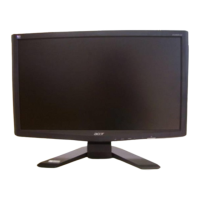

 To Next Page
 General