22
Information
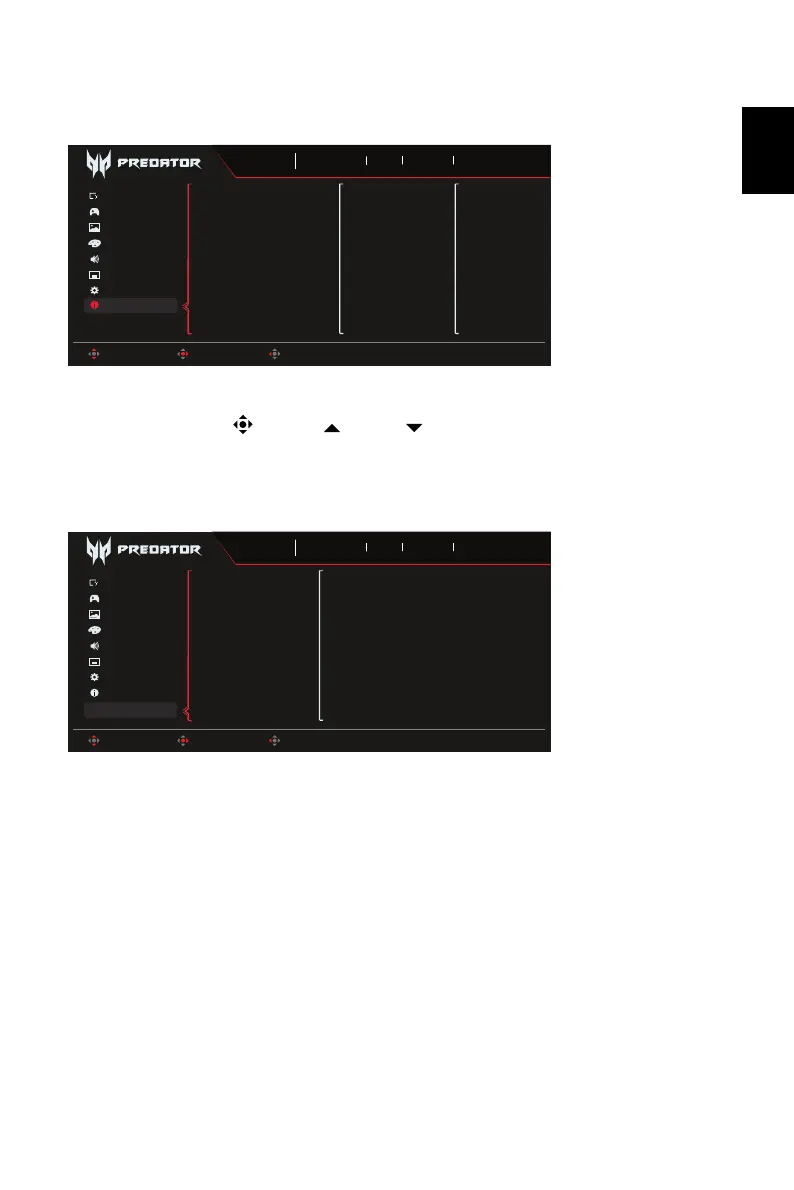
1. Press the MENU key to open the OSD.
2. Toggle the joystick to the up or down to select Information Page to view the
basic information for your monitor and current input.
3. Reset All Settings: Reset the custom color settings to factory defaults.
Save Setting to...(User mode only)
1. Press the MENU key to open the OSD.
2. Using the button, select "Save Setting to..." from the OSD. Then select the
preferred mode.
3. Save Setting to Game mode: There are three user-defined profiles available (Action,
Racing and Sports). Save your customized settings to the Game mode in order to
implement those settings automatically when you select it afterwards.
Game Assistant
OSD
Audio
Gaming
System
Main Source
Sports
Mode
3840X2160
Resolution
240
Hz
DP ALT
Input
On
FreeSync Premium
Move Enter Exit
Picture
Color
Information
DP ALT
Resolution
3840X2160
H/V Frequency
H:89KHz V:60Hz
Mode
SDR Normal
Series Number
MMT J8EE001236000013900
Reset All Settings
Game Assistant
OSD
Audio
Gaming
System
Game mode:Action
Game mode:Racing
Game mode:Sports
User
Mode
3840X2160
Resolution
240
Hz
DP ALT
Input
On
FreeSync Premium
Move Enter Back
Picture
Color
Information
Save Settings to…



 To Next Page