21
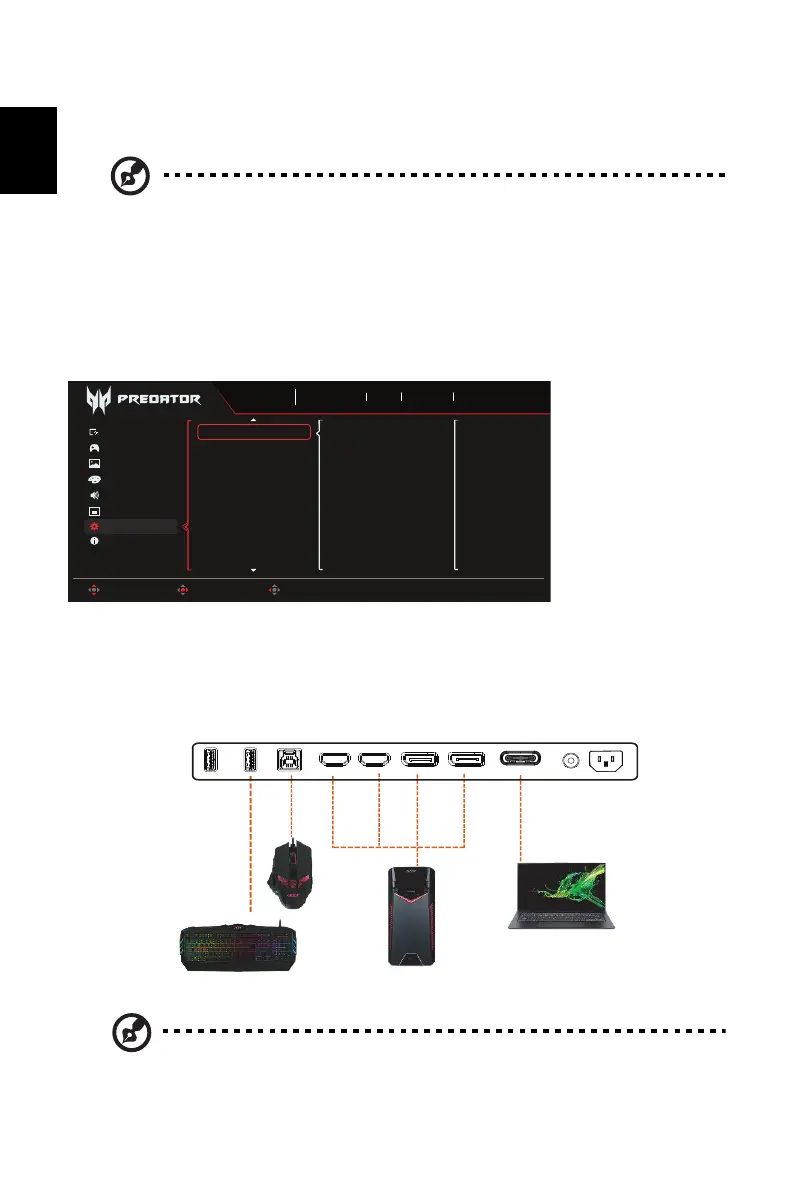
16. Power-off USB Charge: Select "On" to supply power to the USB port and select "Off" to
turn on DC off/Power saving mode.
Setting the KVM
1. You can follow below instruction to set up KVM for your monitor:
• Connect Type-C/USB-B to your computer
• Select Type-C/USB-B of USB Port Select in the OSD
• Suggest setup:
Note: When connecting two computers to the monitor, configure the USB
settings from the OSD menu to share a single set of keyboard and mouse
connected to the monitor between two computers.
Note: 1. To comply with international energy standards, this display is currently
set to power saving mode, which disables certain functions when
display is put to sleep (standby) and has power off (DC off) status.
2. Switching "Power-off USB Charge" to "On" enables all display
functions and may consume more power.
3. The USB port must be connected according to this picture before it
can be used for service. (For example, read Mac Address/SN)
Game Assistant
OSD
Information
Audio
Color
Picture
Gaming
System
Off
On
Power-Off
USB Charge
Sports
Mode
3840X2160
Resolution
240
Hz
DP ALT
Input
On
FreeSync Premium
Move Enter Back
USB Port Select
AUDIOHDMI2 HDMI1 DP ALTDP2USB-A
DC
USB-A USB-B
USB-A to keyboard/mouse USB-B/DP/HDMI to PC
Type-C to laptop
DP1



 To Next Page