4
ACHI
®
IR6500 and IR6000 comparison
1Temperature Sensor
IR6000: probe-type sensor
IR6500 :Soft OMEGA
Thermocouple Wire
OMEGA
Thermocouple Wire is more accurate, and more flexible to locate on main
boards.
CAUTION: the thermocouple wire should be placed in the right position while heating,
to avoid top heater get burned because the top temperature out of control.
2. Bottom heating panel
IR6000: nets bareness type
IR6500: closed panel
Closed panel is safer and can be cleaned.
CAUTION:
You cannot clean the
panel until the high temperature cooling down to room
temperature.
3Power Switch
IR6000: common button switch
IR6500: safe air-break switch
Safe air-break switch is safer and offer overload/ short circuit protection.
4Connector:
IR6000, RS232 connector
IR6500, USB connector
USB connector is more convenient and support hot swappable.
CAUTION: Need to install the USB interface driver in the CD.
5Bottom Heating Controller
IR6000: CH6 controller
IR6500: 8000 controller
8000 controllertemperature is more accurate, and temperature setting is much more easy.
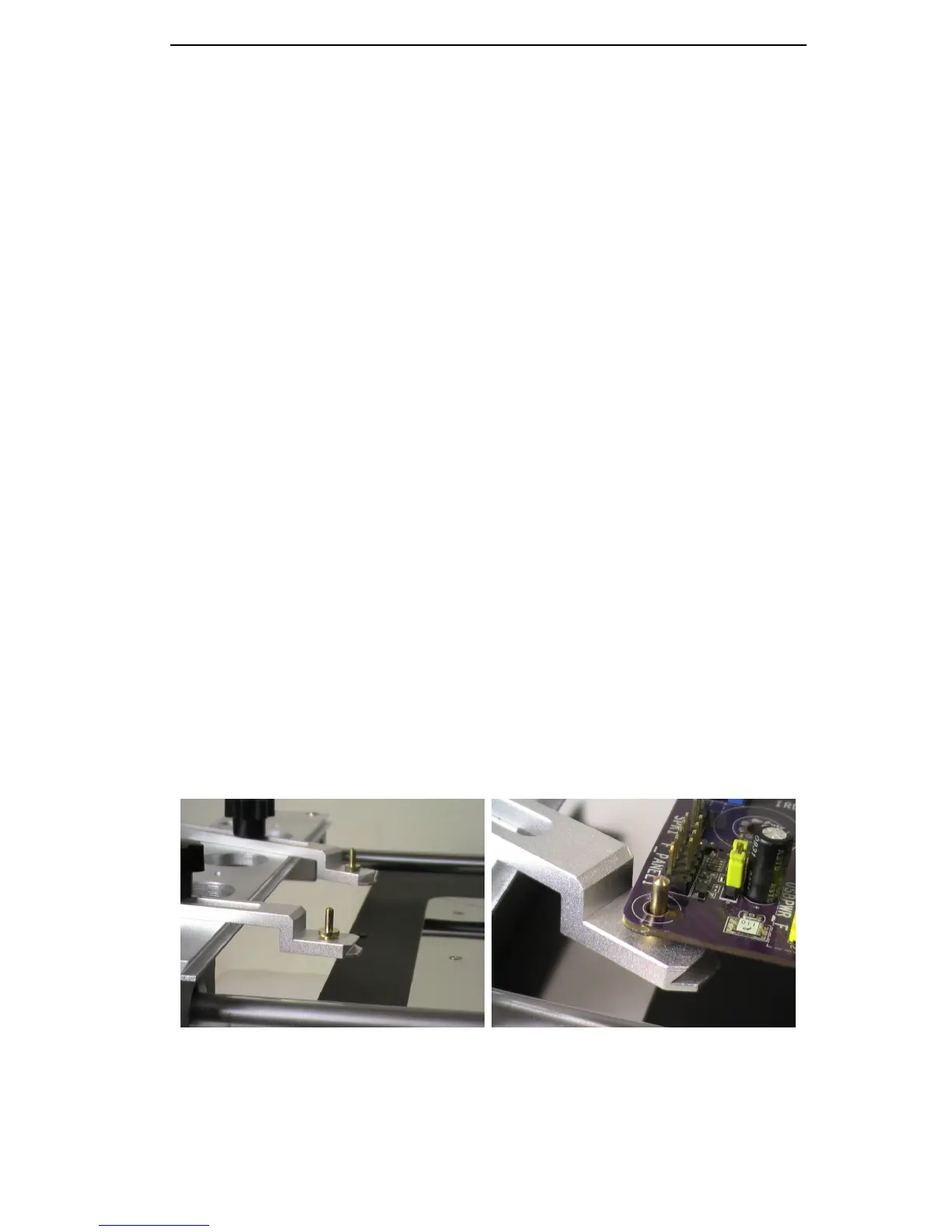
6PCB Jig
IR6000 :standard jig
IR6500 :standard jig+
4 pcs abnormity pole
The abnormity pole is more convenient to fixture irregular boardand can use transverse
tension to prevent motherboard deformation.


 To Next Page