Aclas Pty Ltd Tel: (07) 3277 8989 http://www.aclas.com.au 6-6
ACLAS CR35 Basic Functions
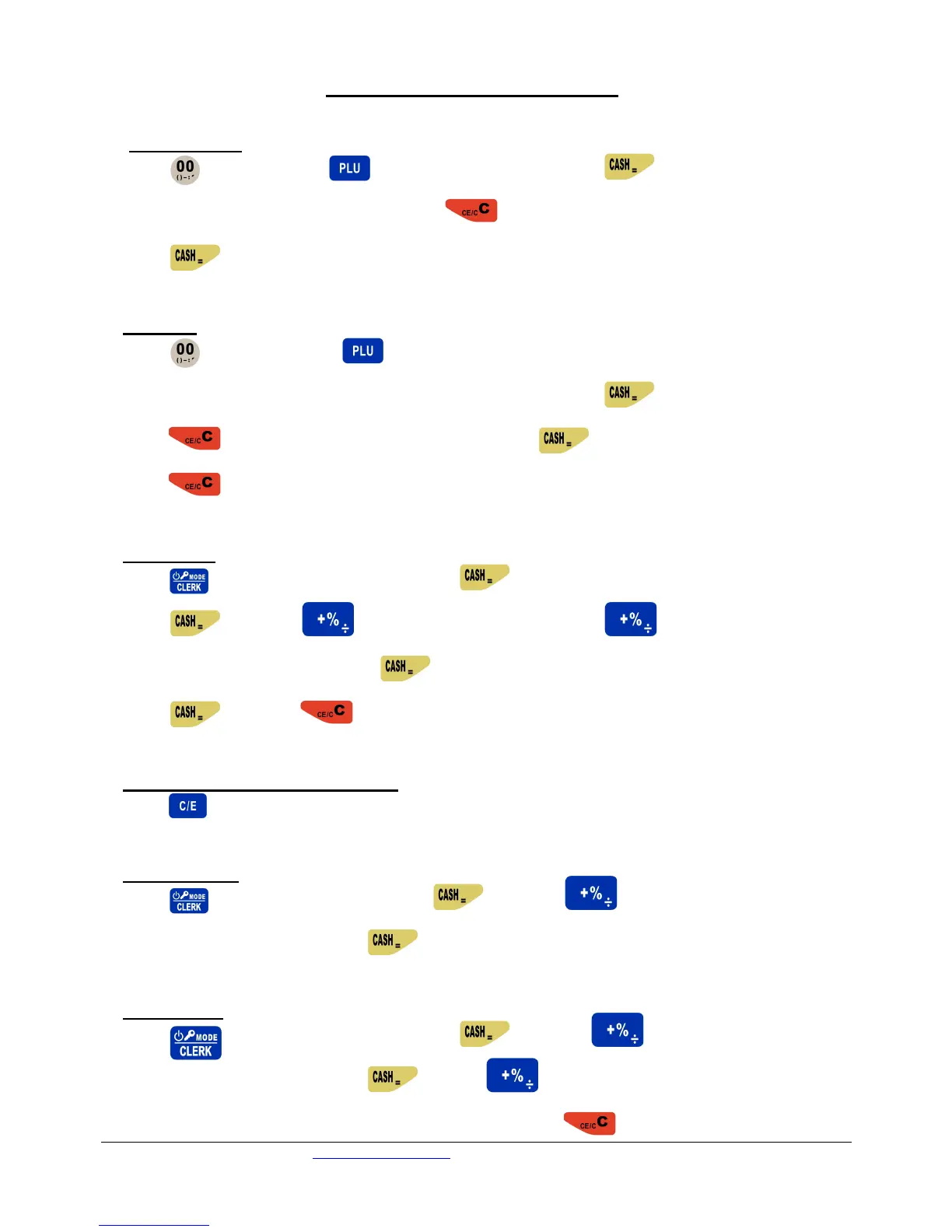
1. Change Price
Press twice press type PLU number press twice
Enter new price enter until it beeps press Enter department number (1-8)
Press until receipt prints
2. Add PLU
Press twice, then press Type new PLU number
Use keys to enter wording (product description) Enter price Press until beeps
Press Enter department number (1-8) Press until receipt prints
Press to finish
3. Delete PLU
Press to change to set mode Press , Should display “Basic Set”
Press Press , Should display “PLU Set” Press again,
Should display “Delete PLU” Press Enter the PLU number to be deleted
Press Press to finish
4. Change the font to Capital letters
Press
5. Print PLU List
Press to change to X-Mode Press Press FOUR times
Should display “PLU Stock” Press Receipt will print
6. Change title
Press to change to set mode Press Press FIVE times
Should display “Receipt Set” Press Press THREE times, Should
display “Head Message Input (1-5)” Enter new wording Press to finish


 To Previous Page