Need help?
Do you have a question about the ACLAS CR35(B) and is the answer not in the manual?
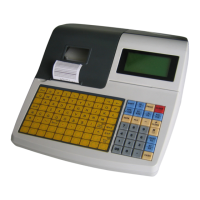
Illustrates the physical arrangement and labeling of keys on the cash register keyboard.
Explains the primary function of each key, such as feeding paper, mode selection, and calculations.
Details the method for inputting letters and numbers, including case changes and width adjustments.
Guides on how to log in as an operator and the automatic logout procedure during Z mode reporting.
Instructions for configuring header and footer messages displayed on receipts and reports.
Procedures for setting up Product Look-Up (PLU) codes and department numbers.
Steps to correctly set the current date and time on the cash register.
Options for configuring the receipt printer, including printing duplicate copies.
Overview of the six operational modes: REG, X REPORT, Z REPORT, SET, SYSTEM SET, OFF ECR, AC LOSS.
Methods for conducting sales transactions using pre-set or key-in prices for departments.
Process for selling items using Product Look-Up (PLU) codes, including quantity sales.
How to apply percentage-based discounts to individual items or total sales amounts.
Instructions for applying fixed monetary amount discounts to sales.
Steps for cancelling the last item, selected items, or all items in a transaction.
Procedure for processing customer returns and exiting return mode.
How to add cash to the drawer for non-transactional purposes (Receive Amount).
How to take cash out of the drawer for non-transactional purposes (Pay Out).
Instructions for processing EFTPOS payments and confirming transactions.
Method to save current transactions for later retrieval by receipt number.
Instructions on how to print X or Z reports, detailing their differences and purpose.
Troubleshooting guide for common errors like Error 19, Error 2, and low battery (LLB).
Steps to log in, access system settings, and authorize clerks with specific functions.
Process for modifying the price of a PLU item or department.
Steps to add new items to the Product Look-Up database with descriptions and prices.
Procedure for removing items from the Product Look-Up database.
How to switch the input font to capital letters using the C/E key.
Instructions for printing a list of all programmed Product Look-Up items.
Guide on changing header messages and receipt titles.
 General
| Model | CR35(B) |
|---|---|
| Type | Cash Register |
| Keyboard | 48 keys |
| Printer | Thermal printer |
| Paper width | 58mm |
| Operating temperature | 0°C to 40°C |
| Departments | 99 |
| Display_Customer | 8-digit LED |
| Interface | USB, RS-232 |
| Display_Operator | 128x64 dot matrix LCD |
| Printing speed | 75mm/s |

 To Next Page