6
3.3 Connecting the Power Supply
※ CAUTIONS
When connect the power supply to the printer, make sure first connect the power supply
cable to the printer, then connect the power supply cable to the power supply. When
disconnecting, the order is reverse. Otherwise you may damage the power supply or the
printer.
If the power supply’s rated voltage and your outlet’s voltage do not match, contact your
dealer for assistance. Do not plug in the power cord. Otherwise, you may damage the power
supply or the printer.
(1) When not using the printer, make sure that the printer’s power switch is turned off, and the
power supply’s power cord is unplugged from the electrical outlet.
(2) Make sure the switch is off when plug or unplug the power.
(3) Check the label on the power supply to make sure that the voltage required by the power
supply matches that of your electrical outlet.
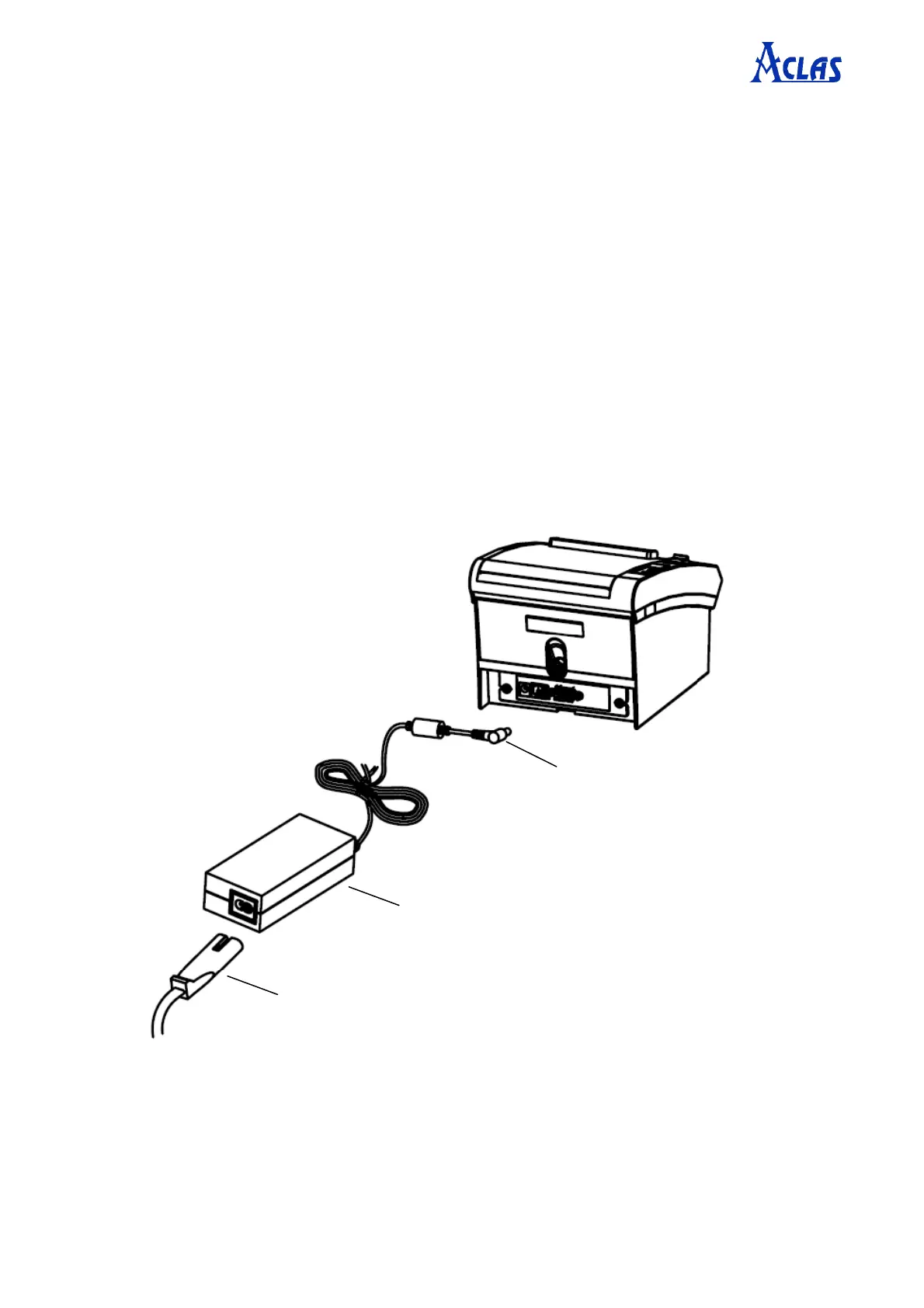
(4) Plug in the power supply’s cable as picture 7.
2. Power adapter connects to the power supply cable.
1. Power adapter connects to the
power port of the printer.
3. Power supply cable connects to the power supply.


 To Next Page