Operation
Operating temperature range is: 14°F to 104°F (–10°C to 40°C)
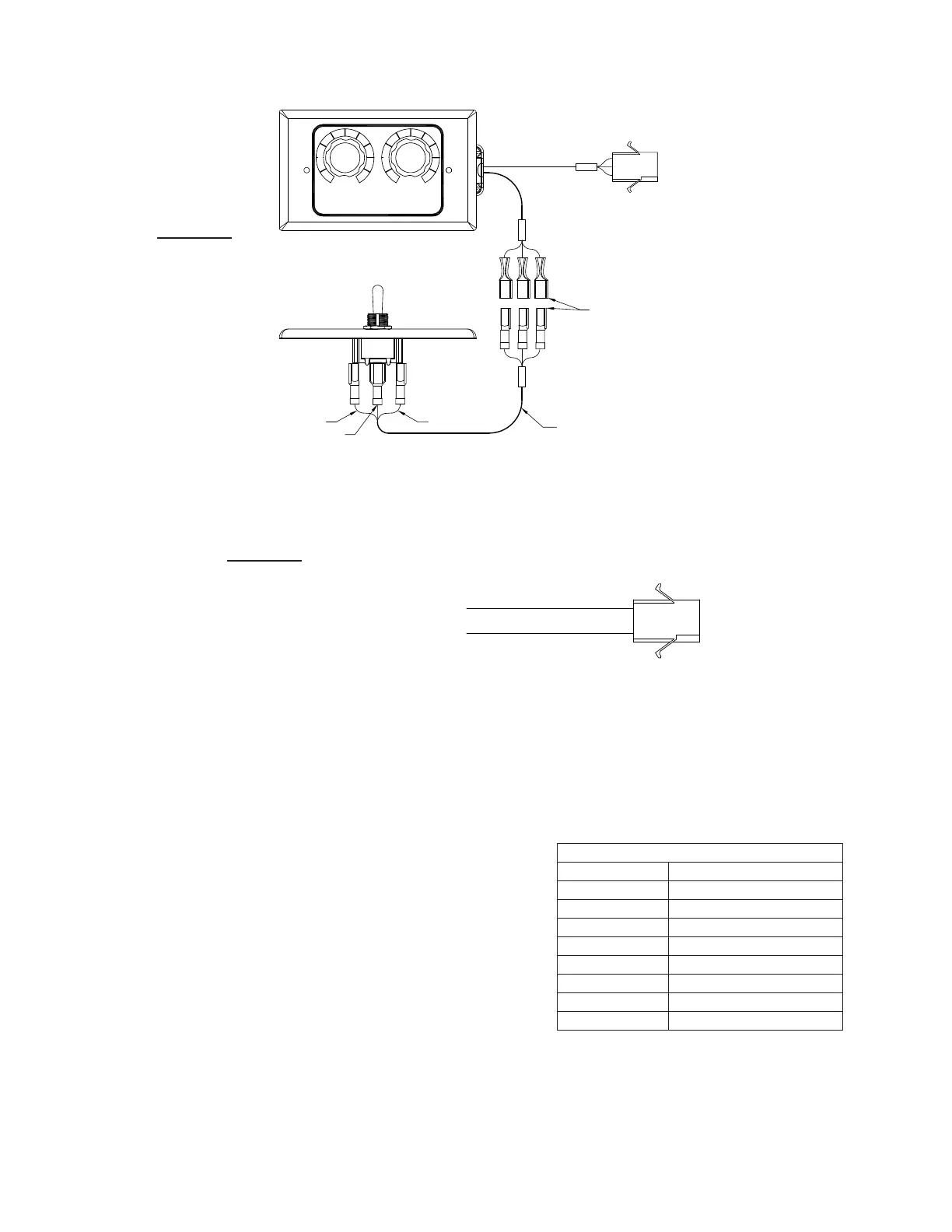
The EBSM motor oers various control options. Follow the correct wir-
ing diagram based on the control option desired.
1. Energize motor and check for proper rotation. Rotation should
match wheel rotation as noted in fans instruction manual and
rotation arrow located on fan.
2. Adjust motor speed to verify the proper motor speed controller
functionality.
Troubleshooting
Mounted Speed Control Dial
1. Check voltage to ensure the motor is receiving the correct control
input.
2. Check voltage at the remote dial. 24VAC should be present across
the 24V and COM terminals. 0-10VDC should be present across
the 0-10V and COM terminals.
3. Verify all of the connections inside the fan and make certain that
they are secure.
Fault Indication
A red LED on the control board provides fault indication. During a fault,
this LED will blink a specic number of times to identify the fault that
has occurred.
The table below describes these fault indications.
Maintenance
EBSM motors use brushless technology with sealed bearings so no
maintenance is required other than keeping any accumulated debris
from collecting on the motor.
Building Supplied Controller Harness
White - Common
Red - 0-10 VDC
Page 14
FIGURE 20
Fault Indications
No. Blinks Indicated Fault
2 Over current
3 Over voltage
4 Under voltage
5 Communication Error
6 Sync Loss
7 Spin Fault
8 3 Sec/60 sec overload
9 Motor over-temperature
Dual Speed Potentiometer
Speed Select Control
A
Black
Red
White
Wired in
Field
B
Red to Red
White to White
Black to Black
Potentiometers and
speed selector can
be mounted up to
100 ft from fan.
A
Variable
1
2
3
4
5 6
7
8
9
10
1
2
3
4
5 6
7
8
9
10
Speed
B
FIGURE 19


 To Next Page