5-
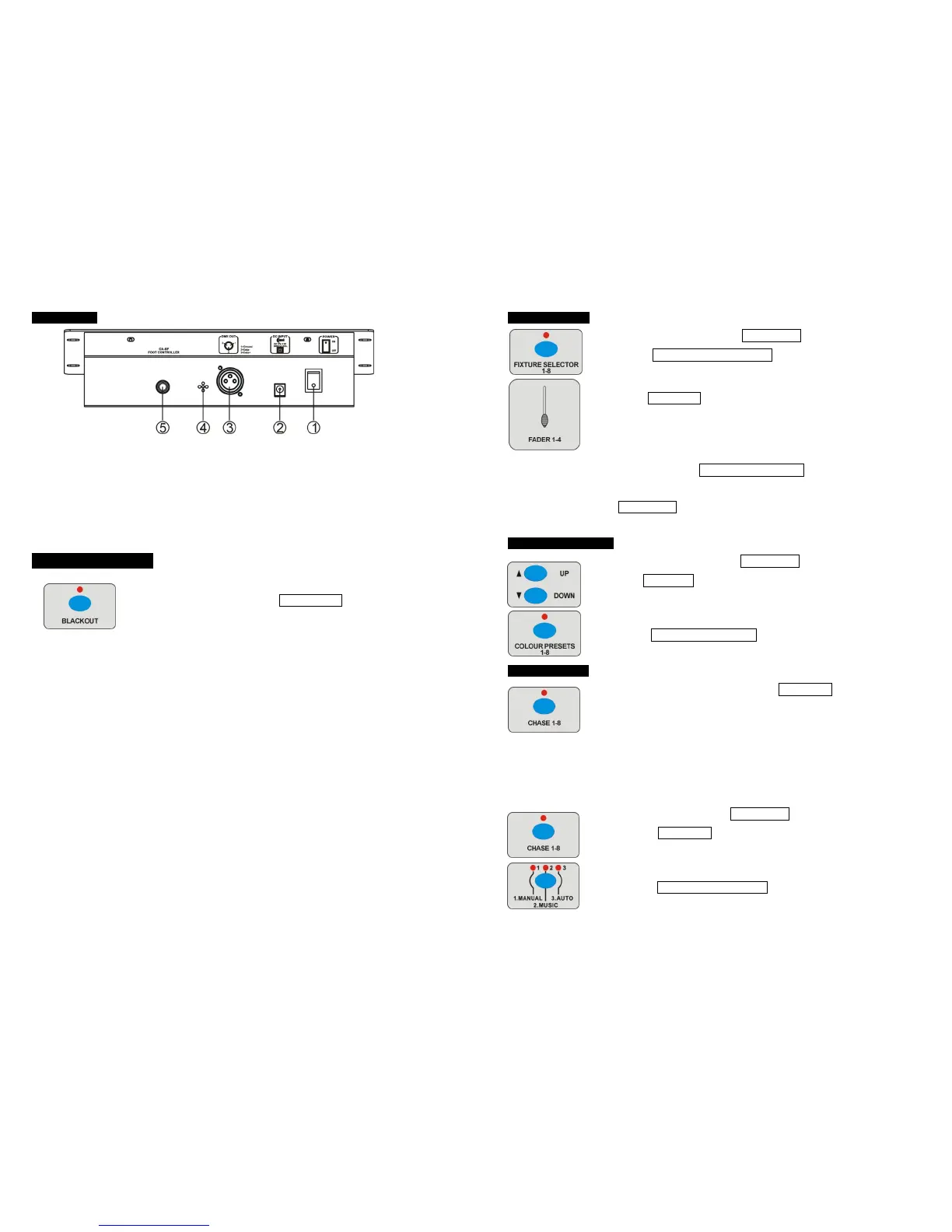
3.2 Rear View
① POWER SWITCH
Turn on/off the power
② POWER IN
9-12DC
③ DMX Out
DMX-512 output
④ MICROPHONE
Receive music for running chase in sound mode
⑤ CA-8F FOOT CONTROLLER
CA-8F connector
4. Operation Guide
Turn on the power, the controller access to the last control status of
LED-0408 or CA-8F. Pressing BLACK OUT button to switch to
LED-0408 or CA-8F control. Follow functions will be available under
LED-0408 controlling.
1、CP1.1-CP4.8
colour preset, 4 banks, each bank with 8 presets
2、CAS1-CAS8
chase
3、ST01-ST32
chase step
4、D000-D255
data
5、F01.0-F20.0
strobe speed
6、0.1 /08.8
21.30 /60.00
chase speed (the time interval of two steps)
(1) one digital after radix point: the unit is second
(2) two digital after radix point: the digital before radix
point is minutes, and the digital after radix point is
seconds.
7、P000---P100
fade time: the percent of the chase speed
8、M001-M100
sound sensitivity
9、L001-L200
loop
10、NULL
null
10-
4.8 Manual Mode
1 Insure the LED above the BLACK OUT button is off.
2 Press FIXTURE SELECTOR 1-8 button to choose units desired.
3 Push FADER 1-4 to adjust the effect.
ATTENTION: The LED which besides FIXTURE SELECTOR button on indicating the
correspond units could be control by faders, you can delete the setting that you do not
want to store by press DEL/CLEAR button.
4.9 Run Colour preset
1 Insure the LED above the BLACK OUT is off.
2 Use UP/DOWN button to choose BANK 1-4 which store the
COLOUR PRESET desired.
3 Press COLOUR PRESET 1-8 button to run COLOUR PRESET.
4.10 Run CHASE
Be sure there are CHASES stored. Press CHASE 1-8 buttons to
run CHASE directly, the correspond LED will be on. If you choose
more than one CHASE at a time, then the first correspond LED will be on
and others will blinking (1Hz), all the CHASE will circuit run one by one.
There are three modes: Manual Mode, Sound Mode and Auto mode.
A. Manual mode
1 Insure the LED above BLACK OUT button is off.
2 Press CHASE 1-8 button to run the CHASE, the display will
show the present CHASE.
3 Press MANUAL/MUSIC/AUTO button to choose Manual Mode,











 To Next Page