5
Charging
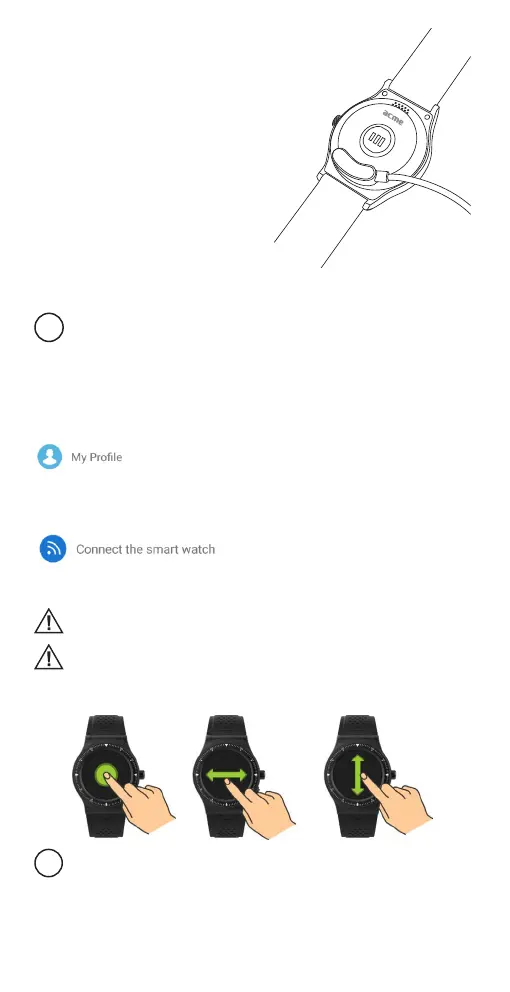
1. Attach the magnetic charging cable to the
watch. Make sure the charging pins of the
cable are touching the charging contacts of
the smartwatch.
2. Connect the charging cable to a powered
USB port – it can be a USB wall charger,
computer USB port, power bank, etc.
3. It takes up to 2 hours to fully charge the
smartwatch.
Pairing with a smartphone
This device is designed to work with smartphones, supporting Bluetooth 4.0 or
higher versions. Be sure that your smartphone’s Bluetooth hardware and
software are working properly; otherwise it may not be able to pair with the
smartwatch or the connection may be unstable.
1. Download OrunningSW application from App Store or Google Play to your
smartphone. (Accept all security requests of the application.)
2. Enable Bluetooth on your smartphone. (Be sure that Bluetooth is also enabled on the
smartwatch.)
3. Open the application and allow all security requests of the application.
4. Gotothesettingssectionoftheapplicationandcreateyourpersonalprole.
5. Tap “Connect the smartwatch” in the settings section, follow on-screen instructions
and select the name of the smartwatch in the list of found devices. Now your data
andnoticationscanbesynced.In casethesmartwatchisnotfound– restartthe
application and the smartwatch by turning it o and on.
6. An IPhone user has to open the Bluetooth menu of the phone and perform pairing
with the smartwatch to enable full functionality of the smartwatch.
Some functionality may not work properly or work dierently depending on the
smartphone model and software. Such issues not necessarily mean the
malfunctioning of the smartwatch.
Time in the smartwatch will be set automatically after synchronisation with a
smartphone.
Device controls
Power button – when pressed longer, this button performs power on/o
functions, and when pressed shortly, it performs the function of return to the
main watch screen.


 To Next Page