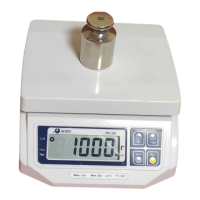
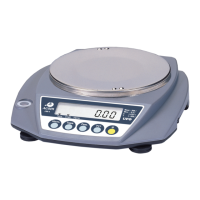
The Acom JW-1 is an advanced top-loading balance designed for precise weighing in various applications. It offers a range of capacities and graduations, making it suitable for tasks requiring high accuracy.
Function Description
The JW-1 balance is primarily used for weighing items, but it also supports parts counting and percentage weighing modes. It features a clear LCD display to show weight, count, or percentage, along with indicators for stability, zero, net weight, and battery status. The balance is designed for ease of use with dedicated function keys for zeroing, taring, mode selection, and setting parameters.
Important Technical Specifications
The JW-1 series comes in four models with varying capacities and graduations:
- JW-1-300 g: Maximum Capacity 300 g, Minimum Graduation 0.01 g
- JW-1-600 g: Maximum Capacity 600 g, Minimum Graduation 0.02 g
- JW-1-1500 g: Maximum Capacity 1,500 g, Minimum Graduation 0.05 g
- JW-1-3000 g: Maximum Capacity 3,000 g, Minimum Graduation 0.1 g
All models share the following specifications:
- Maximum Tare: Full Capacity
- External Resolution: 1/30,000
- A/D Conversion Rate: 3 Updates / second (adjustable)
- Units & Modes: Gram, piece, percent, carat, ounce, pound, pennyweight, grain, kilogram, and Trojan ounce.
- LCD Display: 6 Digits, 999999 max
- Platter Size: 123 mm (4.84") Diameter (for 300g & 600g models), 180 mm (7.09”) Diameter (for 1500g & 3000g models)
- Product Dimensions: Width: 275 mm (10.82”), Depth: 235 mm (9.25”), Height: 70 mm (2.75")
- Product Weight: 1.1 kg (2.4 lb)
- Power Requirements: Input: 120 Volts AC, @ 60 Hz; Output: 9 Volts DC, 300 mA
- Battery: 6 AA Cells (6 x 1.5 = 9 VDC)
- Operating Temperature: 10°C ~ 30°C (50°F ~ 86°F)
- Humidity: RH 35% ~ 85% (no condensation)
- Power Consumption: Approximately 1 Watt
Usage Features
The JW-1 balance offers several operational modes and features:
Simple Weighing:
- Ensure the balance is at ZERO and STABLE.
- Place the load on the platter.
- Read the weight once the STABLE indicator turns on.
- Remove the load.
Entering Tares:
- Ensure the balance is at ZERO and STABLE.
- Place the container on the platter.
- Press the TARE key after the STABLE indicator turns on.
- The display will show zero, and the NET, STABLE, and ZERO lamps will be on.
Removing Tares:
- Ensure the balance is at ZERO, STABLE, and NET.
- Remove the tared container.
- The display will show a negative weight.
- Press the TARE key to return to ZERO and STABLE.
Parts Counting:
- Press MODE until "pcs" is displayed.
- Ensure the balance is at ZERO and STABLE.
- Press SET. The display will show "SEL 10".
- Place a sample of 10 pieces on the platter and press SET.
- If the sample meets the minimum piece weight and sample weight criteria, the count will be displayed. Otherwise, the balance will prompt for 20, 50, or 100 pieces.
- Remove the sample, and if needed, tare a container before placing items to be counted.
Percentage Mode:
- Press MODE until "%" is displayed.
- Ensure the balance is at ZERO and STABLE.
- Press SET. The display will show "SAMPL".
- Place a sample load on the platter and press SET.
- If the sample meets the minimum percent weight or minimum percentage criteria, the percentage will be displayed. Otherwise, the balance will loop back to step 5.
- Remove the sample, and if needed, tare a container before placing items to be evaluated.
Settings Mode (User Parameters UP-1 to UP-4):
Accessed by holding the * key while turning the scale ON.
- UP-1 (Update Speed): Controls display update speed (0=fastest, 3=slowest).
- UP-2 (Weighing Mode): 1 for Average Weighing (for moving items like liquids/livestock), 0 for Normal Weighing.
- UP-3 (Auto-Zero Tracking): 1 to disable, 0 to enable. Disabling is useful for weighing items very near zero.
- UP-4 (RS-232 Mode): 1 for Handshake mode (data transmitted when polled), 0 for Stream mode (data transmitted automatically when stable).
Density Measurement Option:
The balance can be set up with a hook and platform to measure density using a specific formula. The manual illustrates the setup with a container of pure water.
Enable & Disable Weighing Units:
Allows users to customize which weighing units are available. This is done by holding the * key while turning the power switch ON, then navigating through the "St-mod" menu using SET and MODE keys to enable or disable specific units (g, Pcs, %, c.t., oz, lb, dwt, Gn, kg, toz, t).
Maintenance Features
Troubleshooting & Error Messages:
The balance provides error messages on its display to assist with troubleshooting:
- ZEro: Initial zero point failure. Solution: Turn scale on with nothing obstructing the platter, or ensure the platter is properly placed.
- EEP: E2PROM failure. Solution: Contact Service.
- AdC: A/D Converter failure. Solution: Contact Service.
- PArA: Lost memory. Solution: Possibly reprogram and recalibrate, or contact Service.
- BATT: Battery is low. Solution: Replace the batteries.
Calibration:
The JW-1 balance requires both Zero Calibrate and Span Calibrate, which are performed together.
- Turn the scale OFF and remove the platter.
- Locate and hold the CAL Switch (rear of platform) while turning the scale ON.
- Release the CAL Switch when "SPAn" is displayed.
- Replace the platter.
- Press the * key.
- After the STABLE lamp turns on, press the * key.
- The display will show "rERd" then "FULL".
- Press the * key.
- After the STABLE lamp turns on, place a mass weight exactly equal to the balance's capacity in grams on the platter.
- After the STABLE lamp turns on, press the * key.
- The display will show "rERd", then "End", and then "SELF".
- Remove the mass weight.
- Turn the scale OFF, then back ON.
- Note: If "HHHHHH" is displayed, the mass weight is too heavy, or the load cell may be overloaded/shock loaded. If "LLLLLL" is displayed, the mass weight is too light, or the scale may be mistreated.


 To Next Page
 General