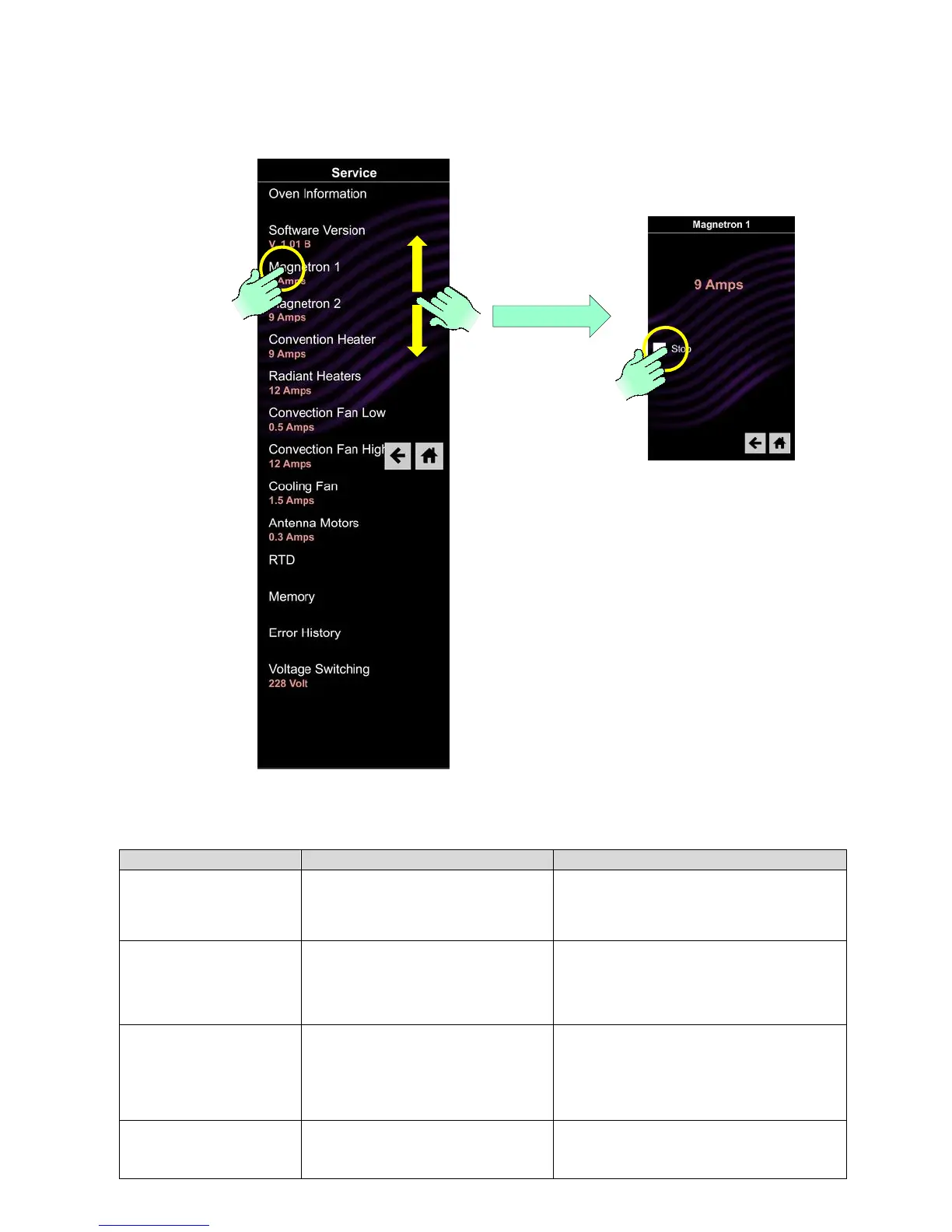
Once the Service Mode is initiated a menu of options and information is displayed. The menu screen can be
navigated by swiping up or down if needed. Some components can be activated from this menu – See
example of Magnetron 1 (Right Side) below, by touching start to start or stop to stop. Pressing the “back
arrow” will return back on screen. Pressing the “home” icon returns to opening screen.
Provide service provider with door
cycles and magnetron tube hours of
operation
Press and the following will display:
Door Cycles:
Tube Hours:
Displays the version of software and
firmware installed in the control
Press and the following will display:
SW:
EE:
App:
System can be started and stopped
by pressing the Start or Stop icon.
The current amperage being drawn by the
HV system. 5 -12amps is considered normal.
Look for consistent reading with Magnetron
2 and Convection Heater. This circuit is
protected by fuse F3
System can be started and stopped
by pressing the Start or Stop icon
The current amperage being drawn by the
HV system. 5 -12amps is considered normal.
Look for consistent reading with Magnetron





 To Next Page