ƶƴ
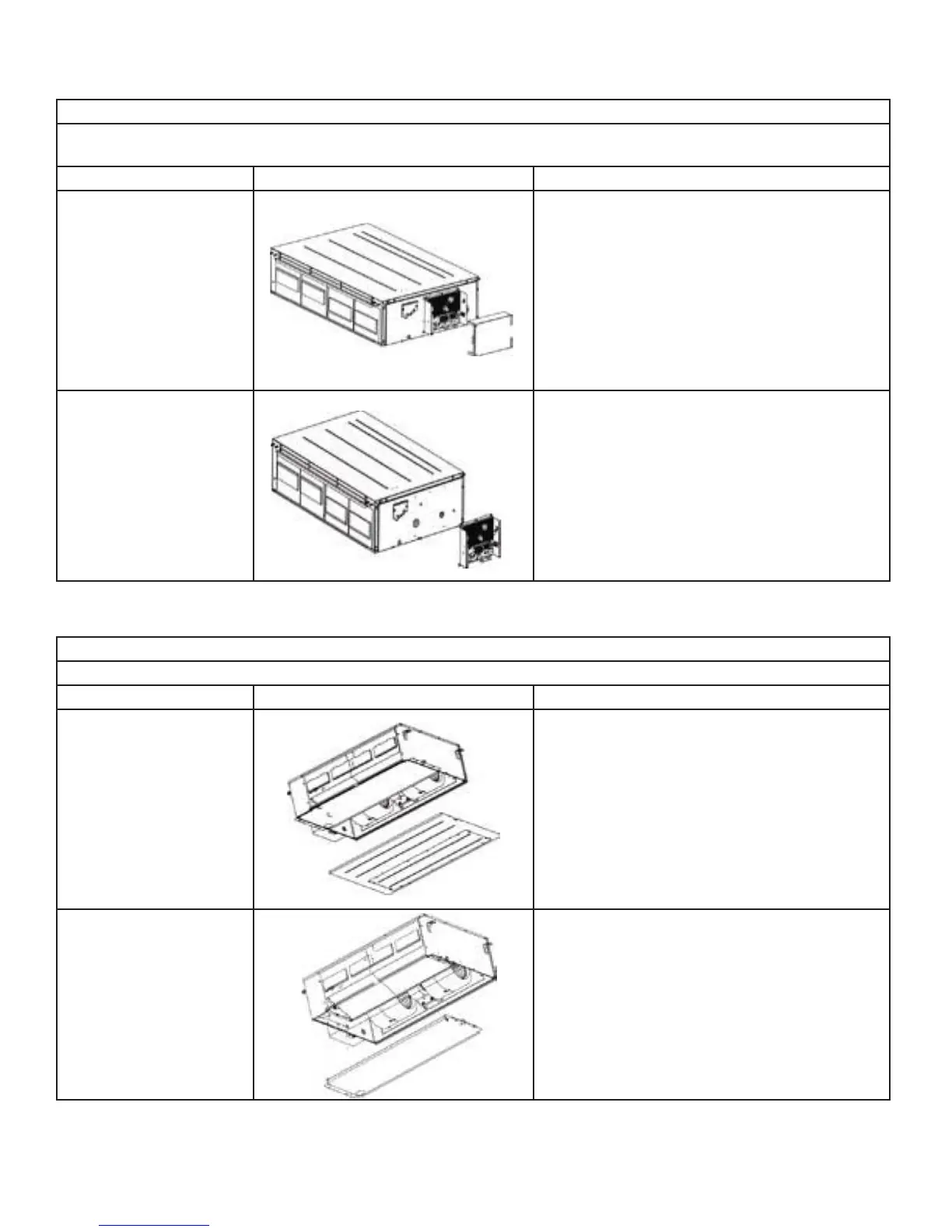
Disassembly of electrical parts box cover panel and electrical parts box
Remark: Make sure that the power supply is cut off before disassembling and protect all the parts during disassembly,
especially the electrical components. Do not dampen or hit them.
Step Illustration Handling Instruction
1. Disassembly of electric
box cover
Disassemble the screw according to the position
shown in the circle and the box and remove the
electric box in the direction of the arrow.
2. Disassembly of electric
parts box
Disassemble the fastening screw and remove the
electrical parts box. (As is shown in the graph,
there are 2 fastening screws in the circle and the
screws in the direction of arrow shall be disassem-
bled too.)
Disassembly of water-containing plate
Remark: Make sure that the power supply is cut off before disassembling and protect all the parts during disassembly.
Step Illustration Handling Instruction
1.Disassembly of cover
plate
Disassemble the fastening screws on the cover
plate and remove the cover plate. (As is shown
in the graph, circle represents 6 fastening screws
under the cover plate and the box represents two
fastening screws on water-containing plate sym-
metrically arranged both on left and right.)
2.Disassembly of wa-
ter-containing plate
Disassemble the fastening screws on the wa-
ter-containing plate, pull upward and remove the
water-containing plate. Disassembled water-con-
taining plate is shown in the graph.



 To Next Page