6 Quick Installation Guide
6
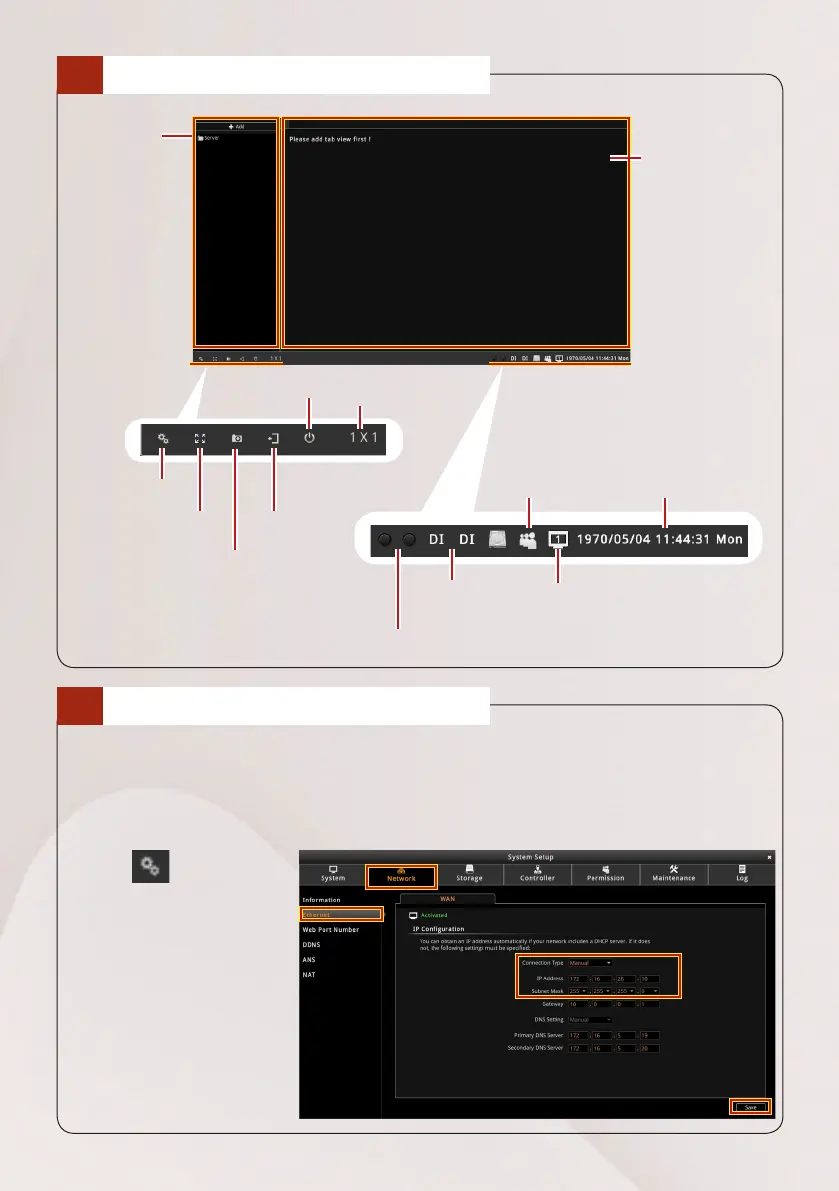
THE USER INTERFACE
7
CHANGE IP ADDRESS
If your network has a DHCP server, the device will obtain the IP address
automatically. In this case, skip to the next step to continue setting up your
device. If you want to assign a different static IP address, change the IP address
manually.
1. Click > Network >
Ethernet.
2. On Connection Type,
select Manual.
3. Set the IP address and
Subnet Mask.
4. Click Save.
Device
List
Live View
User System Date & Time
System Setup
Full Screen
Capture Screenshot
Logout
View Grid
DI1 and DI2 Status Indicators: Lights
green when DI1 or DI2 is active
LAN
Press to manually
trigger DI1 / DI2



 To Next Page