3
Display Symbols and Their Meaning
Your Acticare IC
6
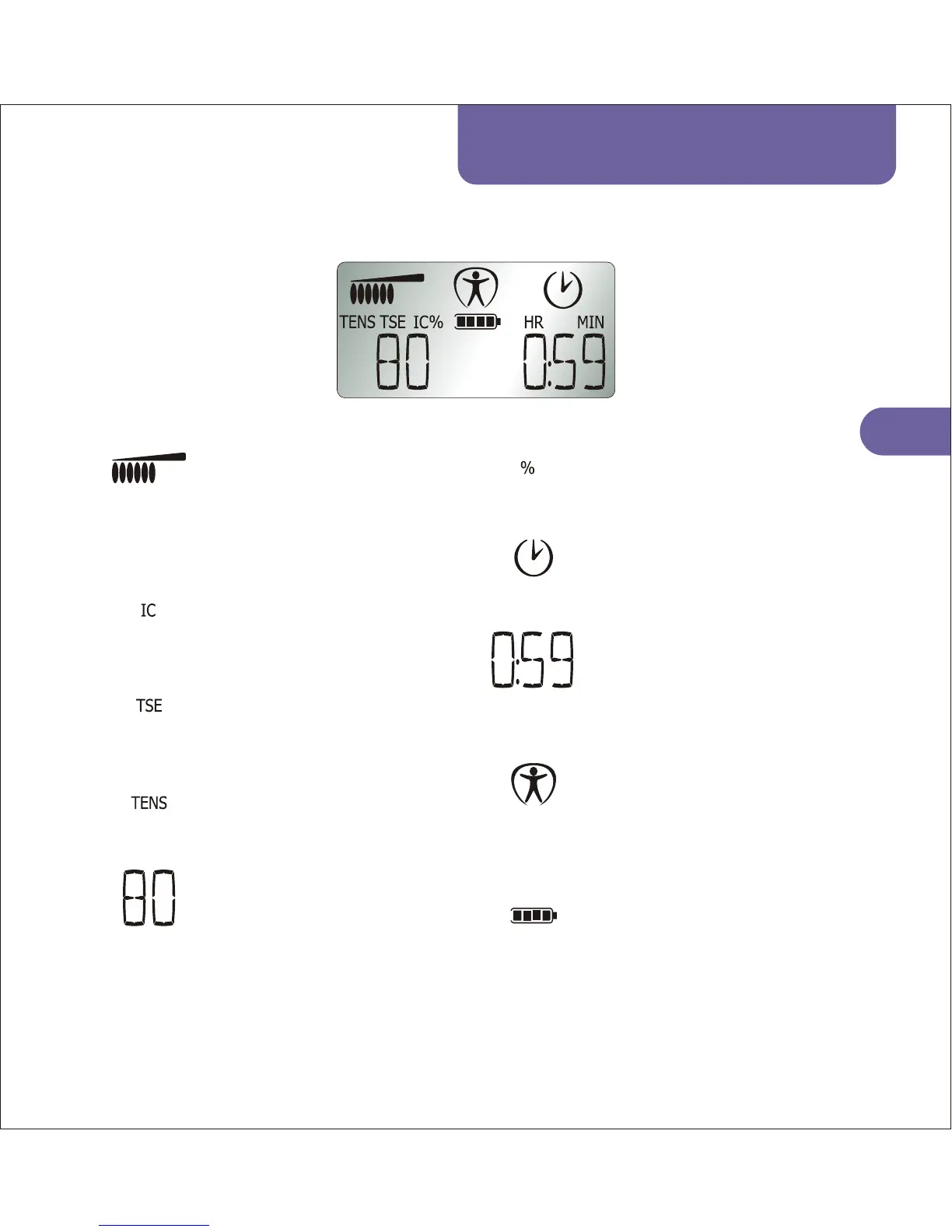
Person:
Indicates when treatment starts.
In TSE and TENS modes only,
flashes if electrodes are not
properly connected.
Clock:
Indicates that the treatment
timer is counting down.
Treatment timer:
Shows the remaining treatment
time in hours and minutes and in
seconds for the last minute of
treatment.
Battery:
Indicates the amount of charge
left in the batteries. Flashes
when charging.
Power Bar:
Shows the intensity setting on a
visual scale, each segment
represents 10% output. Top bar
flashes when power output is at
maximum safety current limit.
TSE Mode:
Indicates when the device is in
TSE mode.
IC Mode:
Indicates when the device is in
Interferential Current (IC) mode.
TENS Mode:
Indicates when the device is in
TENS mode.
Intensity setting:
In TSE/TENS mode:
In IC mode:
shows the
intensity (voltage) setting as a
percentage from 0% (off) to
100% (max).
shows the intensity
setting as 0-100mA peak into a
standard 500ohm load.
Percent Sign:
Indicates that the intensity
setting is in percent form.
Example Screen (Note: The TENS, TSE and IC symbols are never illuminated together).



 To Next Page