If you will not be using the unit for an extended period of time, please store it per the
following steps.
• Clean the filter mesh.
ATTENTION: The evaporator inside the machine has to be dried out before the unit is packed to
avoid component damage and molds. Unplug the unit and place it in a dry open area for a few days
to dry it out.
TIP: Another way to dry the unit is to set the humidity point higher than the ambient humidity to
force the fan to dry the evaporator for 30 minutes. The dehumidifying function will not work and the
fan can accelerate the drying process.
• Collect the power cord, bunch it, and hang it in the power cord pocket at the back of unit.
• Store the unit in a clean, dry environment.
MACHINE STORAGE
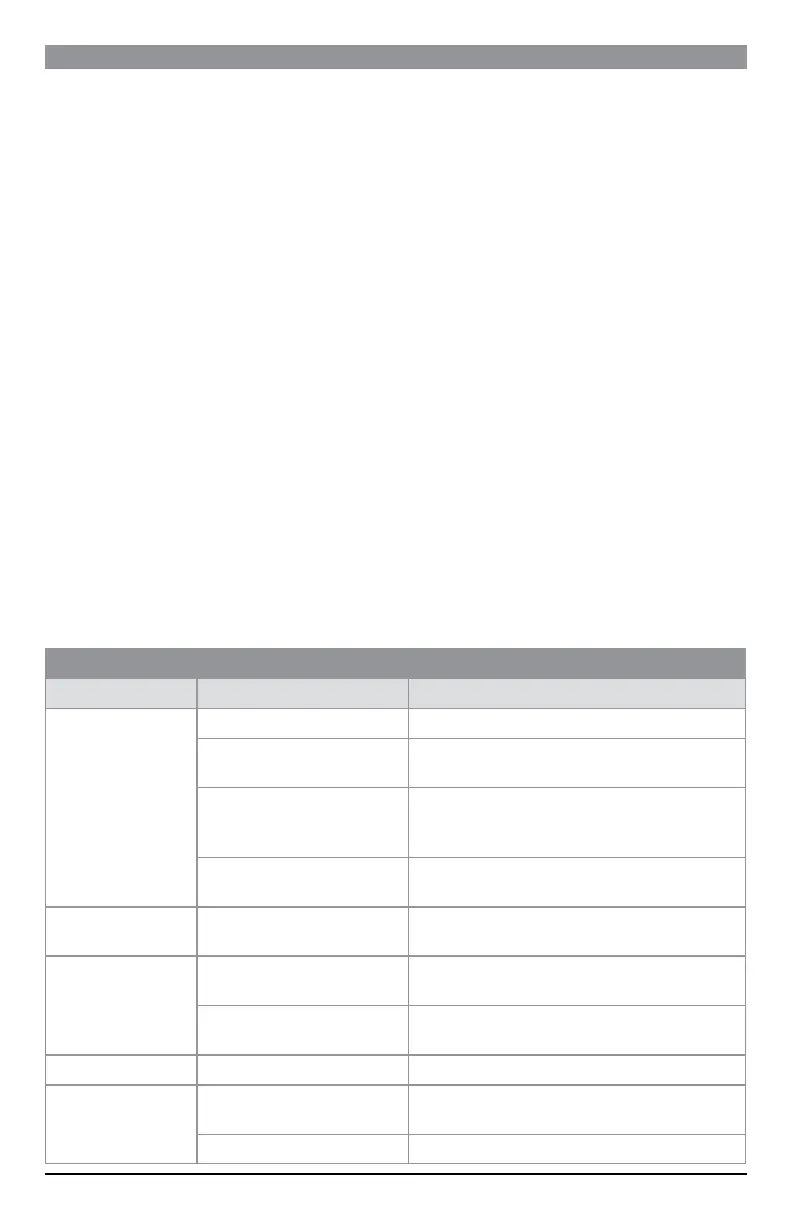
TROUBLESHOOTING
TROUBLE CAUSE SOLUTION
Machine does not run
Unit is not plugged in. Plug in the unit.
Ambient temperature is under 5 degrees
or above 35 degrees.
To protect the machine, use it only when ambient temperature is
between 5 and 35 degrees.
The humidity sensor is loose, wet or
defective; the screen will show “E5”.
Check the sensor connection. Use a blower to dry the humidity
sensor behind the front cover. If the machine still does not run,
contact your retailer to replace the sensor.
The temperature sensor is loose or
defective; the screen will show “E6”.
Check the sensor connection. Contact your retailer to replace the
sensor.
Machine runs but does
not dehumidify
The humidity set point is higher than the
ambient humidity.
Reset the humidity to a lower set point, or power off the machine if
the desired humidity level has been reached.
Reduced dehumidifier
capacity
Filter mesh is jammed. Clean the filter mesh according to manual.
Air-in and/or Air-out louvers are
jammed.
Clear the blockage from Air-in and/or Air-out louvers.
No air inlet Filter mesh or Air-in louver is jammed. Clean filter according to instructions or clean the louver blockage.
Loud Operation
Machine is situated on an incline or
decline slope.
Move to a level location.
Filter mesh is jammed. Clean filter mesh according to instructions.
11



 To Next Page