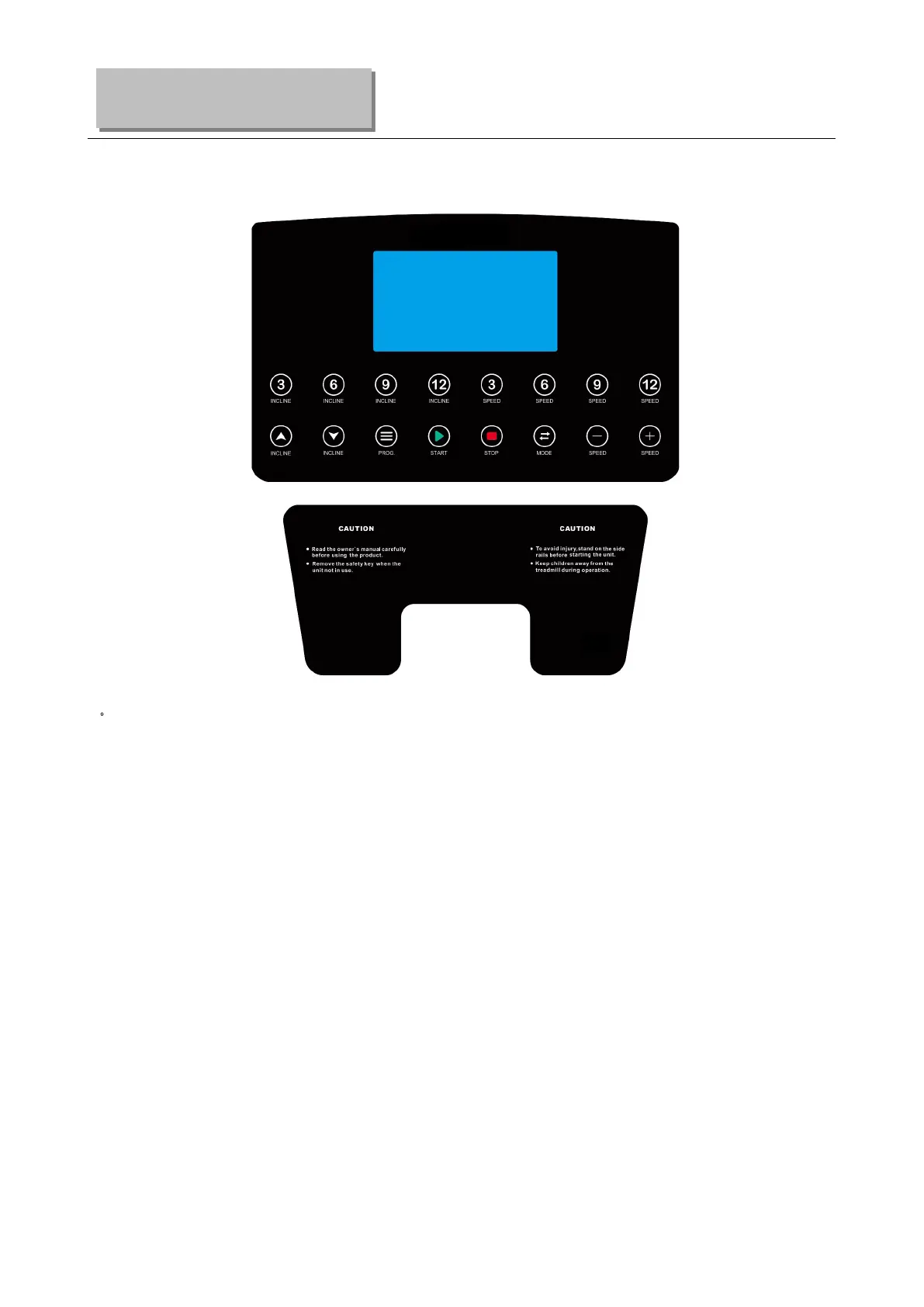
1.DISPLAY WINDOW:
2
.
LCD WINDOW DISPLAY DETAILS:
PROG: s how program number. In manual mode, it show”--”
TIME: Sh ow running time;
SPEED: Show speed;
INCLINE/PU LSE: Show incline level and heart beat data, When the corresponding icon is lit, the
corresponding element is displayed;
CAL/DIST: show Calories and distance. When the corresponding icon is lit, the corresponding elem ent is
displayed; Alternate between heat and mileage every 5 seconds.
3.BUTTON FUNCTION
“PROG” button: Press this button to choose program from manual mode—P1---P15--U1--U3--FAT.
“MODE” button: When machine in standby state, press this button to choose the mode: man ua l
mode, time count down mode, distance count down mode, calories count down mode.
When machine in FAT mode, the choose sequence is “Sex” “Age” “Height” “Weight”.
“START” button: Press this button to start the machine, the machine will run at the lowest speed or at
the speed of default program after 3 seconds time count down.
“STOP” button: Pau se/Stop function. When the treadmill is running, Press this button once t
o slow
down treadmill and stop. All data will remain. In this PAUSE state, If you press the "STOP" button once
Operation Guide


 To Next Page