Installation Guide Easyconnect App
Installation Guide - Easyconnect App
Document: 9590-4008 Ver. 6 230501
6
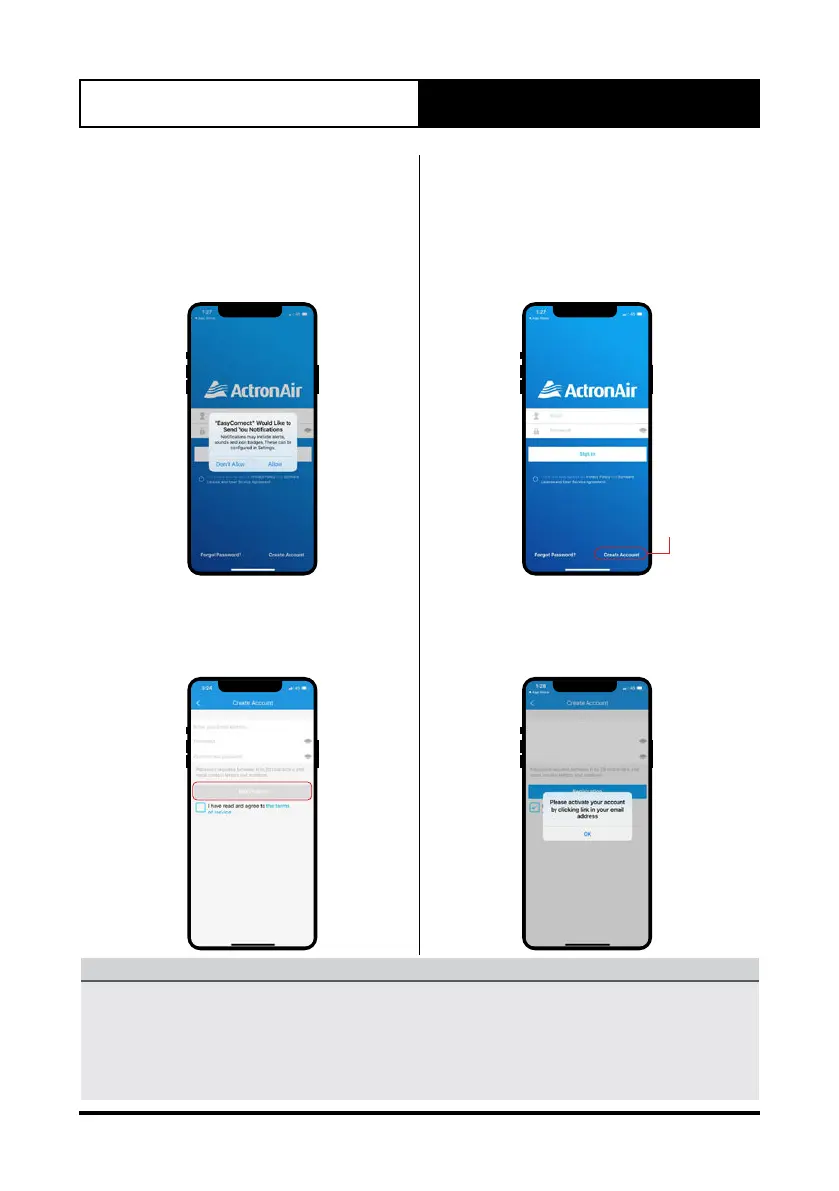
1. When the app is opened for the first
time, it will ask permission for sending
notifications. It is the discretion of the
user to allow or disallow the permission.
The user can change this permission at
any time in the phone’s settings.
2. Tap on Create Account.
Click here
3. Enter your e-mail address, create and
confirm a unique password, confirm
the terms and conditions and tap on
Registration.
4. Once you have successfully registered
with the app, it will prompt you to
activate your account by clicking the
link in your registered email address.
NOTE
• Please check your email for an email from iot1@annto.com titled
“Hi, please activate your account to complete the registration”.
• If you do not see the email in a few minutes, check your “junk or spam” folder.
• Activation time is sensitive and the account will need to be activated within the first
5 minutes of completing the registration.



 To Next Page